
Your file room is full, staff keep asking where the latest signed version went, and nobody wants to be the person digging through boxes when a client, auditor, or employee needs a record fast. That's usually the point where businesses start looking at document scanning services.
The mistake is treating scanning like a simple admin task. It isn't. A paper-to-digital project affects cost control, compliance, searchability, and the way your team works every day after the boxes are gone. The scanning itself matters, but the bigger issues are usually hidden in the quote and buried in the quality process.
Table of Contents
- What Exactly Are Document Scanning Services
- The Critical Choice In-House vs Outsourced Scanning
- Key Benefits and Hidden Risks to Consider
- How to Choose the Right Scanning Vendor
- Integrating Scanning into Your Digital Workflow
- Industry Use Cases and Calculating Your ROI
- Your Next Steps Toward a Paperless Office
What Exactly Are Document Scanning Services
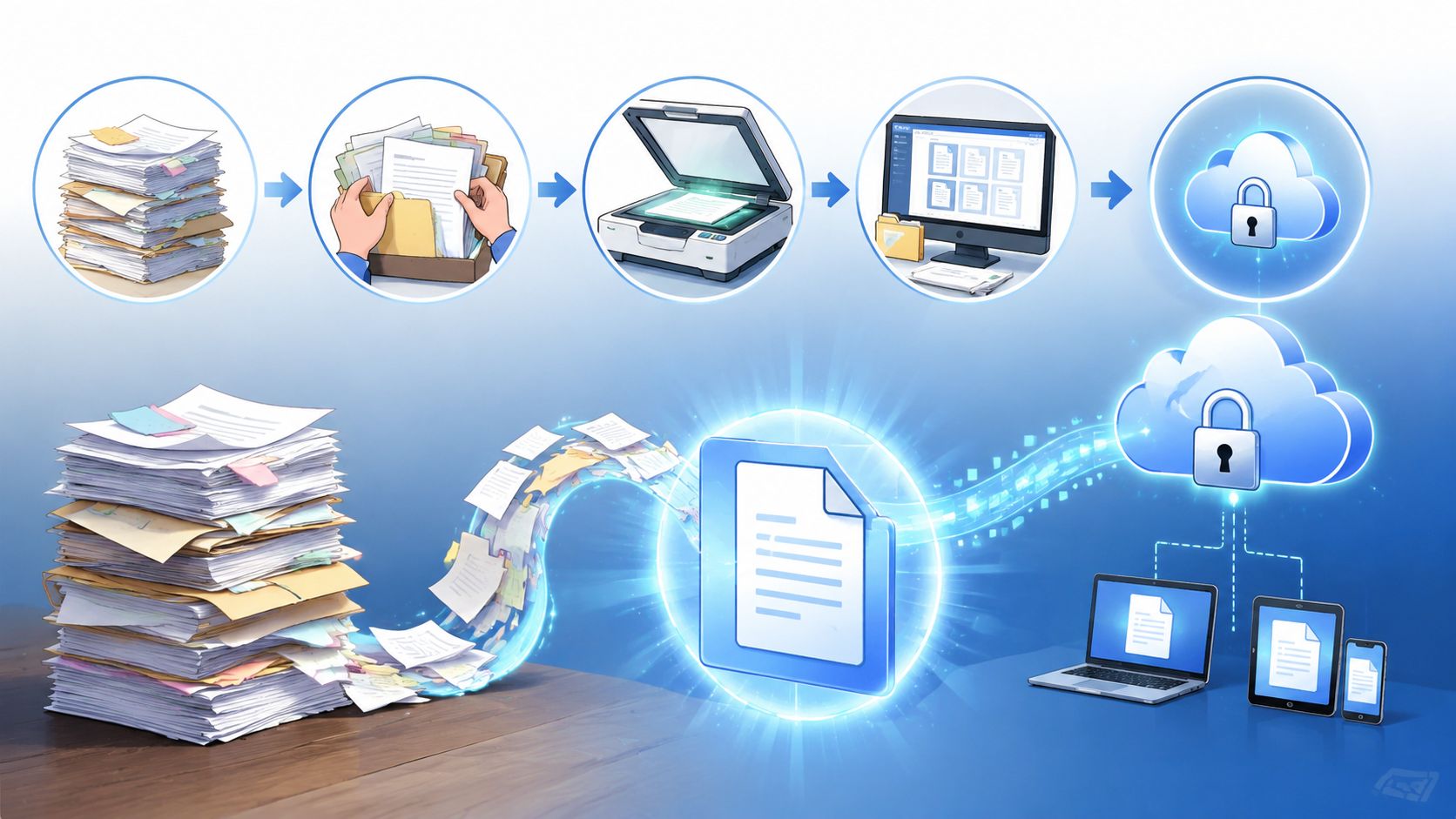
Document scanning services are not just “someone scans your papers.” A proper service takes a physical archive, prepares it, captures it, turns it into usable data, and returns it in a format your team can work with.
A good way to think about it is a professional moving service. You're not paying only for the truck. You're paying for packing, labeling, safe transport, organized unloading, and making sure the right box ends up in the right room. Document scanning works the same way. The scanner is only one part of the job.
It starts long before paper hits the scanner
Most of the labor sits in preparation. Paper arrives with staples, sticky notes, folded corners, mixed page sizes, handwritten labels, duplicate copies, and documents filed in the wrong order. If that prep work is sloppy, the digital archive will be sloppy too.
The normal lifecycle looks like this:
- Collection and intake. Files are boxed, logged, and assigned a chain of custody.
- Preparation. Staff remove bindings, sort records, repair torn pages, and separate what should or should not be scanned.
- Capture. High-speed devices process large batches of paper.
- Review. Operators check for skewed images, missing pages, double feeds, and unreadable scans.
- Indexing. Files get names, tags, or metadata so people can find them later.
- Delivery and retention handling. The business receives digital files, and the paper originals are either returned, stored, or destroyed under policy.
Practical rule: If a provider talks mostly about scanner speed and barely mentions preparation, indexing, or quality review, you're not hearing the full story.
The output matters more than the image
The fundamental value of document scanning services is access, not image capture. A folder full of unnamed PDFs is only a neater form of chaos.
Modern document scanning services support OCR, or Optical Character Recognition, to make scanned text searchable and editable. They also support batch processing and can output files as PDF, TIFF, JPEG, and PNG, which matters when you need scanned records to fit into existing business systems, as explained in this overview of OCR, batch processing, and output formats.
That means a well-run project should answer practical questions such as:
- How will users search. By client name, file number, date, address, employee ID, or another field?
- What counts as one document. A single page, a full packet, or a complete case file?
- Where will files live. In a shared drive, document management system, HR record, or case folder?
- What happens to originals. Kept for retention, returned for review, or securely destroyed?
Scanning works best when it creates a digital library, not just a pile of images. If nobody can retrieve the right record in seconds, the project isn't finished.
The Critical Choice In-House vs Outsourced Scanning
This is the first serious decision. Do you build an internal scanning operation, or do you hand the project to a specialist service?
There isn't one right answer. The better option depends on volume, sensitivity, staffing, and whether scanning is a one-time cleanup or an ongoing operational function.
When in-house makes sense
In-house scanning gives you direct control. Your team can decide how documents are sorted, who touches them, how exceptions are handled, and how files are named. That can work well for smaller ongoing flows, highly sensitive records that shouldn't leave the premises, or departments that already have trained staff and a clear intake process.
But internal scanning gets expensive in less obvious ways. Equipment needs to be sized properly, operators need training, and daily work gets interrupted when paper jams, batches need rescanning, or indexing rules aren't followed consistently.
For high-volume professional scanning, the scanner's Duty Cycle must be rated at least 2.5× the average monthly volume to avoid wear, throttling, and service problems, according to this guidance on selecting a professional document scanner. Many teams underestimate that point and buy hardware that looks affordable until downtime starts.
When outsourced scanning is the better call
Outsourcing usually makes more sense when you have backlog, boxed archives, inconsistent filing, or limited staff capacity. It shifts the burden of prep, capture, and quality review away from your team. It also gives you a cleaner way to handle peak loads without turning office staff into temporary scanning operators.
That said, outsourcing reduces direct visibility. You need stronger vendor controls, better chain-of-custody discipline, and much more attention to pricing detail. If your intake process is messy before documents leave the office, the mess often comes back in digital form.
A side-by-side review helps.
| Factor | In-House Scanning | Outsourced Service |
|---|---|---|
| Upfront cost | Higher equipment and setup burden | Lower internal setup, but service fees apply |
| Operational control | Strong direct control over handling and priorities | Control depends on vendor process and reporting |
| Staff impact | Internal team must prepare, scan, review, and index | Internal team mainly coordinates and validates output |
| Scalability | Harder to scale quickly for backlog projects | Easier to handle large archive conversions |
| Quality consistency | Depends on training and process discipline | Depends on vendor standards and review procedures |
| Security handling | Documents stay on-site if you manage internally | Requires documented transport, custody, and access controls |
| Equipment risk | You own maintenance and uptime problems | Vendor carries hardware burden |
| Best fit | Smaller ongoing flows or tight on-site control needs | Large projects, archive cleanup, or limited internal capacity |
For businesses that are still cleaning up intake before they tackle scanning, it helps to tighten front-end collection first. A clear intake workflow reduces rework later, which is why many operations teams start by improving document intake software workflows before they commit to a larger digitization effort.
Don't choose based on scanner price or per-page price alone. Choose based on who will manage exceptions, naming rules, missing pages, and daily accountability.
Key Benefits and Hidden Risks to Consider
The benefits of document scanning services are easy to understand. The risks are usually what catch people off guard.
The upside is real
Paper records slow teams down. Files sit in cabinets, staff duplicate work because they can't find the latest version, and remote access becomes awkward or impossible. Scanning solves a lot of that friction when the project is done properly.
Document scanners convert paper into digital data that can be stored and retrieved online, helping reduce physical storage costs and improve work efficiency through digital storage and retrieval, as described in this document scanner market overview.
The practical gains usually show up in a few places:
- Faster retrieval. Staff stop hunting through cabinets and shared office cupboards.
- Less physical storage pressure. Teams reclaim rooms, shelves, and desk-side file space.
- Better continuity. Digital files are easier to back up and access across locations.
- Simpler collaboration. Multiple people can work from the same record set without moving paper around the office.

The hidden risks show up after the invoice is paid
A scan can look clean and still be useless. That happens when OCR is poor, indexing is inconsistent, page order is wrong, or batches were split badly. Teams often discover the problem weeks later, when someone tries to search for a contract clause, a visa page, or a signed employee form and can't find it.
Another risk is transport and custody. If documents are moved off-site, every handoff matters. Sensitive records don't become safer just because they will eventually be digital.
The least discussed problem is format and workflow lock-in. If files are delivered in a way that only makes sense inside the vendor's process, your team inherits a new dependency instead of a better system. Ask for standard output structures, clear folder logic, and metadata you can use elsewhere.
A cheap scan is expensive when staff still can't find the record they need.
Buyers also tend to accept vague quality promises. “We check everything” sounds reassuring, but it doesn't tell you what gets checked, how defects are tracked, or what happens when records fail review. For regulated files, that vagueness is a compliance risk, not a minor service issue.
How to Choose the Right Scanning Vendor
Most vendor conversations go wrong in two places. The quote hides the actual total cost of ownership, and the quality section sounds polished but says almost nothing.
Ask for a line-item cost model
A flat per-page price can be useful, but it's never the full story. You need to know what happens before scanning, during transport, and after capture.
One of the biggest blind spots in this market is hidden logistics. Guidance for buyers often mentions ballpark pricing and pricing factors, but rarely spells out how pickup, transport, secure storage, and indexing can push total cost 30–50% beyond the base scanning fee, as noted in this discussion of document scanning service vetting questions.
Ask for a quote that separates:
- Preparation labor. Staple removal, unfolding, sorting, separator sheets, and document repair.
- Transport and pickup. Scheduled collection, secure transfer, and return delivery if originals come back.
- Storage during the project. Temporary holding fees if boxes are not processed immediately.
- Indexing and OCR. Basic file naming versus field-based metadata and searchable text.
- Exception handling. Oversized pages, damaged records, mixed media, or documents that need rescanning.
- Post-scan handling. Return, retention, or destruction of originals.
If a vendor won't break those items out, budgeting becomes guesswork.
Ask for measurable quality control
Quality assurance is where many providers stay vague. Buyers ask if quality checks exist, and vendors say yes. That answer isn't enough.
A frequently missed question is what specific metrics define acceptable quality control. Buyer guidance increasingly stresses the need for tracked measures such as indexing accuracy and defect thresholds, because broad assurances leave customers exposed when missing pages or bad indexing create compliance issues, as discussed in this guide to questions for document scanning companies.
Ask questions like these:
- What defects do you track? Missing pages, skewed images, unreadable pages, wrong file splits, bad index values.
- How do you detect them? Manual review, sample review, or exception-based checks.
- What happens when defects are found? Rescan, reindex, escalation, and reporting.
- How will you show me the results? Batch reports, exception logs, and acceptance criteria.
If a vendor can't explain defect causes in plain language, they probably can't manage them consistently.
Read the service agreement like an operations person
Don't focus only on turnaround promises. Look for the clauses that affect accountability.
Check these points carefully:
- Chain of custody. Who signs for records at every handoff?
- File acceptance. When is the job considered complete?
- Rework terms. What triggers rescanning or reindexing at no added charge?
- Output structure. How will folders, filenames, and metadata be delivered?
- Retention handling. Who authorizes destruction or return of paper originals?
A solid vendor should make cost structure, handling rules, and quality expectations easy to inspect before the first box leaves your office.
Integrating Scanning into Your Digital Workflow
A scanning project can clear years of backlog and still leave the business stuck in paper habits. That happens when organizations digitize the archive but keep collecting new documents through email threads, ad hoc uploads, printed forms, and desk-drop paperwork.
Scanning fixes the backlog, not the intake problem
Bulk scanning deals with the past. Daily document collection controls the future.
That distinction matters. If your team scans a full archive but still asks clients, candidates, tenants, or employees to send records in inconsistent ways, paper reduction stalls. Soon the office has one digital repository, one email inbox full of attachments, and a fresh pile of paper waiting for attention.
A better model is simple. Use scanning to convert legacy records, then set up a controlled intake path for every new document coming in. For teams formalizing that broader process, this guide to a business document management system is a useful way to think through ownership, routing, and review after files become digital.
Build a repeatable post-scan workflow
The strongest document environments usually have a few traits in common:
- Defined document classes. Contracts go one place, employee files another, property records somewhere else.
- Naming and metadata rules. Teams agree on what a file should be called and which fields matter.
- Clear validation ownership. Someone checks whether scanned files are complete and correctly indexed.
- Ongoing collection discipline. New records enter through a standard process instead of whatever's convenient that day.
One practical approach is to map your workflow from request to archive:
- A record is requested from a client, employee, or partner.
- The document is received through a controlled channel.
- The file is reviewed for completeness and correctness.
- It's stored in the right place with the right metadata.
- Expiry or follow-up needs are tracked.
That's where digitization starts to pay off operationally. The scan project removes historical clutter. The workflow keeps the clutter from coming back.
Industry Use Cases and Calculating Your ROI
Document scanning services are used in almost every records-heavy environment, and the market keeps expanding. One market estimate puts the global document scanning services market at USD 6.04 billion in 2025 and projects it to reach USD 12 billion by 2035, with a 7.1% CAGR from 2026 to 2035, according to this market projection for document scanning services. That growth makes sense because the operational use cases are straightforward.
How teams use scanned records in practice
A law office often starts with closed matters, signed agreements, correspondence, and evidence files. Once those records are digitized and indexed properly, staff can retrieve case material quickly during review, discovery preparation, or client response. The key isn't just scanning. It's preserving file boundaries and matter-level naming logic.
An HR team usually has a different pain point. Employee records arrive over time, contain sensitive information, and need orderly access during onboarding, updates, and audits. Scanned records work well when every file follows the same structure and incomplete packets are flagged before they disappear into storage.
Real estate teams care about speed and document completeness. Property files, disclosures, identification documents, lease paperwork, and supporting records move between parties fast. A digital archive helps the team verify what has arrived, what is missing, and which file version should be used.

A practical way to think about ROI
You don't need a complicated finance model to judge whether scanning is worth doing. Start with the operating friction you already know exists.
Use a simple checklist:
- Space savings. What rooms, cabinets, or shelves could be repurposed if paper volume dropped?
- Labor savings. How much staff time goes into searching, re-filing, photocopying, and shipping paper?
- Risk reduction. What is the cost of a missing file, a delayed response, or a bad version being used?
- Continuity value. How much easier would remote access and backup be if records were digital?
- Future process gains. Will faster retrieval improve onboarding, case handling, approvals, or closings?
The clearest ROI signal is not the page count. It's how many manual steps disappear after records become searchable and consistently stored.
If your answer is “we'd still be chasing files the same way,” scanning alone won't create enough value. If your answer is “we can remove repeated search, transport, and rehandling work,” the business case gets much easier to defend.
Your Next Steps Toward a Paperless Office
A paperless office doesn't happen because documents are scanned. It happens because the business makes a few disciplined decisions and sticks to them.
First, decide whether your volume, staffing, and control requirements point to an in-house setup or an outsourced service. Be honest about what your team can sustain. Plenty of internal scanning projects fail because nobody accounted for preparation time, exception handling, and quality review.
Second, evaluate total cost of ownership instead of chasing the lowest quote. Base scanning fees never tell the whole story. Transport, indexing, temporary storage, and cleanup work matter just as much. If you're still organizing physical records before digitization, good archive boxes can make temporary storage and box-level labeling much easier to control.
Third, require concrete quality language. Ask how missing pages are prevented, how indexing is checked, and what triggers rework. Vague confidence isn't a quality system.
Fourth, set the post-scan workflow before the project starts. Decide where files will live, how they'll be named, who validates them, and how new records will enter the business going forward. This broader shift is what makes paperless document management solutions sustainable instead of temporary.
The businesses that get the best results treat scanning as one part of operational cleanup. They clear legacy paper, tighten intake, and give staff a system they'll readily use.
If you're ready to move beyond scattered email attachments and manual document chasing, Superdocu helps you collect, validate, and manage incoming documents through secure, structured workflows. It's a practical next step after scanning, especially if you want your digital process to stay organized instead of drifting back into chaos.