
Monday, 8:12 a.m. A client sends four PDFs in one email, two more from a personal address, and a final file through a reply-all thread your account manager was never copied on. By Friday, your team is still sorting versions, chasing one missing form, and asking the same basic question three times. Which files are complete, current, and approved for storage?
That is not a filing problem. It is an operations problem.
Teams get better results when document collection is built as a process with clear steps, rules, and ownership. The companies that clean this up do not just swap email for an upload link. They decide what gets requested, how clients submit it, what gets checked on arrival, where exceptions go, and how the handoff works once a file is accepted.
That is the angle of this playbook. It connects process design, day-to-day automation, security controls, validation rules, reporting, and the workflow differences that show up in lending, onboarding, legal, finance, and other document-heavy environments. If you are still relying on inboxes and shared folders, this guide on how to collect documents from clients without email will make the shift easier to plan and harder to get wrong.
I have seen the same trade-off in every team that grows past a handful of requests a week. Manual collection feels flexible at first. Then volume rises, exceptions multiply, and the hidden work lands on operations, client success, and compliance at the same time. A workable system removes that drag before it spreads downstream.
Table of Contents
- The End of Email Attachment Chaos
- Designing Your Document Collection Workflow
- Building Your Automated Collection Toolkit
- Securing and Validating Every Document
- Integrating Workflows and Measuring Success
- Industry-Specific Collection Workflows in Action
The End of Email Attachment Chaos
Monday starts with a client saying, “I sent that last week.” Someone on your team swears they never saw it. Another person finds an older version buried in a reply chain, downloaded to the wrong folder and named “final_v2_updated.” By the time anyone figures out what is missing, the work is already late.
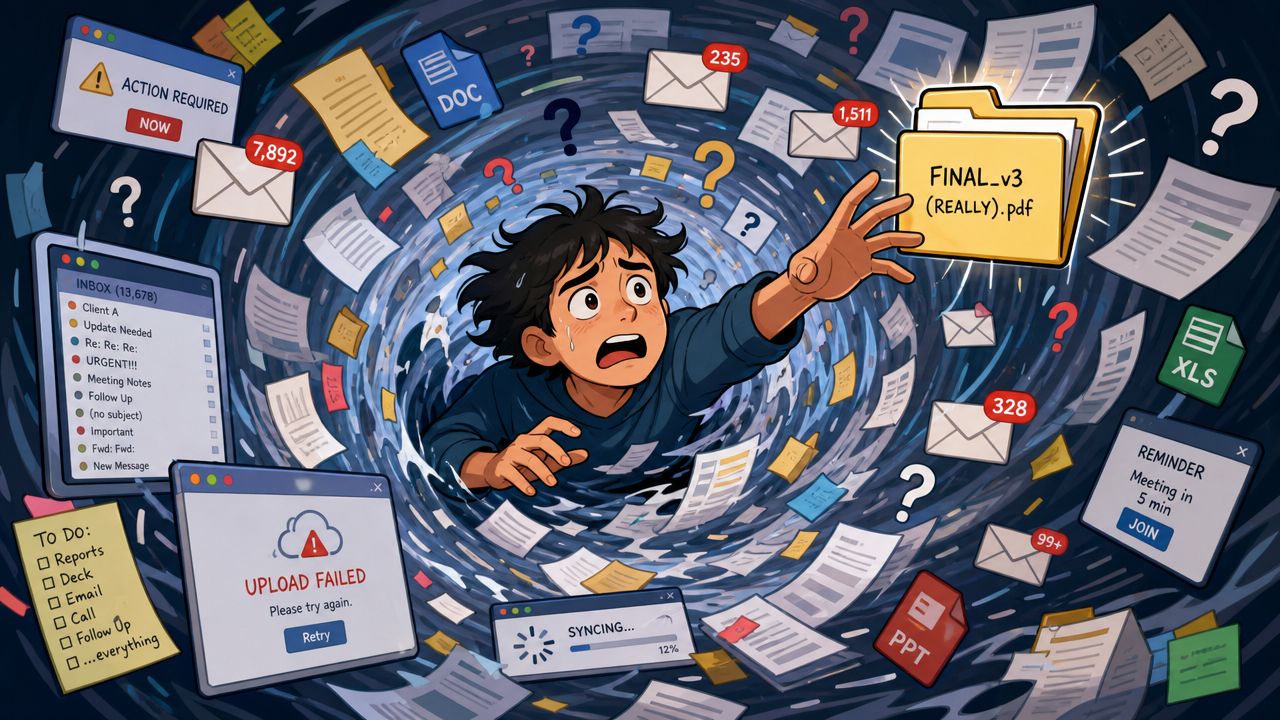
That is what email-based collection does to operations. It scatters one request across inboxes, attachments, shared drives, and people's memory. The delay is obvious. The harder problem is that manual collection hides work inside small admin tasks that never get planned, measured, or improved.
As noted earlier, teams that rely on manual follow-up can lose roughly 20 hours a week to document chasing. In practice, that time disappears into resend requests, attachment checks, file renaming, status updates, and repeated explanations of the same requirement. I have seen teams accept that workload as normal because no single task looks large on its own. Added together, it becomes a process tax.
Manual collection usually fails in predictable ways. The request is vague, the client sends what they think you meant, and your team reviews the gap too late. Email also gives weak visibility. Silence could mean the client is still gathering files, missed the message, or uploaded the wrong item and assumed the job was done.
Once volume rises, inboxes turn into an accidental workflow system. Sales asks for the file. Operations saves it. Compliance reviews it later. Nobody has a complete view of what is outstanding right now.
The failure points are consistent:
- Missing documents surface late because the full request is spread across threads instead of tracked in one place.
- Version control breaks down when revised files arrive days apart through separate email chains.
- Responsibility blurs when several teams touch the same collection request without a shared status view.
- Client trust drops when people have to ask, more than once, what is still needed and where to send it.
One practical test makes this easy to spot. If a manager has to search email to answer “what are we waiting on,” the process is not operational yet.
A better setup does more than replace attachments with an upload link. It defines the request, gives the client one place to submit, shows your team document status in real time, and triggers reminders without someone drafting another follow-up. That is the difference between a software feature list and an operating model. For a simple client-facing example, see this walkthrough on how to collect documents from clients without email.
The same principle shows up in regulated work. A team handling cross-border pet paperwork, for example, cannot afford scattered files and unclear status. That is why a guide to pet travel document compliance fits the same operational lesson. Clear intake rules, visible progress, and controlled handoffs prevent rework long before review begins.
Designing Your Document Collection Workflow
Before you choose software, map the work. That step gets skipped all the time, and it's why many “implementations” turn into a prettier version of the same old confusion. A tool can automate a bad process just as efficiently as a good one.
Poor document handling can lead to 21% productivity loss, with employees spending an average of 5 hours per week searching for files, according to UseCollect's breakdown of document handling challenges. That usually isn't caused by a lack of storage. It comes from weak structure.
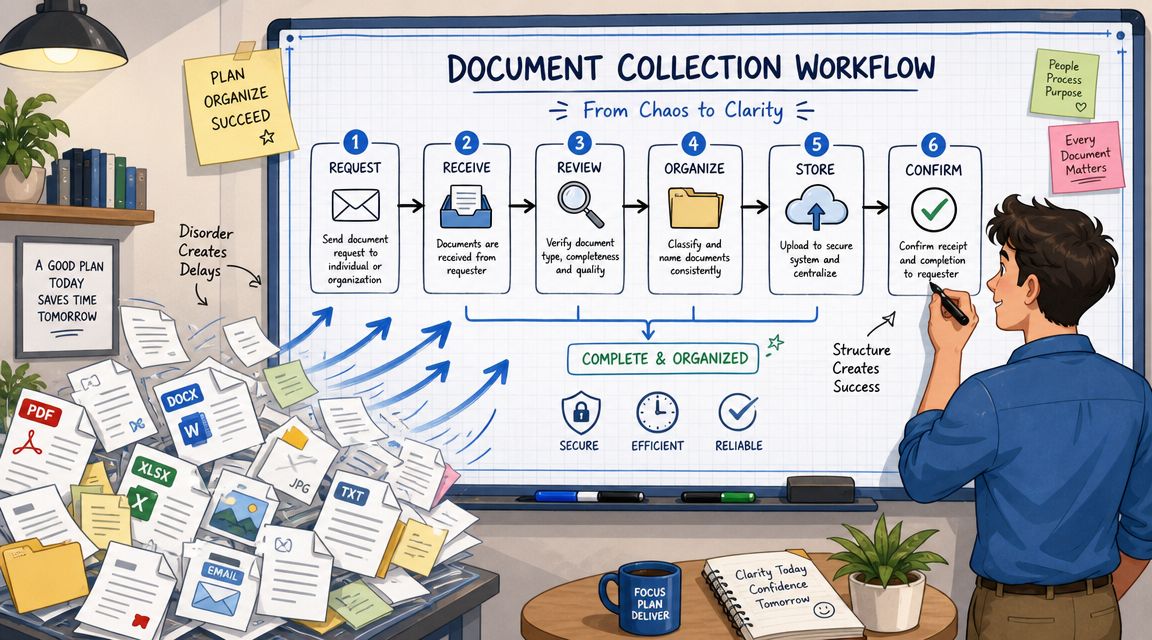
Start with the request, not the tool
Write down one recurring use case. Not ten. Start with something your team handles often, such as client onboarding, contract intake, employee onboarding, property application review, or annual compliance refresh.
For that use case, answer these questions in plain language:
- What exactly do you need? List every required document and every optional one.
- Who provides each item? The client, an employee, a broker, a manager, or a third party.
- What makes a submission acceptable? File type, visible signature, valid date, complete pages, readable scan, correct name.
- Who reviews it? Assign the role, not just the department.
- What happens if something is wrong? Reject, request revision, or escalate.
This sounds basic, but it stops the usual mess. When the requirement is vague, clients guess. When clients guess, your team spends time correcting preventable errors.
Define states that your team can actually use
Most workflows need only a handful of statuses. If you create too many, people stop updating them. If you create too few, nobody can see what's happening.
A workable set often looks like this:
- Requested means the item has been asked for but not received.
- Submitted means the client uploaded something, but nobody has reviewed it yet.
- In review means a team member is checking accuracy, completeness, or validity.
- Approved means it passed review and can move forward.
- Rejected or revision needed means the client must replace or correct it.
- Expired means it was valid once but now requires renewal.
Teams get faster when status names describe actions. “Pending” is vague. “Submitted” and “revision needed” tell people what to do next.
If you're documenting this from scratch, it helps to think in terms of a real process map rather than a list of tasks. This short explanation of what a workflow is gives a clear operating model for that mindset.
Build from the client side first
Internal teams often design requests around internal convenience. Clients don't see it that way. They see a list of demands, unclear deadlines, and scattered instructions. Build the request around how a client completes it with the least confusion.
That means:
- Group related documents together so the request feels coherent.
- Use plain names instead of internal jargon.
- Explain why each item matters when the reason isn't obvious.
- Flag deadlines and expiry-sensitive items early so clients don't submit stale files.
- Review partial submissions quickly so missing items are caught before the process stalls.
This matters in specialized workflows too. A useful example is Passpaw's guide to pet travel document compliance, where timing, document type, and sequence all matter. The lesson applies broadly. Collection works better when the request reflects the actual order in which people gather evidence.
A good workflow isn't complicated. It's specific, visible, and hard to misunderstand.
Building Your Automated Collection Toolkit
A defined workflow still breaks down if the team has to rebuild the same request, reminder, and review steps every time. Automation fixes that by turning repeated admin into a standard operating system for collection.
Analysts at Checkhub found in their document collection software analysis that teams using automated collection tools can cut administrative work sharply and collect files faster than manual email-based methods. In practice, that result comes from removing rework. Staff stop rewriting instructions, hunting through inboxes, and sending one-off follow-ups that nobody tracks.
Templates remove guesswork
Start with the request template.
If staff write every request from scratch, the process drifts fast. One person asks for a “bank statement.” Another asks for “last 3 months of primary operating account statements in PDF.” A third forgets to mention that screenshots are not acceptable. The client sees inconsistency. The reviewer inherits the cleanup.
Strong templates usually include:
- A clear request title that matches the client's task
- A short purpose statement so the client knows why the file is needed
- Explicit document names instead of broad labels like “supporting paperwork”
- Acceptance rules such as signed, dated, unexpired, full scan, or readable PDF
- Fallback instructions for cases where the client doesn't have the exact document
Templates also make training easier. New team members do not need tribal knowledge to send a usable request. They start from an approved pattern, and exceptions become visible instead of buried in email threads.
Portals centralize the work
Email is a poor control layer for document collection. It scatters instructions, files, comments, and status across too many places. A client portal brings that activity back into one request flow, with one list of required items and one place to upload, review, and chase missing pieces.
That changes more than appearance. It changes completion rates and review speed because both sides are looking at the same checklist. Platforms like Superdocu exemplify this model: one request hub, one status view, one review layer. If you are comparing portal setups, this guide to secure document collection workflows is useful for evaluating how request flows, access control, and review logic fit together.
The biggest operational win is clarity. Nobody has to ask which version is current, whether the attachment was already sent, or which items are still missing.
Reminders should run on rules
Manual follow-up feels attentive, but it creates uneven service. Some clients get chased too often. Others hear nothing until the deadline has already slipped. Good reminder logic solves that with timing and status rules.
A simple sequence usually does the job well:
- Send the initial request immediately
- Trigger a follow-up after a set interval if nothing has been submitted
- Remind only on missing or rejected items
- Stop reminders as soon as the checklist is complete
That last point matters. Bad automation creates noise by sending generic nudges after a client has already done the work. Good automation respects status, which keeps the request credible and reduces frustration.
The right toolkit is not the one with the longest feature list. It is the one that fits the operating model you designed earlier. Templates create consistency. Portals keep the request and the files in one controlled place. Rules-based reminders keep work moving without asking the team to spend half the day chasing documents.
Securing and Validating Every Document
Fast collection without control creates a different problem. You get files quickly, but you can't trust the chain of custody, the access rules, or the quality of what was submitted. In regulated work, that's not an admin issue. It's a governance failure.
A key gap in most advice is the failure to address retention and deletion policy design. A well-designed workflow must include controlled retention and an audit trail proving when documents were received, viewed, or deleted for full compliance, as noted in Gatheroo's guidance on efficient client document collection.
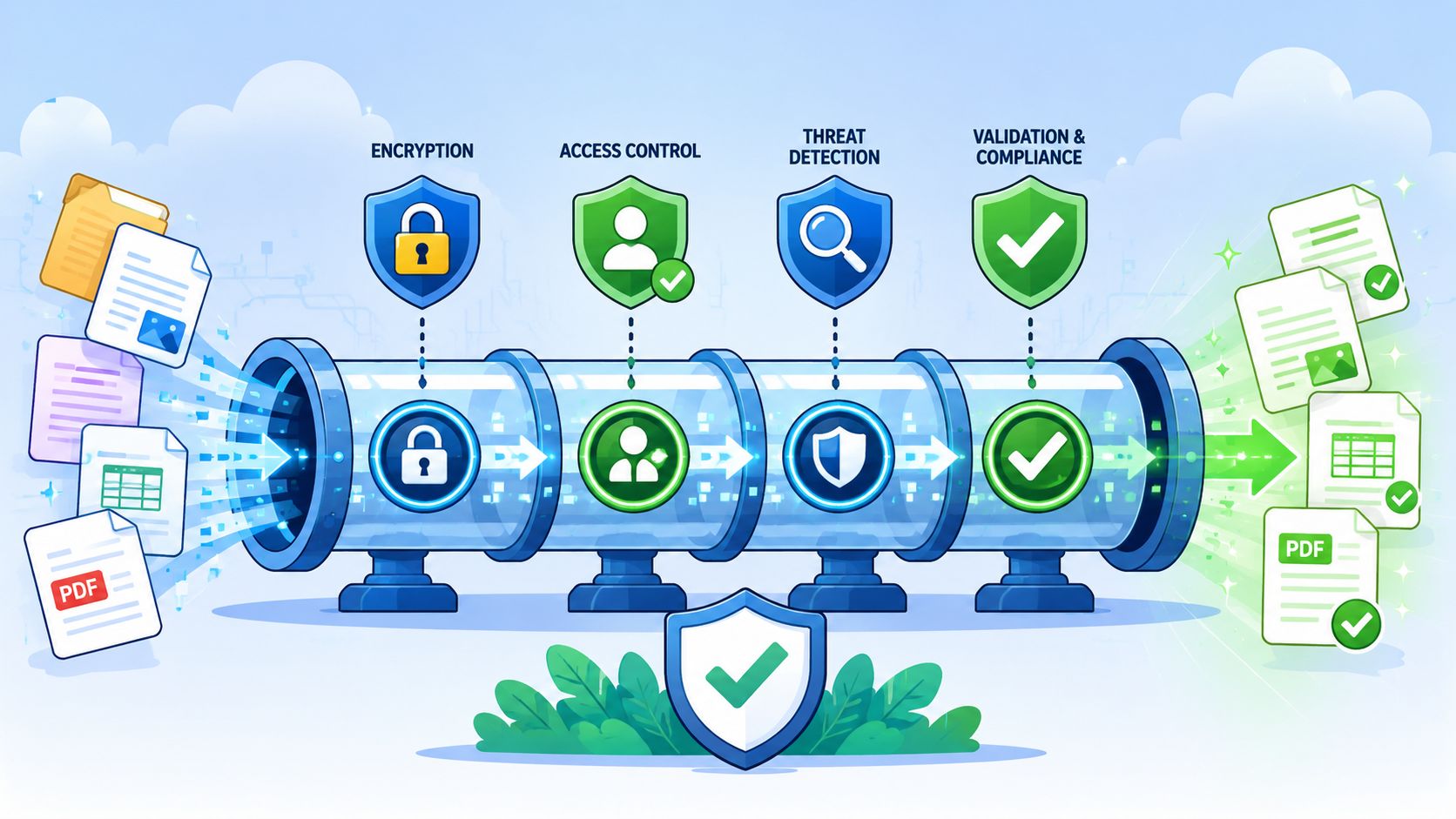
Security starts before the upload
Security isn't just a storage setting. It begins with how the request is sent and who can open it. If a document contains personal, legal, financial, or employment information, your process should assume that access must be limited from the start.
At minimum, a controlled system should enforce:
- Encrypted transfer and storage so files aren't exposed in transit or sitting unprotected.
- Role-based access so reviewers see only what they need.
- Centralized storage instead of downloads scattered across laptops and inboxes.
- Activity visibility so your team can confirm who accessed what and when.
If your current approach depends on people remembering where not to forward an attachment, the process is too fragile. This overview of secure document collection practices is a useful baseline for teams tightening that part of the workflow.
Validation prevents bad submissions from moving downstream
Most delays don't come from no submission. They come from wrong submission. A client uploads the wrong page, an expired license, a cropped image, or a file with no signature. Then your team discovers it during review, after other tasks have already started.
Validation should happen as early as possible. In strong workflows, the system and the reviewer both have a role.
Use the workflow to check for:
- Required file presence
- Accepted file type
- Correct document category
- Naming convention where needed
- Known expiry-sensitive fields
Use the reviewer to check for:
- Legibility
- Completeness
- Correct person or entity
- Date validity
- Consistency with the rest of the case or record
Review rule: Reject fast when a file is wrong. Waiting to batch corrections only extends the cycle.
Retention and deletion need rules
A lot of teams think they're compliant because they can collect documents securely. That's only one part of the lifecycle. You also need to decide how long to keep each file, who can authorize deletion, what happens after a case closes, and how you'll prove the history later.
The practical questions are simple:
| Decision area | What to define |
|---|---|
| Retention period | How long each document category should be kept |
| Trigger event | What starts the retention clock, such as case closure or onboarding completion |
| Access during retention | Who can still view the file after active work ends |
| Deletion rule | Whether deletion is automatic, manual, or approval-based |
| Audit record | What log entries must remain after deletion |
Without these rules, teams either keep everything forever or delete inconsistently. Neither is a strong operating model.
Integrating Workflows and Measuring Success
A document request shouldn't end with “files received.” That's only one stage in a broader business process. The true benefit comes when the collection workflow triggers the next action automatically and gives your team a clean way to measure bottlenecks.
In practice, standardizing requests and automating follow-ups can increase customer response rates by 40% and cut response times by 50%, according to Glasscubes' document request best practices for accountants. That kind of improvement matters most when it feeds the rest of the workflow instead of stopping at intake.
Connect collection to the next operational step
Good integrations remove handoffs. When a document is approved, someone shouldn't have to retype that status into another system if a tool can do it for them.
A few practical examples:
- CRM update after completion so the account record reflects intake status.
- DocuSign trigger after review when approved documents should move into signature.
- Task creation for reviewers when a client submits a critical file.
- Storage routing so approved files land in the right folder structure.
- Renewal reminder setup for documents with expiration dates.
Zapier is often the easiest way to connect collection platforms with CRMs, storage tools, or internal task systems. DocuSign is a common next step when collection leads into execution. The principle is simple. Don't make staff copy workflow progress from one platform to another.
Measure the process, not just the pile of files
Many teams track only one thing: whether the document arrived. That tells you almost nothing about operational quality.
Track metrics that reveal where friction sits:
- Average turnaround time from request sent to complete submission
- Completion rate for each request type
- Reminder cycles per request so you can spot vague or overloaded checklists
- Revision rate by document category
- Approval lag between submission and review
- Expired document count for recurring compliance workflows
A useful reporting habit is to review by template, not just by client. If one onboarding pack always needs extra reminders, the issue may be the request design. If one document type gets rejected constantly, the instructions probably need work.
You improve client document collection by fixing repeat failure patterns, not by telling staff to chase harder.
This is also where scaling decisions become easier. Once you can see which requests stall, which teams review slowly, and which document types create rework, you can change the workflow with intention instead of guesswork.
Industry-Specific Collection Workflows in Action
The mechanics of client document collection stay similar across industries, but the stakes and failure points change fast. A legal team worries about privileged information and version control. HR worries about onboarding completeness and recurring updates. A real estate office needs speed because deals move while paperwork is still arriving. Immigration and compliance-heavy work usually depend on exact evidence, date validity, and complete auditability.
Sample document collection needs by industry
| Industry | Common Documents | Key Workflow Consideration |
|---|---|---|
| Legal | Engagement letters, ID documents, intake forms, evidence files, signed disclosures | Restrict access by matter and track revised versions carefully |
| HR and staffing | ID, tax forms, contracts, certifications, policy acknowledgments, banking details | Separate pre-hire, onboarding, and recurring compliance requests |
| Real estate | Proof of identity, proof of income, lease documents, disclosures, property forms | Keep review fast and clearly flag missing mandatory items |
| Mortgage and financial services | Bank statements, ID, income proof, application forms, supporting financial documents | Validate document recency and make incomplete packs visible early |
| Immigration | Passport copies, visas, civil records, financial proof, employment evidence, translations | Track expirations, country-specific variants, and replacement requests |
| Transportation and fleet | Driver licenses, insurance records, vehicle documents, certifications, onboarding forms | Monitor expirations and trigger renewals before documents lapse |
How these workflows differ in practice
In legal workflows, the common mistake is overusing email because each matter feels unique. In reality, much of the collection work is repeatable. Engagement documents, intake evidence, identity checks, and signed authorizations can all follow a structured request pattern. The part that needs flexibility is usually the evidence layer, not the core intake pack.
In HR and staffing, timing matters more than people expect. Some items are needed before a start date. Others belong in day-one onboarding. Others need recurring renewal. If you put all of that into one request, people miss deadlines and HR ends up manually sorting what should have been phased from the start.
In real estate and mortgage operations, the process lives or dies on speed and visibility. Teams need to know quickly whether a file is acceptable, whether an applicant has submitted everything, and whether a deal can move to the next stage. Long review queues slow the transaction even when the client has already responded.
In immigration work, document collection is rarely a one-time event. Cases often involve updated records, additional evidence, translations, and time-sensitive validity issues. A strong workflow doesn't just gather files. It keeps the matter current and shows exactly what changed over time.
In transportation and fleet management, ongoing compliance is the hard part. The initial collection is straightforward. The operational risk comes later when a license, insurance record, or certification expires and nobody catches it in time. That's why expiration tracking should sit inside the same workflow, not in a disconnected spreadsheet.
The pattern across all of these industries is consistent. Teams get better results when they split repeatable requests from exception handling, review submissions early, and build governance into the process instead of adding it after the fact.
If your team is ready to move client document collection out of inboxes and into a structured workflow, Superdocu is one option to evaluate. It supports branded request portals, reusable workflows, automated reminders, validation, and expiration tracking, which makes it a practical fit for businesses that want a more controlled process without building one from scratch.