
You're probably already doing third party app integration by hand.
A client uploads a document in one system. Someone on your team downloads it, renames it, uploads it somewhere else, updates a spreadsheet, sends an email, and then pings a colleague to review it. None of those steps are hard on their own. The problem is repetition. A process that feels manageable at ten cases, hires, or applications starts to fray when volume climbs.
That's when business owners usually start hearing the same promise from software vendors: “Just connect your apps.” It sounds simple. In practice, it can be a smart growth move, a messy technical project, or both.
This guide is for the non-technical leader who needs the business truth. Not just what integrations are, but where they help, where they break, and how to avoid buying into “low-code” marketing without understanding the actual work underneath.
Table of Contents
- The Hidden Costs of Disconnected Apps
- What Is Third Party App Integration Really
- Common Integration Patterns Explained
- The Strategic Benefits and Hidden Pitfalls
- Building a Resilient Integration Architecture
- Putting Integration to Work in Your Document Workflows
The Hidden Costs of Disconnected Apps
A disconnected business rarely looks broken from the outside. It looks busy.
An HR agency might collect candidate documents in one place, store contracts in another, and track approval status in a third. A legal office might receive client files through email, save them to a case folder manually, and then update internal records by hand. Each step seems reasonable until staff start spending their day moving information instead of using it.
Manual work looks small until it spreads
The true cost isn't just time. It's delay, inconsistency, and avoidable mistakes.
When people re-enter data, they mistype names, skip fields, upload the wrong version, or forget the final status update. Then the team creates workarounds. Someone keeps a “master spreadsheet.” Someone else becomes the person who “knows where everything is.” Those workarounds feel practical, but they make the business fragile.
Practical rule: If a process depends on one person remembering to copy information from one app to another, that process is already risky.
This isn't a niche problem. According to enterprise data integration adoption figures from Integrate.io, enterprises average 897 applications, but only 29% are integrated, creating a major integration gap. The same source says organizations that close that gap see an average ROI of 295% over three years.
That number matters because it changes the conversation. Third party app integration isn't only an IT clean-up project. It can affect speed, staff capacity, customer experience, and revenue operations.
Integration is a business decision first
Business owners often ask, “Can these two systems connect?” A better question is, “Which manual handoffs are hurting us most?”
Start there.
If documents arrive late because staff must monitor multiple inboxes, integration can reduce waiting. If teams keep asking clients for files they've already submitted, integration can reduce friction. If managers can't trust status reports because nobody updates them consistently, integration can make your reporting more reliable.
A useful way to think about it is this: disconnected apps create hidden rent on every task. Your team pays that rent in clicks, duplicate effort, follow-ups, and correction work. An integration removes some of that rent by letting systems pass information directly.
That's why leaders who treat integration as operations strategy usually get more value than leaders who treat it as a side technical feature.
What Is Third Party App Integration Really
Hearing “integration” often brings to mind code flying between systems. That's not wrong, but it's not the most helpful mental model.
A better model is a universal travel adapter. Your laptop charger and the wall socket weren't designed the same way, but the adapter lets them work together safely. Third party app integration does something similar for software. It gives two systems a structured way to exchange information.
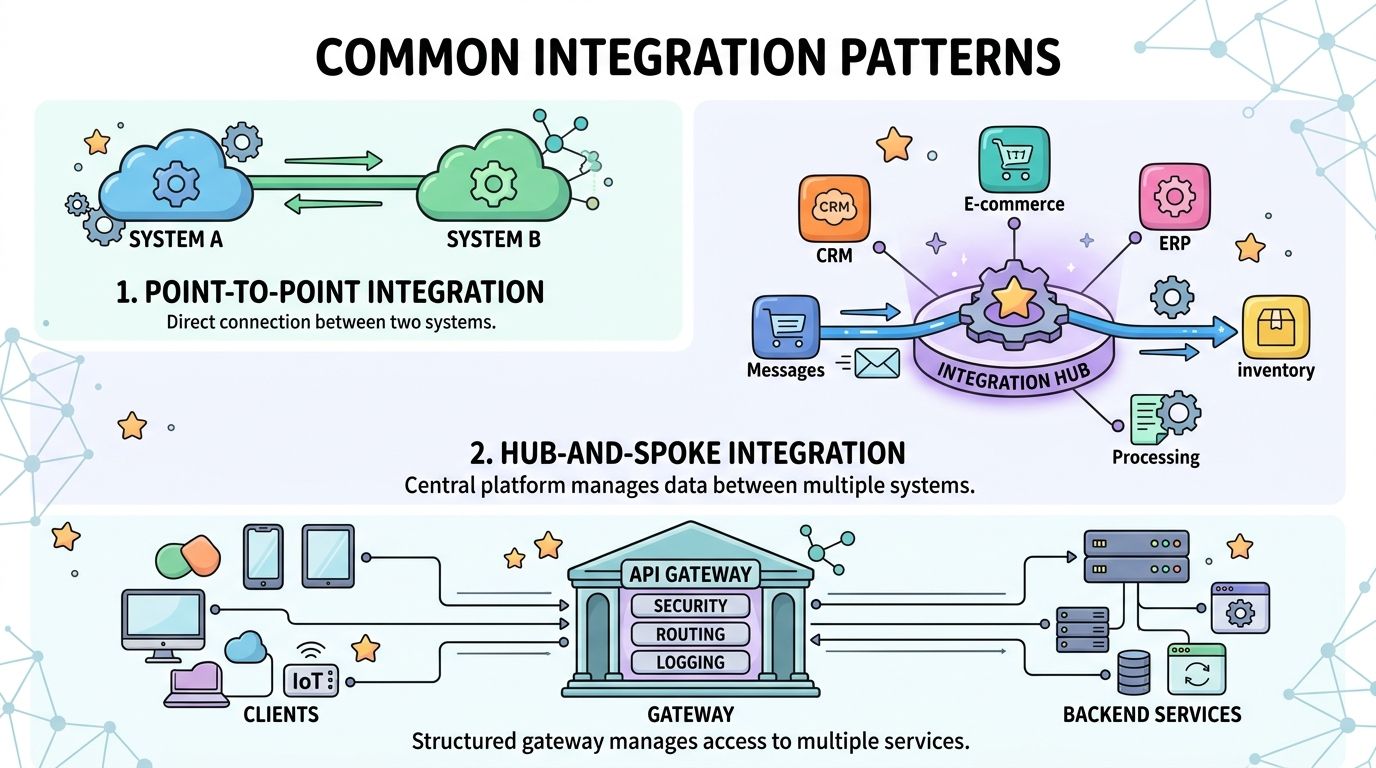
Think of an API like a universal travel adapter
At the center of most integrations is an API, short for Application Programming Interface.
That phrase sounds technical, but the idea is straightforward. An API is a rulebook. It tells one application what it's allowed to ask for, how it must ask, how it proves identity, and what kind of response it will get back. Without that rulebook, every software connection would be improvised.
You can also think of an API as a language translator with strict grammar. One app says, “Create a new client record.” The other app understands that request because both sides follow the same format.
If you want a plain-English overview of the broader process of connecting business applications, that resource is useful because it frames integrations as business systems working together, not just code modules.
What actually happens behind the scenes
The mechanics are less mysterious when you break them into simple steps. According to Indeed's explanation of third-party integrations, the technical process involves identifying an endpoint, constructing a coded request (typically in JSON or XML), and testing the connection. The same source notes that improper setup directly causes data sync failures.
That sounds developer-heavy, but there's a business takeaway in it.
If your team says, “The integration connected, but the data is wrong,” the issue usually isn't magic. It's one of a few concrete problems:
- The wrong endpoint was chosen: The system may be sending data to the wrong place or asking for the wrong action.
- The request format is incomplete: A required field may be missing, mislabeled, or sent in a format the other app won't accept.
- The connection wasn't tested properly: The workflow may succeed in a perfect scenario and fail when a field is blank, a file is late, or a user changes a setting.
A working integration isn't just one that connects. It's one that keeps behaving correctly when real-life exceptions show up.
That's why a business owner doesn't need to learn to code, but does need to ask better questions. What data moves? When does it move? What happens if it fails? Who notices?
Those questions save more trouble than most feature checklists.
Common Integration Patterns Explained
Not every integration works the same way. Some are direct and simple. Others are better for multi-step workflows or event-based updates.
The easiest way to understand them is through analogy.
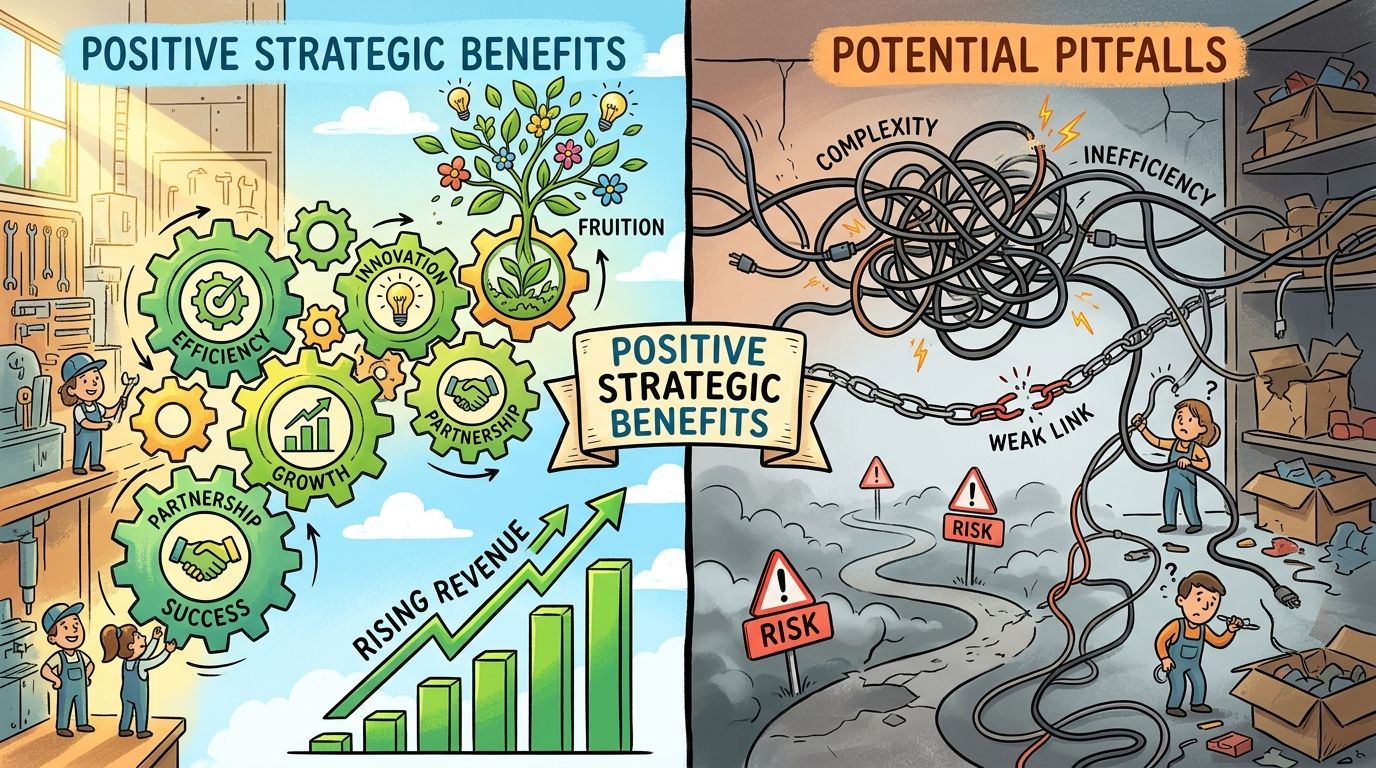
Four patterns you'll hear about most
| Pattern | Plain-English analogy | Best fit | Watch-out |
|---|---|---|---|
| API | A restaurant menu | Structured requests between systems | You still need the right request and permissions |
| Webhook | A doorbell | Instant notifications when something happens | Good for alerts, not always enough for full workflows |
| SDK | A Lego kit | Building features faster inside a product | Still needs technical implementation |
| Middleware | A universal remote | Connecting several apps through one layer | Can hide complexity, not remove it |
An API is like a restaurant menu because it defines the allowed requests. You can order what's offered, in the format the kitchen expects. You don't walk in and invent a dish.
A webhook is closer to a doorbell. One system doesn't wait to be asked. It sends a signal when an event happens, like “document approved” or “new submission received.” If you want to understand why that event-first model matters, this practical guide to event-driven architecture gives useful context.
An SDK is like a Lego kit. It gives developers pre-built components so they don't have to create every piece from scratch. This can speed up development when a business wants deeper product-level integration.
Middleware acts more like a universal remote. Instead of teaching every app to talk directly to every other app, you use an intermediary layer to coordinate actions. For document-heavy teams exploring what that can look like in practice, integration options for workflow automation show how one connection layer can trigger activity across multiple systems.
When each pattern makes sense
The right pattern depends on your process, not on what sounds modern.
Choose based on the operational need:
- Use APIs when you need reliable access to records, files, status data, or updates on demand.
- Use webhooks when speed matters and one event should trigger another action immediately.
- Use SDKs when your product or portal needs embedded functionality rather than a simple data handoff.
- Use middleware when you're coordinating several systems and don't want staff managing each connection separately.
Here's where non-technical buyers get tripped up. They often assume these are competing options. Sometimes they are. Often they work together.
A workflow might use a webhook to announce that a document was submitted, an API to pull the file details, and middleware to route the result to storage, review, and notification steps. From the user's point of view, it feels like one smooth action. Behind the scenes, it's a chain of different connection methods.
That's normal. The key is choosing the pattern that fits the business moment instead of forcing every need into the same model.
The Strategic Benefits and Hidden Pitfalls
Integration can make a business feel smaller in the best sense. Fewer manual checks. Fewer repeated updates. Fewer “Did anyone send that?” messages.
But software vendors often pitch only the clean side of the story. Business leaders need the whole picture.
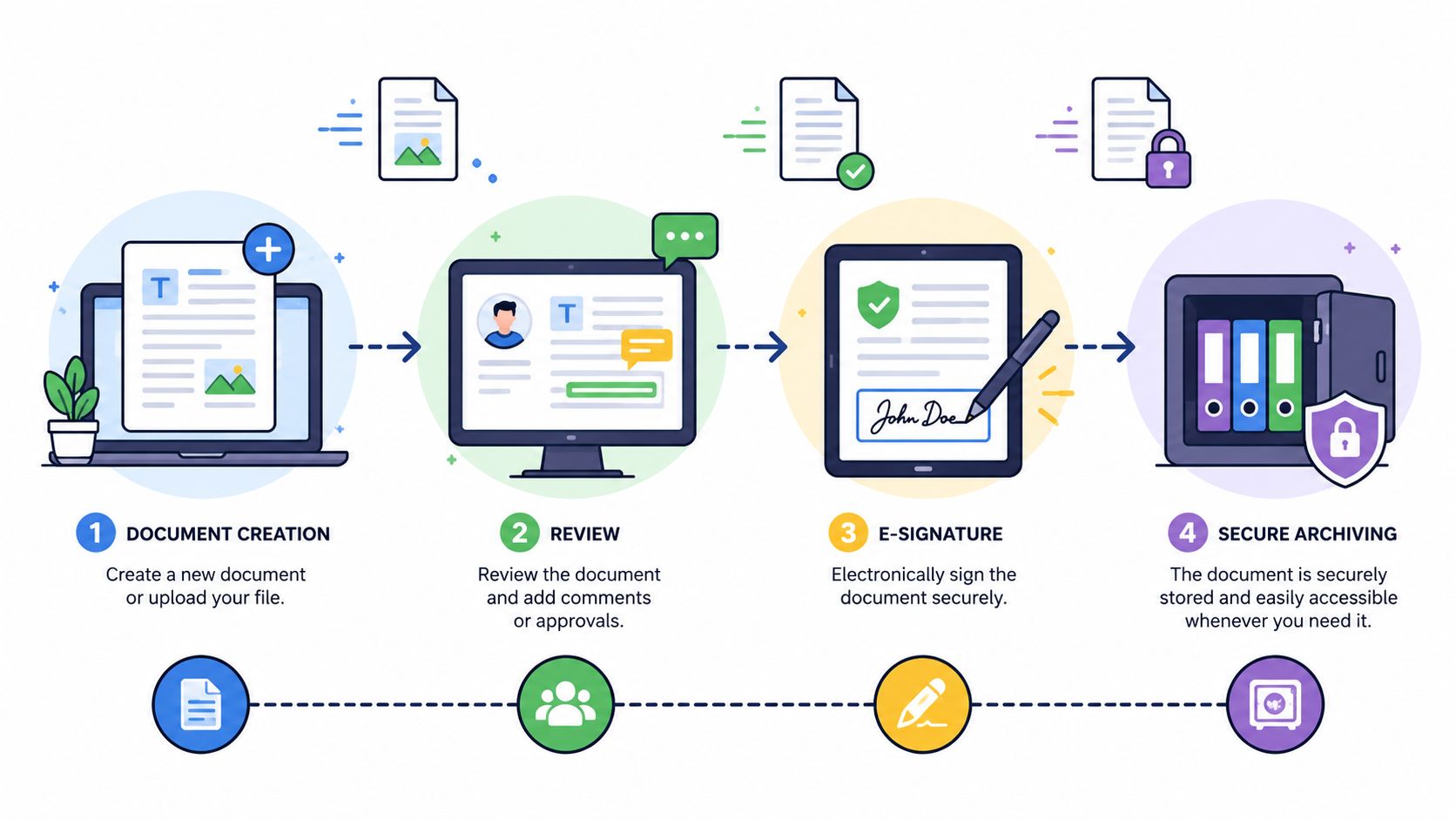
What business leaders actually gain
A solid third party app integration strategy does more than save admin time.
It can create a smoother customer journey because people don't have to repeat the same information across multiple touchpoints. It can improve internal visibility because status changes travel automatically instead of waiting for someone to update them. It can also help teams standardize workflows, which matters when you're growing and training new staff.
For document-driven operations, that often connects directly to automation. If you're mapping where approvals, reminders, and file checks fit into a wider process, this overview of business process automation is a useful companion because it puts integrations in an operations context.
Better integrations usually don't create a brand-new process. They remove friction from the process you already know should work.
The low-code paradox
This is the part many buyers don't hear early enough.
Some vendors frame integrations as low-code or no-code, which makes leaders think implementation will be light, quick, and mostly non-technical. In reality, the setup often still depends on field mapping, authentication logic, error handling, and understanding how each system structures data.
According to Merge's analysis of third-party integration challenges, 60–70% of SMBs attempting self-built integrations fail due to API documentation gaps or authentication mismatches.
That statistic explains a common business experience. A team starts with confidence because the setup wizard looks easy. Then they hit confusing permission screens, unclear field requirements, or a sync that works once and fails later. The project doesn't collapse because the idea was bad. It stalls because the “simple” version assumed technical knowledge the team doesn't have.
A good rule is to separate connection simplicity from workflow reliability. The first can be easy. The second usually takes thought.
Security risk doesn't end at setup
The hidden risk most often ignored is permission sprawl.
When teams connect apps quickly, they often approve broad access scopes just to get the workflow running. Months later, nobody remembers which app can see which records, who approved it, or what should happen when that connection is no longer needed. That's dangerous in any business, and especially in legal, healthcare-adjacent, HR, immigration, and financial document workflows.
The operational question isn't only “Can we connect this?” It's also “How do we audit access, monitor sync behavior, and revoke permissions without breaking live work?”
A related challenge appears in content and reporting too. Some connected systems generate image-based status badges, document stamps, thumbnails, or signature graphics that contain embedded text. If your publishing or compliance rules require no text on images inside the article, those outputs may need to be replaced with plain text alternatives rather than displayed as-is.
Treat permissions like access badges to your office. Don't hand out master keys when a visitor only needs one room.
Building a Resilient Integration Architecture
A rushed integration can work today and trap you tomorrow.
That trap usually appears when a business becomes too dependent on one vendor's exact setup. If that vendor changes its API, increases costs, removes a feature, or sunsets support, your team may discover that the workflow can't be adjusted without rebuilding core systems around it.
Why loose coupling matters to the business
The phrase developers use for avoiding that trap is loose coupling.
According to this Stack Overflow discussion on integration best practices, expert guidance says the interface between an application and a third-party module should be designed for loose coupling, so a component can be replaced without rewriting core application logic if a vendor discontinues support.
The business version of that idea is simple. Your stereo should let you replace one speaker without rebuilding the whole sound system. Your software should work the same way.
If one external service handles signatures, storage, notifications, or identity checks, your internal process shouldn't collapse just because you need to swap that service later. That flexibility is a form of operational insurance.
A simple rule for future-proofing
Ask your team or implementation partner to build a small protective layer between your core process and the outside tool.
That layer acts like a receptionist. Your internal workflow talks to the receptionist, and the receptionist talks to the external service. If the external service changes, you update the receptionist instead of retraining the whole company.
Use these questions before approving any integration design:
- Can this component be replaced? If the answer is no, you may be buying convenience at the price of lock-in.
- Where is the business logic stored? Keep your essential workflow rules as close to your own systems as possible.
- Who notices failures? A resilient design includes alerts, logs, and ownership when syncs break.
- What's documented? If the person who set it up leaves, someone else should still understand the connection.
Build integrations like leased equipment, not poured concrete. You want them useful, but not impossible to replace.
Leaders don't need to dictate architecture diagrams. They do need to insist on replaceability, documentation, and clear ownership. Those requirements prevent many expensive rebuilds later.
Putting Integration to Work in Your Document Workflows
Here, third party app integration stops being abstract.
Document workflows are full of repeated actions that systems handle better than people. Intake, reminders, approvals, filing, notifications, and follow-up tasks all involve information moving between places. When those handoffs are connected, staff spend less time chasing paperwork and more time resolving real exceptions.
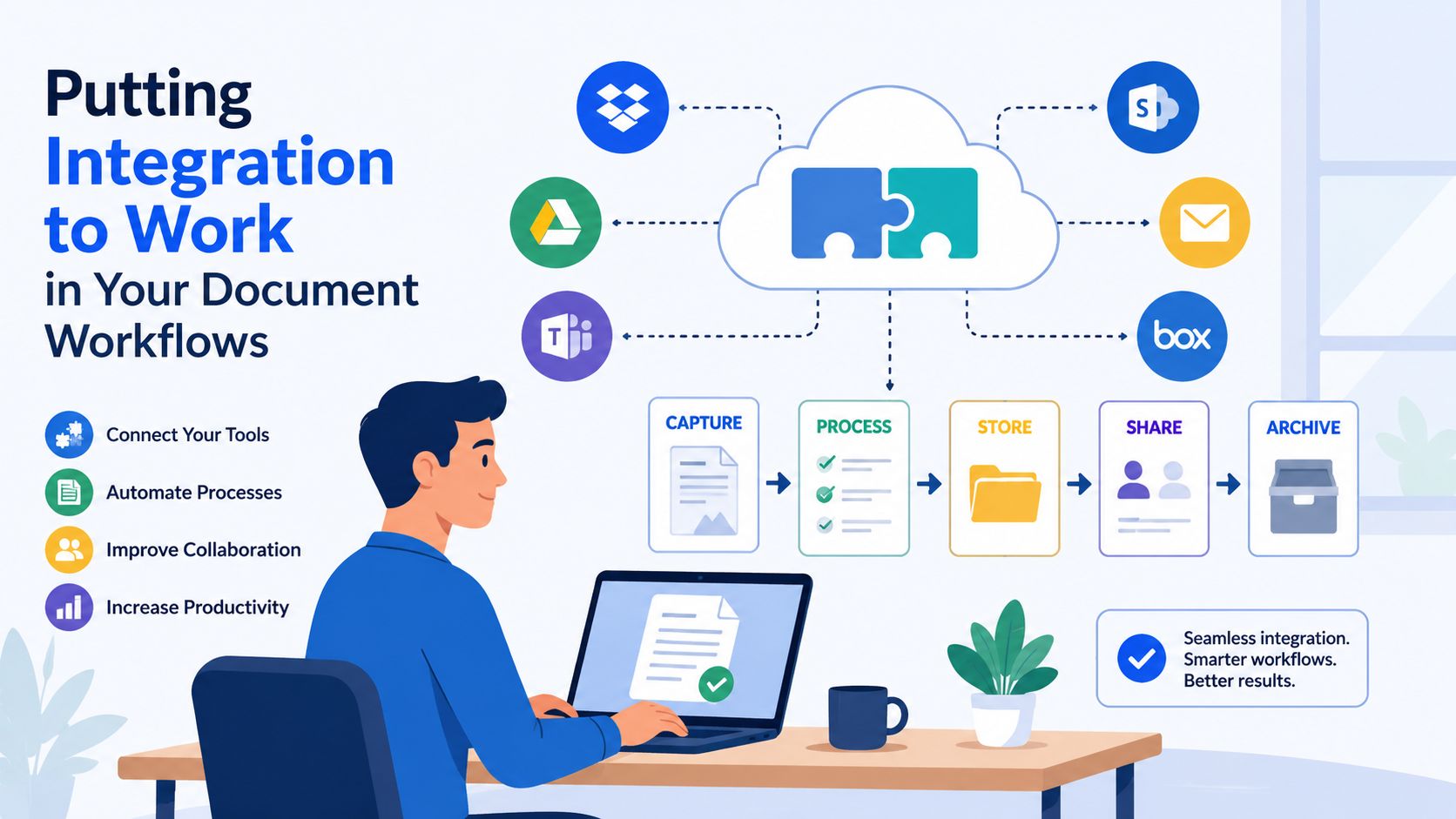
Practical use cases for document-heavy teams
A legal firm might collect client identity documents through a secure request workflow, then automatically route approved files into the correct case structure and notify the reviewing attorney.
An HR agency might trigger onboarding once candidate documents are complete, moving status updates into the HR record and alerting the recruiter only when something is missing.
A real estate team might collect tenant or buyer paperwork, push validated files into the deal folder, and create follow-up tasks for missing disclosures. A portfolio manager might use a similar flow for recurring document refresh cycles.
One option in this space is Superdocu, a cloud-based document collection platform that can automate request workflows and connect to other apps through integration layers.
If your team also coordinates tasks and files inside office productivity suites, this article on Google Workspace project management tools is a helpful reference point for thinking about how operational work gets organized after documents are collected.
A simple checklist before you connect anything
Use this short test before launching a workflow:
- Start with the handoff: Which manual transfer causes the most delay or confusion?
- Define the trigger: What event should start the automation, such as submission, approval, or expiration?
- Name the owner: Who checks failures, permission changes, and exceptions?
- Limit the access: Give each connected app only the permissions it needs.
- Plan the offboarding: Decide how you'll review and revoke access when the workflow changes.
That last point matters more than organizations typically realize. According to the Cloud Security Alliance article on third-party app permissions, 83% of healthcare and legal organizations reported integration-related privacy breaches in the past 12 months, yet guidance rarely covers post-deployment permission auditing or automated revocation protocols.
How to take the first step
Don't begin with your most complicated process. Pick one narrow, high-friction workflow.
For many teams, a good starter project is document intake plus one follow-up action. For example:
- A client submits required files.
- The system marks the request as complete or incomplete.
- Approved files move to the right storage location.
- A reviewer gets notified only if something needs attention.
If you're evaluating how that fits into a broader records process, this guide to a document workflow management system helps connect the intake stage to review, validation, and storage.
Keep the first integration boring. That's a compliment. A boring integration is one staff stop thinking about because it behaves predictably, exposes only the right data, and has a clear owner when something fails.
If your team handles repeated document collection, approvals, and reminders, Superdocu is one way to turn those manual handoffs into structured workflows. Start with a single process, connect only the systems that need to share data, and make permission review part of the rollout from day one.