
Somewhere in your business, the same scene keeps repeating. A client sends the wrong file. A staff member copies names from one form into another. Someone follows up by email, then follows up again, then wonders whether the document ever arrived. Meanwhile, essential work waits.
That's the kind of mess people mean when they ask, what is business process automation. They're usually not asking about abstract software strategy. They're asking how to stop the daily drag of chasing paperwork, re-entering data, routing approvals, and fixing avoidable mistakes.
This matters now because automation isn't a niche project anymore. A 2022 Salesforce study found that over 90% of organizations reported increased demand for automation from different departments over the previous two years, as cited by Zip's roundup of business process automation statistics. Small businesses feel that pressure too, especially when growth creates more forms, more files, and more handoffs.
If your business runs on applications, contracts, ID documents, onboarding packets, compliance records, or signed forms, BPA is less about “future tech” and more about getting your operations under control.
Table of Contents
- Putting Your Business on Autopilot
- Understanding Business Process Automation
- The Real-World Benefits of Automating Workflows
- BPA in Action Industry Specific Use Cases
- A Practical Roadmap for Implementing BPA
- Avoiding Common Automation Pitfalls
- Your First Step Toward a More Efficient Business
Putting Your Business on Autopilot
A lot of owners think their problem is “too much admin.” Usually the deeper problem is that work moves through the business with no reliable system. Documents arrive in different formats, staff members use different naming habits, approvals depend on whoever notices an email first, and no one can see the full status without asking three people.
In a small team, that chaos hides in plain sight. One person knows where the files are. Another remembers which client still owes a signature. A third keeps a mental list of what needs review. It works until someone takes a day off, volume picks up, or one missed document delays the whole job.
The document bottleneck most teams live with
Document-heavy processes create the biggest headaches because every step depends on the last one. You can't review an application until all files are in. You can't send for signature until the right version is approved. You can't move to onboarding until compliance documents are checked.
That means a “small” delay at intake becomes a delay everywhere else.
When work depends on documents, the real bottleneck usually isn't the document itself. It's the handoff around it.
BPA helps by turning those handoffs into a system. Instead of relying on memory, inboxes, and manual chasing, the process itself moves the work forward. The right request goes out. The right file gets checked. The right person gets notified. The next step opens only when the last one is complete.
What autopilot really means
“Autopilot” doesn't mean your business runs without people. It means people stop doing the parts that software can handle more consistently. The software collects, routes, validates, reminds, and records. Your team steps in where judgment matters.
That's a big difference.
If you run a law firm, staffing agency, mortgage office, property business, or immigration practice, this shift can remove a surprising amount of friction from daily operations. Instead of treating every client file like a one-off project, you build a repeatable path for work to follow.
Understanding Business Process Automation
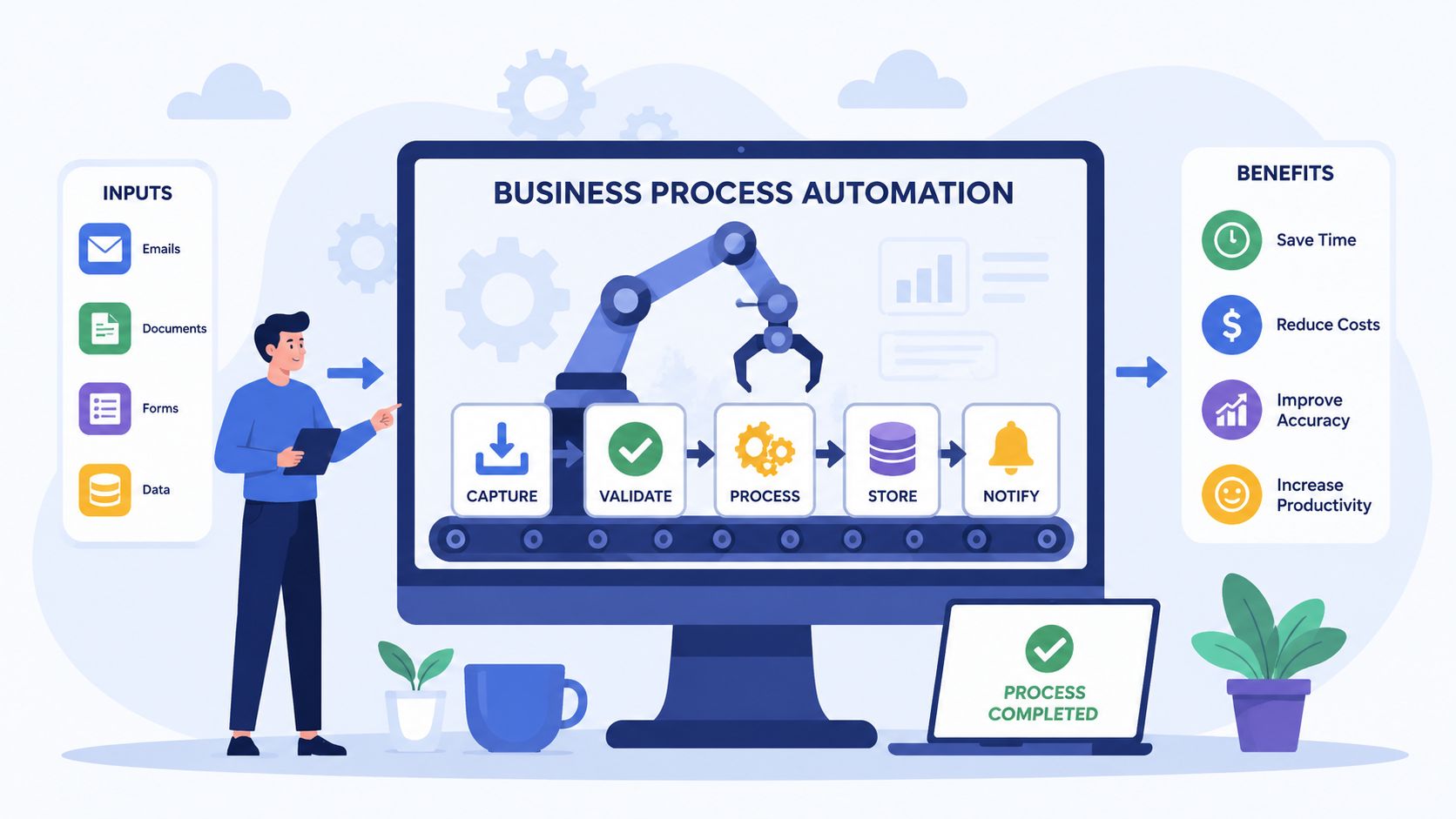
Business process automation is easier to understand if you ignore the buzzwords for a minute. At its core, it means using technology to handle a repeatable business workflow with less manual effort and more consistency.
Think like a restaurant kitchen
Think about a well-run restaurant kitchen. Orders come in, dishes get assigned, ingredients move to the right station, quality gets checked, and the final plate goes out in sequence. The kitchen isn't just full of people working hard. It has a flow.
Now compare that with a chaotic kitchen. Tickets pile up. Two cooks make the same dish. One step gets missed. Someone keeps asking, “Did that table's order go out yet?” The problem isn't effort. The problem is coordination.
Business process automation is that coordination layer for business work.
Simple definition: BPA uses technology to coordinate a full workflow, so tasks, documents, approvals, and notifications move in the right order with less manual intervention.
That's why BPA is more than one automated action. It's the structure that connects many actions into a process.
BPA versus RPA in plain English
Often, readers get stuck. They hear BPA and RPA used together and assume they mean the same thing.
They don't.
According to BOC Group's explanation of process automation, BPA acts as an orchestration layer that connects multiple enterprise IT systems to automate complex, repetitive processes, while RPA is narrower and typically handles a single structured task like data entry.
Using the kitchen analogy:
- RPA is one cook doing one repetitive station task, such as copying order details from one screen to another.
- BPA is the head chef's system for how the whole kitchen runs, including sequencing, handoffs, checks, and exceptions.
A document workflow makes the difference clear.
- A narrow automation might copy customer details from a form into a CRM.
- BPA would handle the full chain: request the documents, check whether the upload is complete, route files for review, notify the client if something is missing, trigger e-signature, store the final version, and update the record.
If you want a related view of how workflow tools fit into this picture, this guide on what workflow automation means in practice is a useful companion.
What BPA usually includes
Modern BPA platforms often combine several capabilities:
- Workflow routing: Work moves to the next step automatically.
- Rules and validation: Required fields, file checks, and approval logic are applied consistently.
- Notifications: The system sends reminders and status updates without staff chasing them.
- System connections: Information can move between tools like CRM, ERP, e-signature, and document storage.
- Exception handling: If something is missing or outside the rules, the process can pause, reroute, or flag it for review.
For SMBs, the important part isn't the architecture diagram. It's the practical result. Less waiting, fewer missed steps, and a clearer answer to “where is this file in the process?”
The Real-World Benefits of Automating Workflows
The strongest case for BPA isn't technical elegance. It's operational relief. When teams automate repetitive workflows, they spend less time pushing work from one step to another and more time handling the parts requiring judgment.
What changes in day-to-day operations
In document-heavy businesses, the first gains usually show up in ordinary places.
- Intake gets cleaner: Instead of accepting whatever a client happens to send, you request the exact files you need.
- Review gets faster: Staff see what's complete, what's missing, and what needs attention.
- Approvals stop stalling: The system routes the file to the next person instead of waiting in an inbox.
- Compliance becomes easier to prove: The workflow leaves a record of what was received, checked, approved, and stored.
The highest-value use cases tend to be high-volume, rule-based workflows where consistency, compliance, and auditability matter, and Workday's BPA guide notes that automating document extraction, validation, and approval routing can dramatically shorten turnaround times.
That combination matters for small businesses because delays rarely come from one giant problem. They come from dozens of tiny manual actions repeated all day.
A good automated workflow doesn't just move faster. It makes the process easier to trust.
Why businesses keep investing in automation
The bigger market trend points in the same direction. According to FlowForma's review of business process automation statistics, the process automation market is projected to grow from USD 13 billion in 2024 to USD 23.9 billion by 2029, and forecasts suggest intelligent automation could generate up to $813 billion in savings through lower production costs and shorter timelines.
You don't need to run a giant enterprise to understand why. If your team spends too much time on reminders, file checks, rekeying data, and status updates, every improvement compounds. You reduce friction for staff and clients at the same time.
Common practical benefits include:
- Less rework: Standard rules catch missing items earlier.
- Better client experience: People know what to send and where to send it.
- More capacity: Your team can handle more volume without adding the same amount of admin overhead.
- Stronger consistency: The process doesn't depend on one employee remembering every step.
For many SMBs, that's the actual return. Not flashy transformation. Just smoother operations, cleaner files, and fewer hours lost to preventable follow-up work.
BPA in Action Industry Specific Use Cases
A small business owner opens the inbox on Monday morning and finds 14 emails about one client file. One message has the ID, another has a half-completed form, someone forgot the signed agreement, and two teammates are asking the same question in different threads. The work is not hard. It is fragmented.
Document-heavy processes create that kind of drag every day.

What good document automation looks like
Good BPA in an SMB usually starts with one simple goal. Get the right documents from the right person, in the right order, without your staff having to chase every step manually.
A well-run restaurant kitchen is a useful comparison. Orders come in, each station knows what to do next, missing items get noticed quickly, and the meal moves forward only when the previous step is complete. Document workflows work the same way. Requests go out automatically, files are checked against clear rules, incomplete submissions get follow-ups, and completed packages move to the next person without inbox chaos.
That is why automated document collection is often one of the clearest first use cases for BPA. If intake is messy, everything after it gets slower too.
Six document-heavy examples
Legal firms
Opening a new matter usually means collecting IDs, engagement letters, intake forms, prior records, and supporting evidence. In many small firms, that work sits across email, shared folders, and staff memory.
BPA gives the client one clear submission path. The system records what has arrived, shows what is still missing, routes complete files for review, and keeps an audit trail of who sent and approved what.
Real estate
Agencies and property managers collect applications, proof of income, identification, disclosures, and signed lease documents. The bottleneck is rarely one file. It is figuring out whether each applicant's file is complete enough to review.
An automated workflow requests the required items, checks the package against a checklist, sends reminders to applicants, and passes complete files to the next step. Staff spend less time hunting through attachments and more time evaluating qualified applicants.
HR and staffing
Onboarding breaks down fast when contracts, tax forms, IDs, certifications, and policy acknowledgments arrive from different people in different formats. A spreadsheet can track the process for a while, but it often turns into a second job.
BPA turns onboarding into a guided sequence. Forms are requested in order, incomplete submissions are flagged early, and approvals move automatically to the right manager or HR contact.
In onboarding, one of the biggest gains is clarity. Everyone can see what is done and what is still blocking day one.
Mortgage and financial paperwork
Loan processing depends on complete and current documentation. A missing statement, an expired proof of income, or an unsigned form can stop the file cold.
BPA helps by collecting documents through a secure portal, checking whether the package meets the required rules, and routing it to reviewers only when it is ready. That reduces back-and-forth and gives staff a cleaner queue to work from.
Transportation
Driver onboarding and compliance often involve licenses, insurance records, certifications, vehicle documents, and renewal dates. Without automation, those records can end up spread across folders, inboxes, and calendar reminders.
A structured workflow gives each driver or contractor the same process. Expiring documents trigger reminders automatically, and administrators can review status in one place instead of piecing it together from separate threads.
Immigration services
Immigration cases often require passports, civil records, employment letters, translations, financial evidence, and signed forms. Missing one item can hold up the whole application.
BPA helps firms collect documents with a clear checklist, secure upload steps, and automatic prompts when something is missing or needs correction. Clients get clearer instructions, and staff get fewer avoidable delays.
Why these use cases fit BPA so well
These industries differ, but the pattern is the same. The work involves repeatable steps, document checklists, deadlines, handoffs, and a high cost when something goes missing.
That makes BPA especially useful for SMBs with document-heavy operations. The software handles the routine flow, and your team focuses on review, exceptions, and client support. That is where automation earns its keep in real businesses. Cleaner files, fewer follow-ups, and less time wasted asking, "Do we have everything yet?"
A Practical Roadmap for Implementing BPA
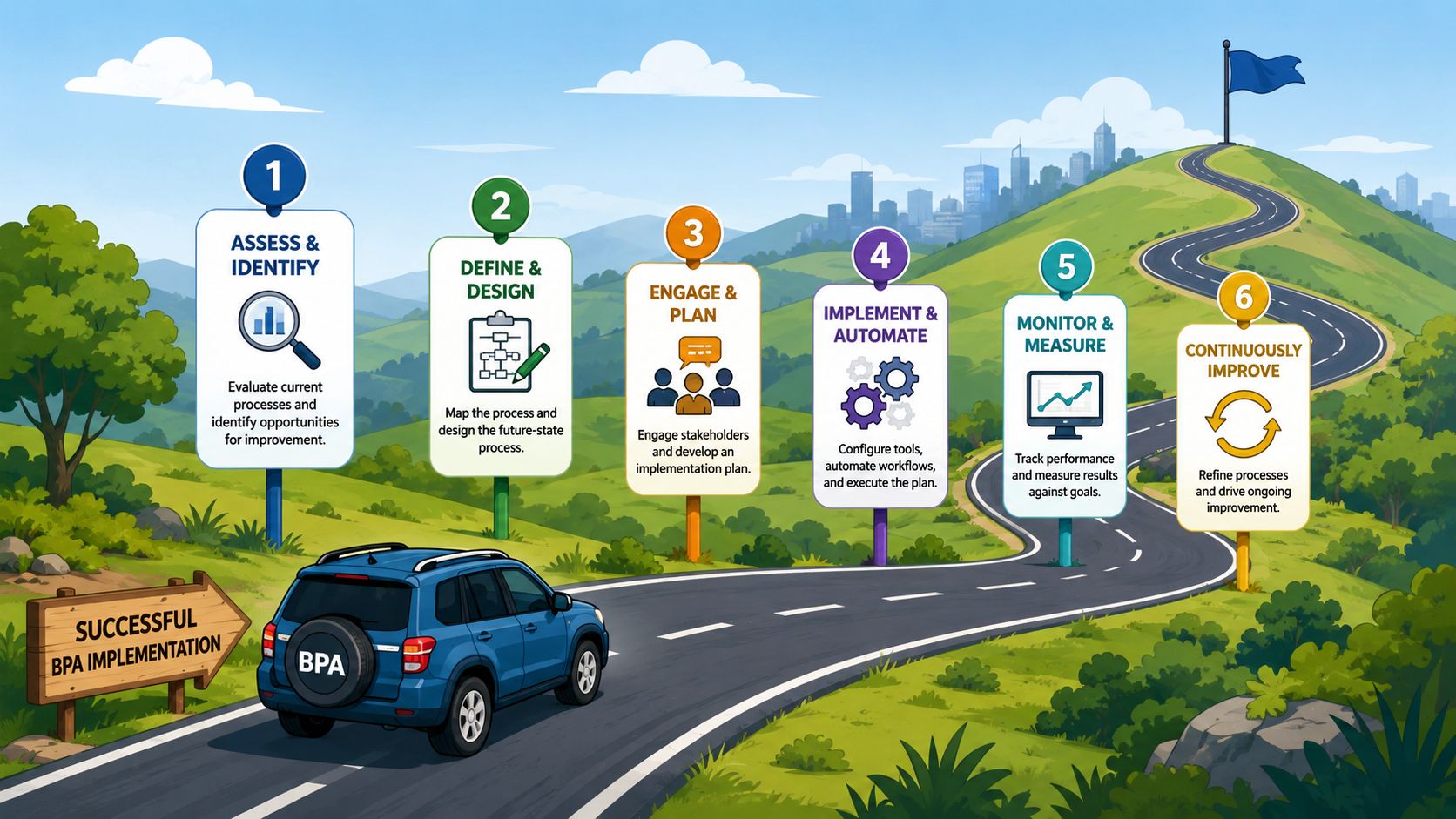
The biggest mistake small businesses make is trying to automate everything at once. That usually creates confusion, not progress.
Start with one process that hurts enough to be worth fixing and is stable enough to automate. Document collection is a common place to begin because the pain is obvious, the steps are repeatable, and the result is easy to see.
Start with one process not ten
Pick a workflow that has most of these traits:
- It repeats often: You run it weekly or daily, not once a year.
- The rules are clear: You know what documents, decisions, or approvals are required.
- Manual work is slowing it down: Staff spend too much time chasing, checking, or routing.
- Mistakes are expensive: Missing steps create delays, risk, or frustrated clients.
A useful example is onboarding a client who must submit several documents before service can begin. If that process currently depends on inboxes and memory, it's a strong automation candidate.
A simple rollout plan
You don't need a giant transformation program. A practical rollout can be straightforward.
Map the current process
Write down the actual steps, not the ideal ones. Who requests the documents? Where do they arrive? Who checks them? What happens when something is missing?Mark the friction points
Look for delays, repeat questions, manual copy-paste work, and approval bottlenecks. These are the spots where automation usually pays off first.Separate rules from judgment
If a step is repeatable and rule-driven, automate it. If it requires human interpretation, keep a person in the loop.Choose a tool that fits the workflow
For document-heavy processes, look for structured request flows, secure upload portals, automated reminders, validation dashboards, and integrations with the systems you already use. Tools vary. Some focus on broad workflow orchestration, while others focus on document collection and handoffs. For example, Superdocu is a document collection platform that lets teams build request workflows, send automated reminders, use branded portals, review submissions in a validation dashboard, and connect with tools like Zapier and DocuSign.Run a pilot first
Start with one team, one client type, or one document set. A small pilot helps you spot confusing steps before rollout.Measure a few useful outcomes
Track process cycle time, common error patterns, how often reminders are needed, and how much staff time still goes into follow-up. You don't need a perfect dashboard on day one. You need evidence that the process is improving.
Practical rule: Automate the repeatable path first. Handle edge cases second.
If you're looking for a narrower starting point, this guide on how to automate repetitive tasks can help you identify the low-friction wins before you expand to broader workflows.
What success looks like early on
Early success usually feels boring in the best way. Fewer “just checking” emails. Fewer incomplete files. Clearer visibility into status. Less dependence on one employee who knows where everything is.
That's enough.
Once one workflow runs reliably, you can extend the same approach to approvals, renewals, onboarding, or compliance tracking.
Avoiding Common Automation Pitfalls
A small business owner decides to automate client document collection. The tool goes live. Two weeks later, the team still spends half the day answering “What exactly do you need from me?” and hunting through inboxes for missing files. The software changed the container, but not the process inside it.
That is why automation disappoints so many teams. A messy workflow moved into a new system is still a messy workflow.
IBM's overview of business process automation explains the same underlying problem. BPA works best when the steps, roles, and rules are clear before automation starts. If your process depends on memory, personal habits, or constant clarification, the tool has nothing stable to run.
A restaurant kitchen is a useful comparison. If every cook uses a different recipe, plates food in a different order, and stores ingredients in different places, buying a faster oven will not fix dinner service. Document-heavy workflows work the same way. Faster requests and reminders help only after your team agrees on what gets collected, who checks it, and what happens when something is missing.
Why automation projects stall
In SMBs, the trouble usually shows up in a few predictable places:
The process changes from person to person
One team member asks for last year's tax return. Another also asks for proof of address and a signed form. Clients get mixed signals, and staff spend time cleaning up the mismatch later.No one owns the handoffs
Documents arrive, but who checks them? Who follows up on missing pages? Who approves exceptions? If those answers are fuzzy, files sit still.Work is split across too many places
Part of the process lives in email. Part lives in a spreadsheet. Part lives in a shared drive. Status becomes hard to trust because no one is looking at one complete picture.The workflow depends on manual chasing
A process that runs on “Don't forget to remind them again on Thursday” is fragile. If the employee is busy, out sick, or forgets, the request stalls.Sensitive files move through informal channels
Personal documents should not be scattered across inboxes, chat threads, and desktop folders. Clear submission paths and access rules protect both the business and the client.
Document collection manual vs automated
| Task | Manual Process | Automated Process |
|---|---|---|
| Document request | Staff send custom emails and attach checklists manually | The system sends a structured request with required items |
| Follow-up | Team members chase by email or phone | Reminder rules trigger automatically |
| File intake | Documents arrive in scattered inboxes and folders | Uploads land in one organized workflow |
| Completeness check | Staff compare submissions against a checklist by hand | Required items and validation rules flag gaps |
| Routing | Someone forwards files to reviewers manually | The workflow sends files to the next step automatically |
| Status tracking | Teams rely on spreadsheets or memory | A dashboard shows what's pending, complete, or blocked |
| Audit trail | Teams reconstruct what happened from email threads | The system records submissions, actions, and timestamps |
The pattern here is simple. Automation struggles when the business has not decided on a standard way to work.
For document-intensive processes, that standard usually needs five things: one request format, one intake point, clear review responsibility, clear exception handling, and a visible status view. Without those basics, even a capable platform ends up acting like a fancier email system.
What prevents those failures
Start with process rules, not software features.
Define the exact documents required for each case type. Decide what “complete” means. Set who reviews submissions and what happens if something is missing, expired, or unreadable. Then configure the automation around those decisions.
This is why document-focused platforms often fit SMBs better than broad enterprise automation tools. They are built for friction points that slow down smaller teams: incomplete uploads, repeated follow-up, approval bottlenecks, and compliance-related document handling. Instead of asking you to design everything from scratch, they usually provide structure around requests, reminders, intake, validation, and routing.
If a process changes every time a different employee runs it, standardize it before you automate it.
Once the process is consistent, the software can do its job well. It sends the same request every time, checks for the same required items, moves files to the same next step, and gives the team one place to see what is waiting, complete, or blocked.
Your First Step Toward a More Efficient Business
Business process automation isn't just for large companies with big IT teams. For many SMBs, it starts with one frustrating workflow that repeats every week. Usually, that workflow involves documents, follow-ups, approvals, and too much manual tracking.
If you've been wondering what business process automation is, the short answer is this. It's a way to make repeatable work move in the right order with less chasing, less guessing, and less rework.
Pick one process. Clean it up. Automate the repeatable parts. Then build from there.
If document collection is where your team loses the most time, Superdocu is one option to explore. It's a cloud-based platform for building document request workflows, sending automated reminders, collecting files through secure branded portals, reviewing submissions in a validation dashboard, and tracking expirations so records stay up to date.