
Monday starts with three separate to-do lists. One sits in Outlook. One lives in a spreadsheet someone updated last Thursday. The third is in a legal pad on a paralegal's desk. A client emails a revised document, but nobody is sure whether it replaces the version in the shared drive. A hearing date changes, and now two people think they updated the calendar. One of them didn't.
That's how small firms end up working hard without feeling in control. The problem usually isn't effort. It's fragmentation. Matter notes are in one place, billing lives somewhere else, documents sit across folders and inboxes, and nobody has full confidence that the file in front of them is the current one.
Legal case management software exists to stop that cycle. It gives the firm one operational home for active matters, deadlines, documents, communication history, and billing activity. This isn't a niche category anymore. The global market for legal case management software was valued at USD 1.90 billion in 2023 and is projected to reach USD 8.06 billion by 2032, according to Zion Market Research's legal case management software market report. That growth reflects a broader move toward digital legal operations, not a temporary software trend.
For a small or mid-sized firm making its first major platform decision, the key question isn't whether software has lots of features. It's whether it will remove daily friction, reduce avoidable risk, and save enough administrative time to justify the switch. That's the standard worth using.
Table of Contents
- Introduction The End of Spreadsheet-Driven Law
- What Is Legal Case Management Software Really
- Core Features and Tangible Benefits for Your Firm
- Choosing Your Software A Practical Evaluation Checklist
- Navigating Security and Compliance in the Cloud Era
- Successful Implementation and Driving Firm Adoption
- Supercharging Your Workflow with Document Collection Automation
Introduction The End of Spreadsheet-Driven Law
Monday starts with a client call in 20 minutes. The signed intake form is in someone's inbox. The medical records request is tracked in a spreadsheet. The limitation date may be on the firm calendar, or it may still be in a note from last week. Nobody is failing at their job. The firm is paying a tax for running matters across too many disconnected places.
That tax rarely shows up as one dramatic problem. It shows up as constant small delays. Staff search for the latest version of a document, re-enter information that already exists, and interrupt each other to confirm status updates that should be visible without a meeting. Time slips through the cracks. So does confidence in the file.
Firms usually do not buy legal case management software because they want more software. They buy it because too much billable and administrative time is spent chasing information they already collected.
For a small or mid-sized firm, that makes the purchase less of a feature question and more of an operations and risk question. The market for these systems is growing quickly, as noted earlier, but growth alone is not the point. The point is that firms now have to make a deliberate choice. Keep managing matters through email, spreadsheets, shared drives, and memory, or put a system in place that reduces rework, protects deadlines, and gives the team a dependable record of what happened and when.
What chaos looks like in practice
A partner asks for the status of a matter. The assistant checks email. The paralegal checks a spreadsheet. The associate opens a document folder. Each person finds part of the answer, and nobody is fully sure they are looking at the latest information.
That is an operational bottleneck.
It also has direct financial consequences. Delayed billing often starts with scattered time entries. Write-offs increase when staff spend hours on follow-up that should have been handled by a standard workflow. Client service suffers when document requests have to be repeated because files arrived through five different channels and were never organized properly. Firms that want better control should also review their broader approach to document management for law firms, because matter software works best when document handling is disciplined from intake onward.
What changes when the firm centralizes work
Once the team has one trusted place for matter activity, daily work becomes easier to verify. People stop relying on side notes and recollection. A task is either assigned or it is not. A deadline is either recorded in the matter workflow or it is missing and needs attention. A document is attached to the file, or the team knows it still has to be collected.
That clarity is where the return on investment starts.
The payoff is not just speed. It is fewer handoffs, fewer status-check emails, fewer duplicate requests to clients, and fewer avoidable mistakes caused by incomplete files. For firms making their first major software investment, that is the standard to use. Buy the system that removes friction from real work, gives you a clearer audit trail, and leaves room to improve high-friction processes such as client document collection instead of forcing everything through inboxes and manual follow-up.
What Is Legal Case Management Software Really
Legal case management software is easiest to understand as the operating system for a matter, not just a place to store files.

A system of record, not a nicer folder structure
The core value of legal case management software is its function as a single system of record for all matter data. Thomson Reuters describes that central role in its guidance on why legal case management software supports centralized legal work. That's what reduces the fragmentation, risk, and inefficiency that come from using disconnected tools.
Managing a legal file is akin to air traffic control. Documents are arriving. Deadlines are moving. Staff need different levels of access. Clients need updates. Time needs to be captured. Billing needs to reflect work already done. If each of those activities happens in a separate place, the team spends its day coordinating tools instead of progressing the matter.
A proper system of record should hold or connect the parts of the file that the team needs constantly:
- Matter details: contacts, opposing parties, notes, status, and key dates
- Working documents: drafts, signed versions, supporting materials, and correspondence
- Task flow: assignments, reminders, recurring steps, and handoffs
- Financial activity: time, expenses, invoices, and payment status
- Client interaction: messages, requests, uploads, and communication history
For firms reviewing their document processes, it also helps to think beyond storage and look at workflow design. This guide to document management for law firms is useful for that narrower operational question.
Why generic tools usually fall short
Small firms sometimes try to build a legal workflow out of Outlook, Excel, SharePoint, Dropbox, Trello, or a generic CRM. That can work for a while. It usually stops working when volume increases, staff responsibilities overlap, or compliance expectations rise.
Practical rule: If your team has to remember where something probably lives, you don't have a reliable system yet.
Generic project tools can track tasks. File storage tools can hold documents. Accounting software can issue invoices. But legal work depends on the relationship between those pieces. A deadline belongs to a matter. A note belongs to a client conversation. A draft belongs to a stage in the case. A billed activity belongs to work performed on that file. Purpose-built legal systems handle those relationships more cleanly.
The difference matters most when a firm grows from informal coordination to repeatable process. That's the point where software stops being administrative overhead and starts acting like infrastructure.
Core Features and Tangible Benefits for Your Firm
A feature list doesn't help much unless it answers a harder question. What bottleneck does this remove?
Modern platforms commonly include deadline tracking, document management, client portals, billing, scheduling, and automated workflows. Clio also states that its legal case management software is trusted by 150,000+ legal professionals worldwide, which is a useful sign that the category is mainstream rather than experimental. You can see that mix of capabilities on Clio's case management features page.
Matter management that reduces rework
When firms talk about wanting better organization, they usually mean they want less duplication. Matter management is the part of the system that helps with that.
If the intake details, client contact information, matter notes, related documents, and status updates live together, staff stop rebuilding the same file context every time they touch the case. New team members ramp faster because they can read the matter history in one place instead of asking three people what happened last month.
A useful matter view should answer these questions quickly:
- Who is involved: client, opposing counsel, related contacts, experts
- What is happening: current status, next action, recent activity
- What is due: hearings, filing dates, internal milestones
- What supports it: documents, emails, notes, and attachments
The benefit isn't abstract. Fewer handoff errors. Less “didn't you send that already?” Fewer internal interruptions.
Calendaring and workflow tools that protect deadlines
For many firms, calendaring is the first feature they care about and the last one they should treat casually. Deadline management is where operational sloppiness turns into real exposure.
Rules-based calendaring and workflow automation can do more than send reminders. Standardized workflows can trigger task sequences after a filing, intake completion, or case stage change. Related document templates can pull matter data into standard forms. Time and expense entries can flow into invoicing. CARET Legal's feature discussion highlights this connection between customizable workflows, document generation, deadline tracking, and invoice creation in its overview of important legal case management software features.
What works well is a workflow that reflects how your firm already handles recurring matters. What doesn't work is a vendor demo workflow that looks polished but doesn't match your actual sequence of work.
If your staff still keeps a private backup calendar because they don't trust the main system, the implementation isn't finished.
Billing and client communication that support cash flow
Billing tends to improve when it stops being a separate monthly event. The most useful systems tie time capture, expenses, invoice generation, and payment follow-up to the life of the matter itself.
That changes behavior. Attorneys are more likely to record work when the timer or activity log is already inside the case file. Staff can draft invoices with fewer missing pieces. Clients can review bills and messages through a portal instead of through scattered email threads.
A good client communication setup also reduces the “quick status update” tax that hits small firms all day. Portals, shared documents, and logged communication don't replace personal service. They reduce repeated administrative chasing.
Choosing Your Software A Practical Evaluation Checklist
Software demos are built to make every platform look easy. Buying well means ignoring the polished path and testing how the system handles your actual workload.
For small firms, the central question isn't just what features a platform includes. It's how much administrative time it will save to justify the cost. CARET Legal makes that point clearly in its guidance on choosing legal software for small firms with ROI in mind. That's the right frame.
Buy for payback, not for demos
Start with your current pain, not the vendor's feature grid. If the firm loses time to document retrieval, poor handoffs, duplicate data entry, delayed billing, or missed follow-up, test each product against those exact issues.
I usually tell firms to score software on five business questions before they get pulled into cosmetic comparisons:
Will this replace existing tools or sit beside them?
A platform that adds another login without removing old habits often creates more clutter, not less.How difficult is migration?
Contacts, matters, documents, dates, and billing history don't move cleanly unless someone owns the plan.What does training look like?
“Training included” can mean anything from a real onboarding process to a link to a help center.Can the software handle the way your firm works now?
Over-customization is expensive. Under-fit software is worse.How quickly will people use it as the default?
Adoption determines value. Shelfware doesn't produce ROI.
Legal Case Management Software Evaluation Checklist
| Evaluation Criterion | What to Ask | Why It Matters |
|---|---|---|
| Workflow fit | Does the system match our matter lifecycle, or will we need workarounds for routine tasks? | A poor workflow fit creates resistance and hidden admin time. |
| Document handling | How are files organized, searched, versioned, and linked to matters? | Document confusion is one of the fastest ways to lose trust in a system. |
| Deadline management | How are reminders, recurring tasks, and key dates managed across the team? | Reliable calendaring reduces operational and professional risk. |
| Billing workflow | Can time, expenses, invoices, and payment status be managed without duplicate entry? | Billing friction delays cash flow and weakens reporting. |
| Client collaboration | What can clients upload, view, sign, or message through the platform? | Better collaboration reduces inbox traffic and manual follow-up. |
| Reporting | What can we see about workload, billing status, and matter progress? | Firms need visibility to spot bottlenecks before they become habits. |
| Migration support | Who handles import mapping, cleanup, and testing? | Migration problems can poison adoption from day one. |
| Training and support | Is onboarding role-based and practical, or generic and self-serve? | Attorneys, assistants, and billing staff need different training. |
| Security controls | How are permissions, logs, and retention settings managed? | Sensitive legal data requires controlled access and accountability. |
| Exit options | How can we export our data if we switch later? | Firms should avoid being trapped by poor portability. |
A final caution. Don't buy around rare edge cases. Buy for the work your team performs every week. If the software handles common matters cleanly, your firm will use it. If it only shines in special scenarios, people will drift back to email and spreadsheets.
Navigating Security and Compliance in the Cloud Era
The security conversation around legal case management software often stops too early. Vendors say “secure.” Buyers nod. Contract signed.
That isn't enough.
Security is a governance issue, not a badge
Mobile access and cloud delivery have obvious operational value. Lawyers can review files outside the office, respond faster, and keep work moving. But mobility also expands risk. Axon's legal software guidance puts the trade-off plainly. Mobility improves responsiveness, but firms need deeper evaluation of access controls, retention rules, and auditability. That point is discussed in Axon's article on features attorney case management software must address.
What matters in practice is not whether a platform claims encryption or cloud hosting. What matters is who can access what, how those permissions are reviewed, what gets logged, how long data is retained, and what happens when a device is lost or a staff member leaves.
A lot of firms still treat security as an IT issue. It's really an operational policy issue with technical enforcement.
Secure software with weak internal permissions is still weak security.
Questions firms should ask before signing
The strongest buying conversations around security sound specific. They don't sound like “is it secure?” They sound like this:
- Access controls: Can the firm limit matter access by role, team, or user?
- Auditability: Does the system log uploads, downloads, edits, and user actions in a way the firm can review?
- Retention: Can the firm define how long documents and communications should remain available?
- Remote work controls: What protections exist for mobile access and offsite use?
- Compliance posture: Does the vendor provide enough transparency for your jurisdictional and ethical obligations?
If your firm operates under UK regulatory obligations, practical guidance on SRA and GDPR compliance for legal IT is worth reviewing alongside vendor documentation. For a broader operational view of internal controls, this article on data security and compliance in document workflows is also useful.
Don't reduce security review to a procurement checkbox. In legal work, centralization improves control only if governance improves with it.
Successful Implementation and Driving Firm Adoption
A legal case management platform can be well chosen and still fail. The usual reason is simple. The firm treated rollout like a technical install instead of a behavior change.
Start narrow and make early wins visible
The safest approach is usually a controlled rollout. Start with one practice area, one office group, or one matter type that has enough repetition to show value quickly. That gives the firm room to clean up templates, naming standards, permissions, and task flows before everyone is expected to rely on them.
The first milestone shouldn't be “system is live.” It should be something operationally concrete, such as all new matters entering through the same intake path, or all deadlines being created inside the platform rather than in personal calendars.
A few habits make adoption much easier:
- Appoint a champion: Pick someone respected by both attorneys and staff, not just the most technical person.
- Define core requirements: Decide what must live in the system from day one, such as notes, deadlines, or finalized documents.
- Clean before migrating: Don't import years of clutter if nobody uses it now.
- Review weekly: Early correction is easier than rebuilding trust after confusion spreads.
Firms adopt software faster when the first visible result is less friction, not more policy.
Train by role, not by software menu
One generic training session rarely works. Attorneys care about matter status, deadlines, mobile access, and billing capture. Assistants care about task flow, documents, and scheduling. Billing staff care about time entry quality, invoice review, and payment follow-up. Give each group the parts of the system that make their own work easier.
Training also needs to happen close to real work. Abstract walkthroughs are quickly forgotten. Role-based scenarios stick. Open a file. Save the document. assign the task. log the call. prepare the invoice. That's how a team learns where the software belongs in the day.
If people keep bypassing the system, don't assume they're resistant to change. Often they're signaling that the workflow inside the platform still takes too many clicks or doesn't match the way the firm operates.
Supercharging Your Workflow with Document Collection Automation
Most legal case management software handles internal file management reasonably well. The bigger friction often sits earlier in the process. Getting documents from clients.
The workflow gap most firms still feel
Every firm knows the pattern. A client receives a list of requested documents by email. They reply with some of them, then attach others in a later thread, then send phone photos of the rest. Staff chase missing items, resend requests, and manually check whether submissions are complete. The matter system may be organized. The intake and collection stage still isn't.
That's where a separate collection layer can help. Instead of using the case management platform to do everything, firms can pair it with a dedicated intake and document request tool that sends structured requests, tracks what has and hasn't arrived, and gives clients a simpler upload experience.
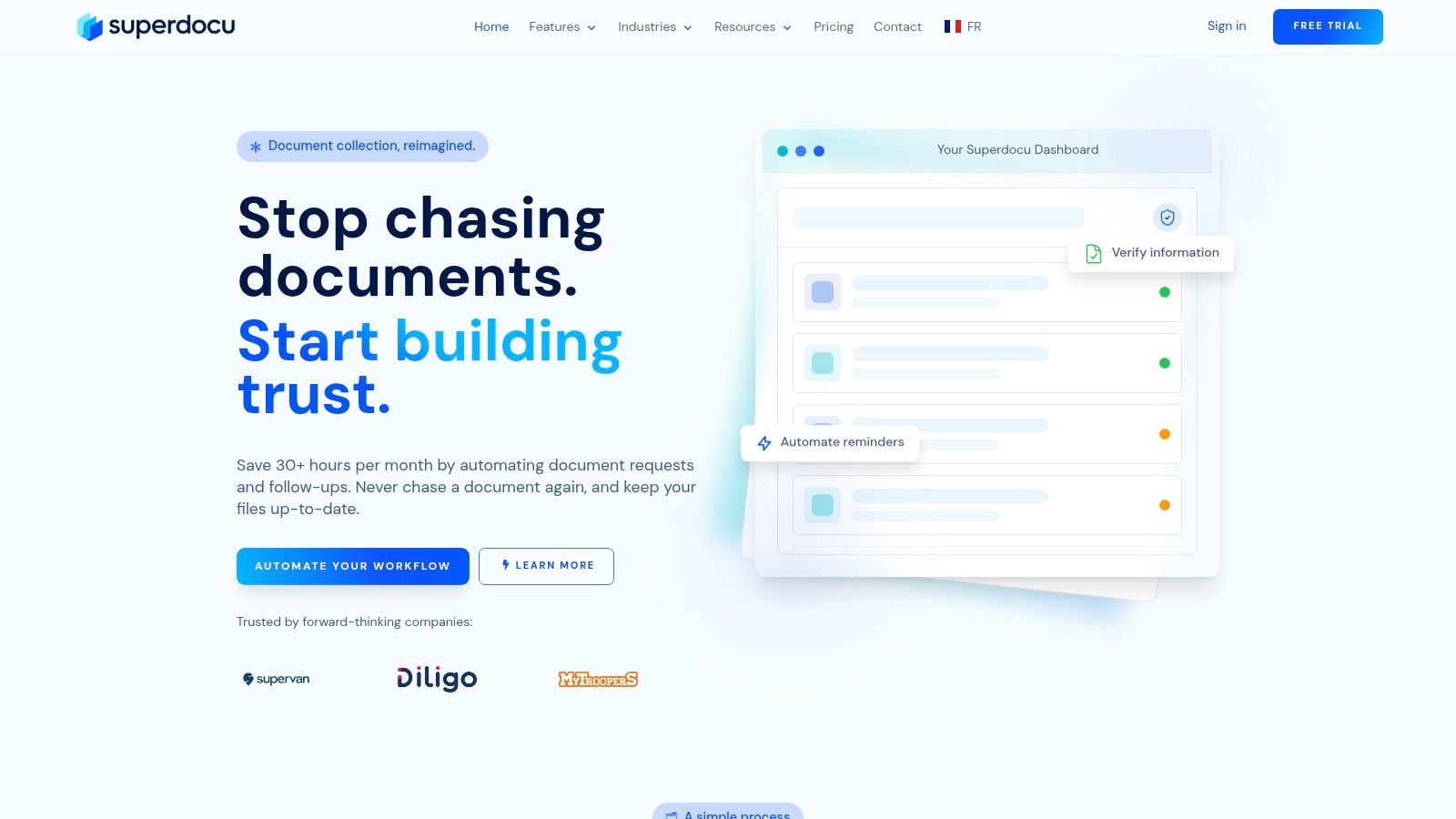
How a collection layer supports the main system
A tool like Superdocu's automated document collection workflow fits into that gap. It's not a replacement for the main matter platform. It handles the front-end collection process that many case systems only partly address. That includes request links, branded portals, reminders, submission tracking, and review before documents are transferred into the working file.
The operational benefit is straightforward:
- Clients get clarity: they see exactly what to upload and what is still missing
- Staff spend less time chasing: reminders and status tracking are built into the workflow
- Files arrive in a more usable form: collection becomes structured instead of improvised
For firms handling immigration, family, probate, property, or any matter type that depends on repeated client document requests, this can remove a surprising amount of administrative drag. The case management platform remains the system of record for the matter. The collection tool makes it easier to feed that system cleanly.
If your firm is spending too much time requesting, chasing, and checking client paperwork, Superdocu is worth a look as a focused document collection layer alongside your case management system. It gives firms a structured way to request files, automate reminders, and review submissions without turning every document request into another inbox project.