
You probably already know the feeling. A client sends a contract by email, another uploads an ID photo from a phone, HR gets a resume in PDF format, and someone on your team still has to open each file, rename it, check what's missing, copy details into another system, and chase people for the rest.
That work doesn't look dramatic, but it eats hours. It also creates risk. One missed signature, one wrong date, or one document saved in the wrong place can slow down onboarding, payment, hiring, or compliance checks.
Intelligent document processing begins to matter. For small and mid-sized businesses, it isn't about buying a giant enterprise platform or hiring a team of AI specialists. It's about giving your business a better way to collect, read, verify, and route documents without turning every process into a manual relay race.
Table of Contents
- What Is Intelligent Document Processing and Why It Matters Now
- The Core Components How IDP Works
- Real-World Benefits and ROI for Your Business
- Security and Compliance in Document Processing
- Implementing IDP A Practical Checklist for SMBs
- Common Pitfalls to Avoid During Adoption
- Putting IDP into Action with Superdocu
What Is Intelligent Document Processing and Why It Matters Now
Intelligent document processing, often shortened to IDP, is software that doesn't just scan a document. It identifies what kind of document it is, reads the contents, pulls out the useful fields, checks whether they make sense, and sends that information where it needs to go.
A simple way to think about it is this. Basic OCR is like a scanner that can recognize letters. IDP is more like a sharp operations assistant who opens the mail, sorts it, spots what's important, flags problems, and updates the right system.
That difference matters most when your business deals with more than one file format. A form might arrive as a clean PDF, a phone photo, a signed scan, an email attachment, or a mixed set of supporting documents. Old-school tools usually struggle when layouts change. IDP is built to handle variation across structured, semi-structured, and unstructured documents.
Why SMBs are paying attention
This isn't a niche trend anymore. The global IDP market was valued at about $1.5 billion in 2022 and is projected to reach $17.8 billion by 2032, a projected 28.9% CAGR, according to Fortune Business Insights on the intelligent document processing market.
For a busy business owner, the headline isn't just market growth. It's what that growth signals. More companies now see document work as a process to improve, not an unavoidable administrative burden.
Plain-English takeaway: If your team still treats document handling as "just part of the job," competitors are increasingly treating it as a workflow they can speed up, standardize, and control.
Where it matters most
IDP becomes especially useful when documents drive revenue or compliance, such as:
- Client onboarding: collecting IDs, applications, proofs, and signed forms
- HR intake: reviewing resumes, contracts, and employee records
- Legal work: organizing agreements, evidence, and client documents
- Real estate and finance: handling supporting paperwork for transactions
- Operations: processing invoices, permits, and recurring submissions
If your team spends too much time asking, "Did we receive everything?" or "Can someone check this file?" then intelligent document processing is already relevant to your business.
The Core Components How IDP Works
IDP makes more sense when you follow the path of a document from arrival to action. A resume, contract, invoice, or intake form comes in. The system identifies it, reads it, checks it, and sends the result where your team needs it.
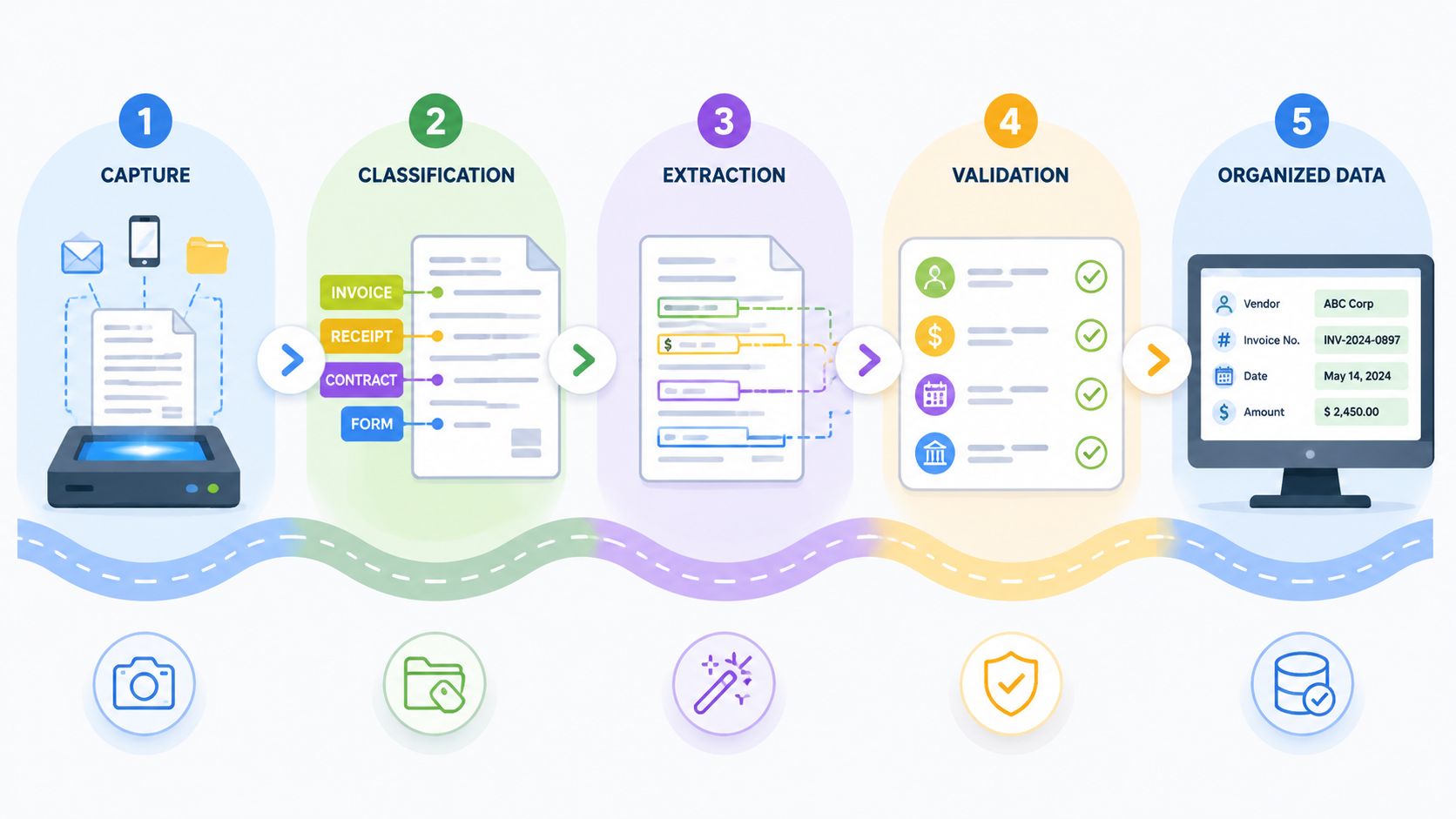
A useful mental model: a digital mailroom clerk
For a small business, this is often the clearest way to picture it. IDP works like a digital mailroom clerk that receives every document, sorts it, pulls out the important details, checks for problems, and routes it to the right desk. The difference is speed, consistency, and the ability to handle large volumes without tiring out your staff.
Here is the flow in plain English:
Capture
Documents arrive from email, upload forms, scanners, mobile photos, or shared portals. The first job is to bring them into one controlled intake process so nothing gets lost in inboxes or folders.Classification
The system determines what each file is. A driver's license needs one workflow. A signed employment contract needs another. A legal intake packet may need several checks before anyone can use it.Extraction
Once the document type is known, the software pulls out the details that matter. That might include names, dates, addresses, case numbers, salary terms, invoice totals, or signature status.Validation
This step turns captured text into usable business data. The system checks rules such as missing required fields, invalid dates, mismatched names, or values that do not fit the expected format. For HR and legal teams, this step matters because a readable document is not the same as a trustworthy record.Integration
After validation, the data moves into the systems your business already uses, such as a CRM, HR platform, case management tool, approval queue, or document repository.
If you are new to this category, it helps to see how document automation fits into everyday business workflows. In practice, document intake, data extraction, and process automation usually work together.
Why this goes beyond basic OCR
Basic OCR reads characters from an image or scan. That solves only part of the problem.
According to Automation Anywhere's overview of intelligent document processing, IDP combines image pre-processing, OCR, AI-based classification, extraction, and validation rules in one process. The company reports that this layered approach can reach up to 99% accuracy and reduce costs by 80% or more compared with manual entry.
The pre-processing step is easy to miss, but it matters a lot. If a scan is crooked, blurry, shadowed, or low contrast, the system cleans it up before reading it. Then it identifies the document type, extracts the right fields, and checks the result against business rules.
That is why IDP handles messy real-world documents better than simple template tools. A law office may receive client records in mixed formats. An HR team may get resumes, IDs, tax forms, and signed agreements from different channels. IDP is built for that kind of variability.
A good system does more than read text. It helps your business decide whether the document is complete, whether the information makes sense, and where it should go next. For SMBs without a large IT department, that is the practical value. You get a repeatable process for document-heavy work without building everything from scratch.
Real-World Benefits and ROI for Your Business
A small HR team gets 40 onboarding documents on Monday morning. Offer letters, IDs, tax forms, bank details, signed policies. By lunch, someone is already copying data from PDFs into spreadsheets, someone else is chasing missing pages, and a manager is waiting to approve a file that is still buried in an inbox.
That kind of work drains time fast. It also creates hidden costs. Every typo, missing field, and delayed approval adds rework, slows billing or hiring, and increases risk for teams handling sensitive records.
For SMBs, the business case for intelligent document processing is usually simple. It helps you process more documents with the same team, make fewer manual mistakes, and keep work moving even when your staff is busy. According to SenseTask's 2025 document processing statistics, organizations using IDP report average processing time reductions of 60% to 70%, human error reductions of up to 90%, first-year ROI of 200% to 300%, and automation of nearly 70% of data entry work.
Those numbers matter because they show up in day-to-day operations, not just in a slide deck.
Where SMBs usually see ROI first
The first return often comes from labor savings, but that is only part of the picture. IDP also shortens cycle times and reduces the cost of fixing preventable errors. For a legal office, that can mean faster client intake and cleaner case files. For HR teams, it can mean quicker onboarding and fewer payroll or compliance issues caused by bad data.
A useful way to frame IDP is this. It works like a very fast assistant that reads incoming documents, pulls out the important details, checks whether something is missing, and passes the file to the right next step. Your staff still controls the process. They just stop spending hours on copy-and-paste work.
Here is where the value usually appears first:
- Faster intake and review: New client files, hiring packets, invoices, and claims move through the queue faster.
- Lower correction costs: Staff spend less time fixing mismatched names, missed dates, duplicate entries, and incomplete forms.
- Better use of skilled employees: Paralegals, HR coordinators, and operations staff can focus on review and decisions instead of transcription.
- More predictable turnaround: Work no longer stalls as easily when one person is out or inbox volume spikes.
- Stronger record quality: Teams work from more consistent data across systems and folders.
If your business is also trying to improve storage, search, and document handoffs, a business document management system for day-to-day operations often becomes the practical partner to IDP.
Manual Document Processing vs Intelligent Document Processing
| Metric | Manual Processing | Intelligent Document Processing (IDP) |
|---|---|---|
| Data entry workload | Staff retypes information from forms, emails, and PDFs | Much of the repetitive entry work is automated |
| Turnaround time | Depends heavily on staff availability and inbox backlog | Documents move through intake and review much faster |
| Error rates | Higher risk of typos, missed fields, and inconsistent records | Fewer manual mistakes and more consistent output |
| Financial return | Costs rise as volume grows | Teams often see payback through time savings, fewer corrections, and faster throughput |
The best early wins usually come from recurring workflows with clear pain points. Client onboarding. Employee onboarding. Invoice capture. Contract intake. Compliance file checks. These are good starting points because you can measure them.
Start with one process and track four numbers before and after adoption: hours spent per file, average turnaround time, correction rate, and backlog size. That gives a small business a clear ROI picture without needing a large IT team or a long transformation project.
For teams in legal and HR, that measured approach matters. You are not only trying to save time. You are trying to handle sensitive documents more consistently, with fewer avoidable mistakes and less administrative drag. Tools like Superdocu can help SMBs begin with a focused workflow, prove value quickly, and expand only after the process works.
Security and Compliance in Document Processing
A paralegal uploads a client ID. An HR manager sends payroll forms. A property team collects signed contracts. In each case, the document may contain personal, financial, or legal information that your business is expected to protect and account for later.
That is why security and compliance sit at the center of document processing for SMBs in legal, HR, finance, immigration, and real estate. Faster intake helps, but speed alone is not the goal. You also need to know where documents are stored, who can access them, what the system does with the data, and whether you can prove those controls if a client, auditor, or regulator asks.
Many small firms in regulated sectors hesitate to adopt IDP tools for exactly this reason. The concern is simple. If a vendor cannot explain data residency, model training practices, retention rules, and access controls in plain language, your team is left carrying the risk.
A good way to judge an IDP platform is to treat it like a new employee who will handle sensitive files all day. You would not hand that person a stack of contracts or employee records without clear rules, limited access, and a record of what they changed. Software should meet the same standard.
Questions worth asking every vendor
Skip the polished demo for a moment and ask the questions that matter in daily operations.
- Where is client data hosted? If you need EU hosting or region-specific storage, get the answer in writing.
- Is customer data used to train AI models? Ask for a direct yes or no, plus the policy behind it.
- How are user permissions managed? HR, legal, and operations teams often need different levels of access.
- What audit trail is included? You should be able to see who uploaded, viewed, edited, approved, or exported a document.
- How is data protected in transit and at rest? Encryption should be standard, not a premium extra.
- Can documents be reviewed before the system triggers the next step? That matters for offer letters, legal packets, identity checks, and other records with real consequences.
- What retention and deletion controls are available? Your team may need to keep some files for years and remove others on schedule.
For many SMBs, the safest starting point is the intake stage. That is the point where files first enter your process, where permissions can be set early, and where required documents can be checked before they spread across email threads and shared folders. If you want a practical example, these document intake software examples for service businesses show why controlled intake often improves compliance as much as efficiency.
Compliance-friendly document processing starts with visibility. If a vendor cannot explain the data flow clearly, do not assume the controls are good enough.
The strongest setup for a small business is rarely the flashiest one. It is the one your team can explain, manage, and audit without a large IT department. Tools like Superdocu are useful here because they can help SMBs put structure around sensitive document workflows without turning the project into a major systems overhaul.
Implementing IDP A Practical Checklist for SMBs
Most SMBs don't need a grand transformation plan. They need one document process to stop wasting time.

Start with one bottleneck
The worst way to launch IDP is to automate everything at once. The better approach is narrow and practical.
Pick one workflow that causes repeated friction, such as:
- Client onboarding: missing IDs, unsigned forms, repeated follow-ups
- HR hiring packets: resumes, offer letters, right-to-work documents
- Accounts workflow: invoices arriving in inconsistent formats
- Real estate or finance files: supporting records that have to be reviewed before approval
If you need a model for this kind of workflow-first thinking, document intake software examples for service businesses show why the intake step is often the cleanest place to begin.
A rollout plan your team can handle
Use this checklist to keep the project grounded.
Name the exact bottleneck
Don't start with "we need AI." Start with "our team spends too much time collecting and checking applicant documents."Define a clear success outcome
Make it operational. Faster turnaround, fewer missing files, fewer hand-entry tasks, or cleaner review queues are all good targets.Map the document path
Write down where documents come from, who touches them, what gets checked, and where the data goes next. Even a simple one-page workflow map helps.Choose a tool your team can use
Fancy features don't matter if daily users avoid the system. Look for templates, simple review screens, reminders, and straightforward permissions.Run a pilot with one team
Start with a limited workflow, a small group of users, and a controlled set of document types. That keeps problems visible and manageable.Review low-confidence cases early
Someone should own exceptions. If the system flags uncertainty, your process needs a clean review step.Track wins and friction points
Note where time is saved, where users get stuck, and which document types create extra review work.Expand only after the first workflow stabilizes
Once one process runs smoothly, you'll have a repeatable approach for the next department.
A good SMB rollout usually looks less like an IT program and more like process cleanup with better tools. That's why these projects work best when operations, compliance, and frontline users all have a say.
Common Pitfalls to Avoid During Adoption
A common SMB mistake is buying an IDP tool and expecting the software to clean up a messy document process on its own. That rarely works, especially in legal, HR, and other sensitive workflows where files are inconsistent, approvals matter, and mistakes create compliance risk.
IDP works best more like a strong operations assistant than an autopilot. It can read, sort, extract, and flag issues fast. It still needs a clear process around it, especially for unclear files, missing pages, handwritten notes, and documents that do not follow a standard format.
Expecting full automation from day one
The biggest trap is assuming every document will be read correctly on the first pass. In practice, some files will come through with low-confidence results and need human review. If you do not plan for that review step, the team loses trust quickly because errors show up in the exact places where accuracy matters most.
That is especially risky for SMBs handling offer letters, employee records, contracts, signed disclosures, or case files. One missed field is not just an admin problem. It can turn into rework, delays, or a compliance issue.
A better approach is simple. Treat uncertain extractions like an inbox your team manages every day. Someone checks the flagged items, fixes them, and keeps the process moving.
The goal is not zero human involvement. The goal is less manual work, fewer avoidable errors, and a faster path for the documents that are easy to process.
Other mistakes that slow adoption
Some problems are less dramatic, but they still kill ROI.
- Choosing software your team finds hard to use: If reviewers need technical help for everyday tasks, they will return to email, shared folders, and spreadsheets.
- Trying to automate every document type at once: Start with one high-volume workflow first. A hiring packet or client intake process is usually easier to improve than the entire back office in one project.
- Leaving compliance out of the setup: Legal and HR teams need retention rules, access controls, audit trails, and clear review ownership built in early, not added later.
- Ignoring document intake quality: If files arrive through scattered channels with missing labels, bad photos, or incomplete submissions, the system starts with poor inputs and produces more exceptions.
- Measuring success too broadly: "Use AI for documents" is not a useful target. "Cut applicant file review time by 40%" or "reduce missing HR forms before onboarding" gives the team something concrete to improve.
Many SMBs also underestimate change management. A tool can be affordable and still fail if no one owns the workflow, defines exception handling, or trains reviewers on what to do when the system is unsure.
The best rollouts stay practical. Start with a process that wastes obvious time. Add review rules for sensitive documents. Prove the savings. Then expand.
That approach is usually how a small team gets real value from IDP without needing a large IT department.
Putting IDP into Action with Superdocu
The easiest way to make this concrete is to look at a familiar service workflow.
A mortgage brokerage often collects IDs, payslips, bank statements, proof of address, and signed forms from applicants. Without a structured system, those documents arrive through email threads, phone photos, late uploads, and scattered follow-ups. Staff then spend time checking what's missing, asking again, and trying to keep everyone aligned on the latest version.
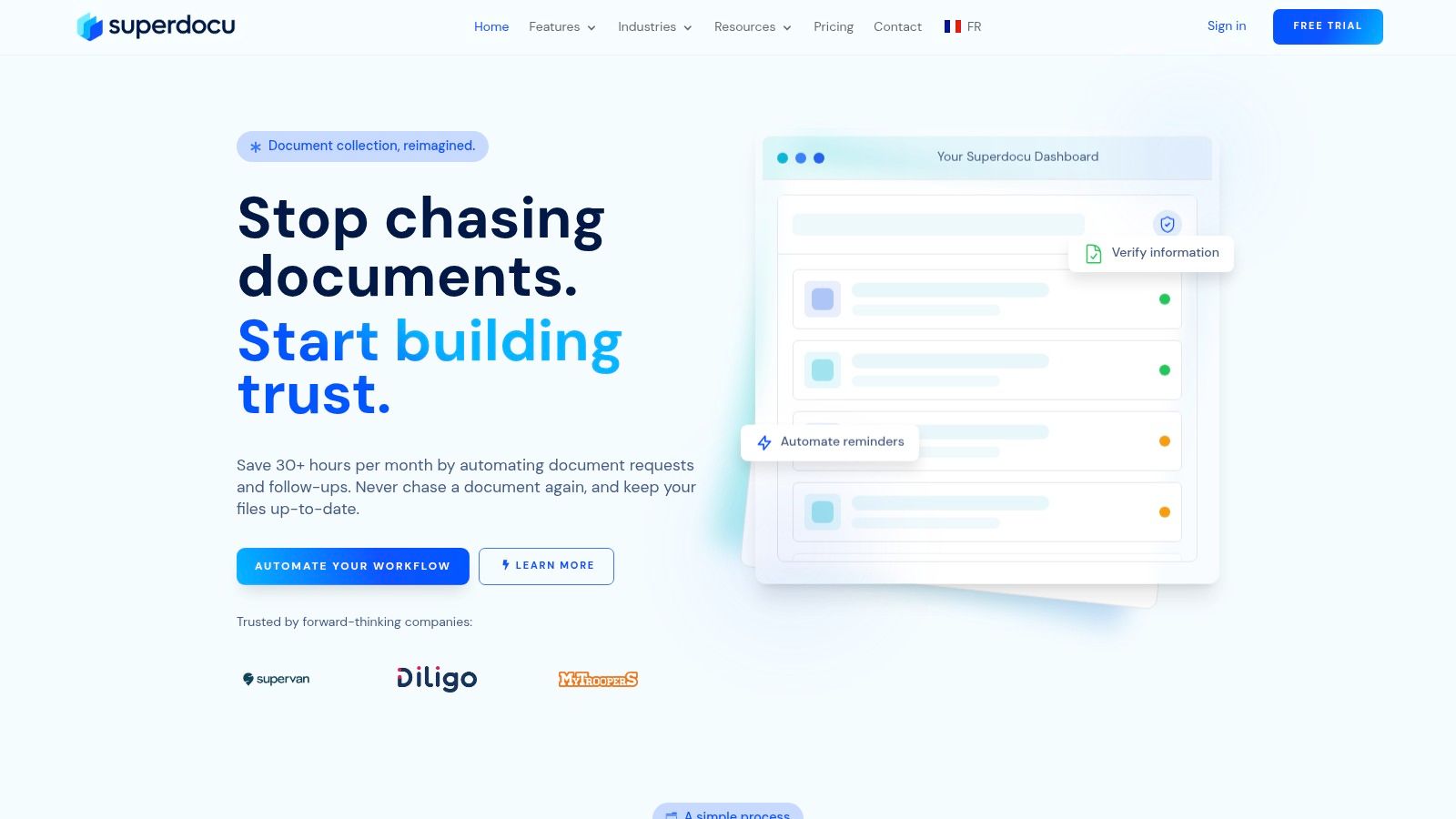
A simple mortgage document workflow
Using Superdocu, that brokerage can give each applicant a branded request portal instead of a messy email chain. The applicant sees exactly which files are needed and uploads them from any device.
That changes the first part of the workflow immediately. Document capture becomes organized, consistent, and easier for clients to complete.
On the team side, submitted files move into a validation dashboard where staff can review what has arrived, spot missing items, and keep the checklist current. Automated reminders then handle much of the chasing that usually consumes admin time.
What the team experience looks like
This kind of setup reflects the core ideas behind intelligent document processing, even when the business doesn't think of it in technical terms.
- Capture becomes cleaner: documents arrive through a dedicated intake flow
- Validation becomes visible: reviewers can check completeness before the file moves forward
- Workflow improves: reminders and status tracking reduce manual follow-up
- Client experience gets better: applicants know what to send and where to send it
For SMBs, that's often the sweet spot. You don't need a massive IT department to improve document operations. You need a reliable intake process, structured review, and automation around repetitive follow-up.
If your business is drowning in document collection, Superdocu is worth a look. It helps teams build secure, branded document request workflows, automate reminders, review submissions in one dashboard, and keep sensitive files organized without turning the process into another IT project.