
If you're still collecting documents through email, you already know the pattern. A client sends one attachment, forgets the second, sends a blurry phone photo instead of the signed PDF, and replies to an old thread that half your team can't see. Someone downloads the wrong version, someone else asks for the same file again, and the whole process starts to feel bigger than the work it was supposed to support.
That mess doesn't stay administrative for long. It delays onboarding, slows approvals, frustrates clients, and pushes sensitive files through channels that were never designed to manage a governed intake process. I've seen teams treat document collection like a small back-office nuisance, when it's one of the main places where operations either stay in control or unravel.
Table of Contents
- Beyond Email Chaos The True Role of Document Collection
- Anatomy of a Modern Document Collection Workflow
- The Hidden Costs of a Broken Document Process
- Navigating Security and Compliance Requirements
- How Document Collection Works Across Industries
- How to Build Your Efficient Collection Process
- Measuring Success and Taking the First Step
Beyond Email Chaos The True Role of Document Collection
Organizations often don't realize their document process is broken until work starts backing up. A hire can't start because ID is missing. A deal sits idle because the client sent the wrong form. A property application stalls because one supporting file arrived in a separate email and nobody matched it to the record.

What looks like a file problem is usually a process problem. The request wasn't clear, the submission path wasn't controlled, and the review step depended on people remembering what to chase. That's why a good file request workflow matters. It turns a vague ask into a repeatable operational step.
Document collection has always been infrastructure
Document collection isn't a new burden created by modern software. It's part of how institutions preserve evidence, rights, decisions, and history. The Library of Congress notes that its manuscript holdings include more than 70 million items, and it also highlights the Burney Collection Newspapers as covering over 200 years of newspapers from England, Ireland, and Scotland in its overview of historical documents and archives.
That context matters. Businesses aren't just gathering files. They're preserving proof. In a small company, that proof might be tax forms, contracts, ID documents, lease records, or compliance paperwork. The scale is different, but the function is the same.
Document collection works best when teams stop treating it like inbox traffic and start treating it like operational evidence.
Before and after looks very different
Before a structured process, teams spend their day chasing. After a structured process, they manage exceptions.
That's the true shift. The goal isn't to make uploads look nicer. The goal is to build a system where requests are consistent, submissions are traceable, reviewers know what to approve, and missing items trigger action without someone drafting another follow-up email.
Anatomy of a Modern Document Collection Workflow
A modern document collection process works like an assembly line. Not because it's cold or impersonal, but because each stage has a different job. If you mix those jobs together, errors pile up fast.
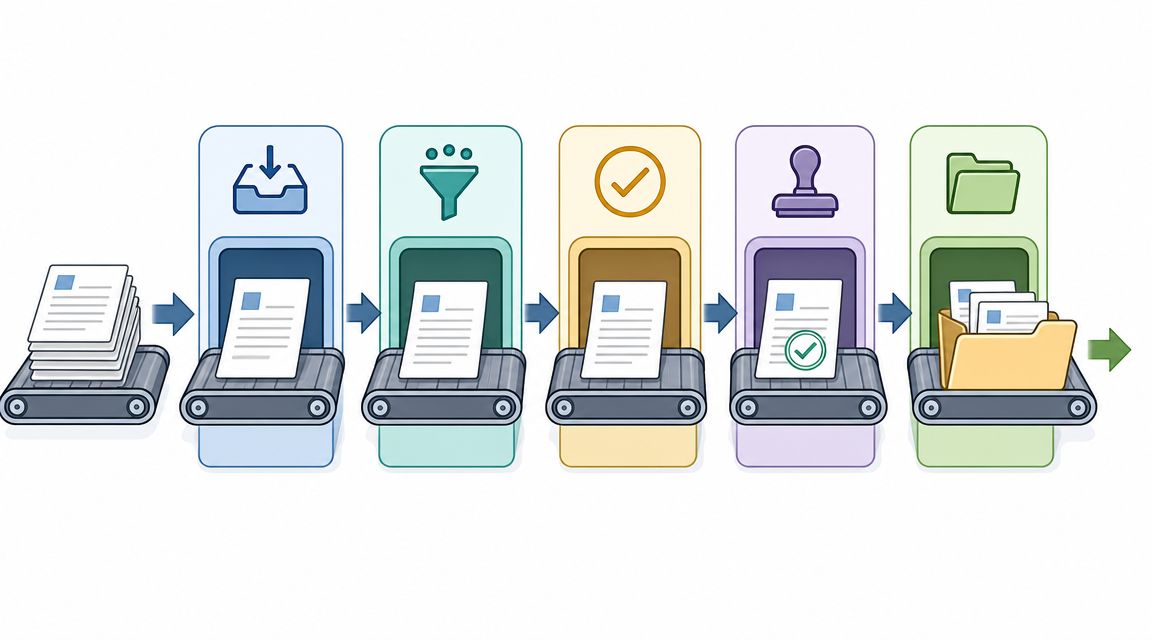
Industry guidance describes document collection as the systematic process of requesting, receiving, organizing, and managing documents from external parties, and it argues that the workflow should be treated as a structured intake pipeline with explicit request generation, submission validation, storage, and retention controls in Pipefile's explanation of document collection. That's the right model.
Request stage
The request stage is where most downstream problems begin.
If the request says "send us your documents," people will interpret that in different ways. One person sends a scan. Another sends screenshots. A third uploads an outdated file because nobody stated the date requirement. Strong request design removes guesswork before the first upload happens.
Good request design usually includes:
- Clear document names so users know exactly what's needed
- Simple instructions that say what format is acceptable
- Due dates or urgency cues so the request doesn't drift
- Context explaining why the document is needed
Submission stage
Submission is the user-facing part of the process. In this phase, teams often overfocus on appearance and underfocus on friction.
A clean portal matters, but so do practical details. Can someone upload from a phone? Can they pause and return? Can they understand what's missing without calling support? If submission is clumsy, users delay, abandon, or send files outside the approved process.
Validation stage
Validation is where modern workflows separate themselves from shared folders and email threads.
A file arriving isn't the same as a file being usable. Validation checks whether the right document was submitted, whether required fields are present, whether the file type is allowed, and whether the item is current enough to move forward. Without this layer, teams discover mistakes late, usually when the case is already waiting.
Practical rule: Validate at intake, not at approval. The later you catch an error, the more expensive it becomes.
Storage and management stage
Storage isn't the end of the workflow. It's the start of governance.
Once a document is accepted, it should move into a controlled environment with the right naming, permissions, retention handling, and status history. Teams that skip this step end up with files scattered across inboxes, desktops, shared drives, and chat attachments. At that point, nobody is sure which copy is current or whether the business can prove who received what and when.
The Hidden Costs of a Broken Document Process
A broken process doesn't fail loudly at first. It leaks time in small increments until the team starts normalizing the waste.
One employee checks three inboxes for one missing attachment. Another renames files manually so they can be stored consistently. A manager reviews the wrong version because two people uploaded similar documents under different names. None of that feels dramatic in isolation. Together, it slows the business down.
Where teams lose time
The obvious problem is follow-up. Someone has to ask again for the missing file, then ask again because the file was incomplete, then ask again because the attachment wasn't readable. Email chains grow, but the process doesn't get clearer.
Version confusion is another drag on operations. Everyone has seen filenames that try to solve a workflow problem with punctuation. "Final_v3_final_revised" isn't version control. It's a warning sign that the process has no controlled review path.
Common operational failures look like this:
- Repeated manual chasing because reminders depend on staff memory
- Review bottlenecks because files arrive in different formats and channels
- Search delays because documents aren't tied to one visible request record
- Rework because problems are found after the file has already moved downstream
What clients experience
Clients don't see your internal workflow map. They see the confusion it creates.
If you ask for one item at a time across multiple messages, they assume your team isn't coordinated. If they submit a file and hear nothing back, they don't know whether it was accepted. If you reject a document without a clear reason, they have to guess what to fix.
A messy intake process makes competent teams look disorganized.
That perception matters in legal, HR, finance, real estate, and any service business where people are handing over personal or sensitive records. The collection experience often becomes the first real test of trust.
Why email creates risk
Email feels easy because everybody already has it. That's also the problem. It invites teams to use a general communication tool as a document intake system.
Once that happens, security and governance become inconsistent. Files sit in inboxes longer than they should. Access depends on who was copied. Review history gets buried in threads. If an employee leaves, knowledge of the process often leaves with them.
The hidden cost isn't only labor. It's the absence of control.
Navigating Security and Compliance Requirements
Security in document collection isn't a feature you add at the end. It's part of the workflow design from the first request onward. If the collection path is weak, everything after it becomes harder to defend.
A lot of teams still rely on email because it's familiar. But familiar isn't the same as controlled. When sensitive files move through inboxes and attachments, the business usually loses visibility over exposure time, access scope, and what happened after review.
Secure collection starts before upload
A secure process begins with controlled access to the request itself. Not every request should stay open indefinitely, and not every link should be reusable forever.
Alogent's document-portal guidance highlights practical controls that regulated buyers care about, including expiration settings, short-lived request links, identity-based access, and secure transfer into an ECM environment after review in its discussion of secure document collection. Those controls close real gaps that email leaves open.
If you're reviewing vendors or redesigning your workflow, this is also where broader data security and compliance guidance becomes useful. It helps translate technical concerns into operating rules your team can follow.
Storage rules matter after submission
Most businesses think about security at upload and stop there. That isn't enough.
You also need to decide where approved files go, who can access them, how long they stay exposed in the collection layer, and what happens when documents expire. If a file is valid today but unusable later, the process should detect that and trigger a controlled re-request. Otherwise staff discover the problem only when a case reaches review, approval, or audit.
A secure collection setup usually includes:
- Access controls so only authorized staff can view sensitive files
- Encryption expectations for files in transit and at rest
- Expiry handling so stale documents don't remain accepted
- Transfer rules that move completed submissions into governed storage
A defensible process is visible
Compliance isn't just about protecting files. It's about proving what happened.
That means keeping a record of what was requested, when it was sent, when it was submitted, whether it passed review, what was rejected, and who took each action. Without that history, teams rely on memory and mailbox searches when questions come up.
Secure document collection isn't only about preventing access. It's also about preserving evidence of the process.
When auditability is built into intake, reviewers move faster because the workflow already carries its own history.
How Document Collection Works Across Industries
The core workflow stays consistent across sectors, but the document mix, urgency, and review logic change a lot. That's why generic file upload tools often fall short. They can receive documents, but they don't reflect the operational pressure around those documents.
Industry-specific document collection needs
| Industry | Common Documents | Primary Challenge |
|---|---|---|
| Legal | Engagement letters, identity documents, case files, signed authorizations | Confidentiality and organized case intake |
| HR and Staffing | ID verification, contracts, certifications, payroll forms, background documents | High-volume onboarding with consistent checks |
| Real Estate | Lease applications, proof of income, ID, property records, disclosures | Fast turnaround across multiple parties |
| Mortgage | Financial statements, identification, tax documents, supporting loan paperwork | Missing items blocking review |
| Transportation | Driver licenses, insurance records, vehicle documents, compliance forms | Expiration tracking and renewals |
| Immigration | Passports, supporting evidence, forms, translations, status records | Accuracy, completeness, and frequent updates |
Legal teams
Legal intake breaks down when firms collect documents through long email threads tied to each matter. A client may send partial files over several days, and staff then spend time matching attachments to the right case and checking whether each item satisfies the original request.
A stronger legal workflow starts with one controlled request packet. The client sees exactly what's required, uploads through one channel, and the reviewer marks each item approved, rejected, or needing revision. That keeps the firm from mixing communication history with evidence intake.
HR and staffing teams
HR teams often feel document chaos most sharply during onboarding. Several candidates or hires may be active at once, each with different required forms, deadlines, and approval points.
The practical fix isn't just automation. It's standardization. If every new hire receives the same role-based checklist, and the review team sees all submissions in one queue, they stop rebuilding the process for each person. Then reminders can target only missing items instead of generating broad follow-up emails that confuse everyone.
A hiring manager doesn't want to ask, "Did we get everything?" They want to see the answer.
Real estate and mortgage teams
Real estate and mortgage workflows involve multiple external parties, time pressure, and documents that often determine whether the next step can happen at all. That makes partial submissions especially damaging.
One applicant sends income proof promptly but forgets identification. Another sends the wrong statement period. A broker or agency can end up spending more time coordinating paperwork than moving the transaction forward.
What works here is a request flow built around completeness. Instead of waiting for staff to notice what's missing, the process should surface gaps early and keep the applicant focused on the remaining items only.
In transaction-heavy work, the fastest team usually isn't the one sending the most reminders. It's the one that asks correctly the first time and routes exceptions clearly.
How to Build Your Efficient Collection Process
If you're fixing document collection, don't start with branding or automation rules. Start with the operating spec. Teams usually fail at the handoffs between request, intake, review, and approval, which is why technical-spec guidance emphasizes defining functional requirements, non-functional requirements, validation criteria, roles, and timelines up front, along with document classes, mandatory fields, permitted file types, and review states mapped to actions such as reminder, rejection, or approval in Slack's technical specification template guidance.

Write the rules before you automate
A manager should be able to answer these questions before choosing any platform:
- What document classes exist and what belongs in each one
- Which fields are mandatory at submission
- What file formats are acceptable
- Which review states are allowed
- What action each state triggers
That last point matters more than teams expect. If "rejected" doesn't automatically produce a clear next step, staff end up writing custom emails anyway. If "expired" doesn't trigger a fresh request path, stale records sit unnoticed.
Build the workflow your users will actually finish
The best process on paper still fails if users don't trust it or can't complete it easily.
Government and public-service guidance for underserved communities recommends providing materials in preferred languages and offering alternate submission options for people facing local barriers. That matters because the World Bank estimated 2.6 billion people remained offline in 2023, as noted in the U.S. Department of the Interior white paper on underserved communities and digital access. A mobile-friendly form helps, but it doesn't solve every intake problem.
A practical checklist for rollout:
- Standardize request templates. Don't let each employee improvise document names and instructions.
- Automate reminders. Reminders should target missing or expiring items, not everyone in the queue.
- Use a branded portal. Clients are more likely to trust a process that looks official and consistent.
- Set up a review dashboard. Reviewers need one place to approve, reject, and request corrections.
- Support alternate paths. Some users will need a lower-bandwidth or assisted option.
Connect collection to the rest of your stack
Document collection works better when it doesn't end at upload. It should connect to signature steps, storage rules, and the systems your team already uses to manage cases or clients.
If your team relies on Microsoft environments after intake, it's worth reviewing practical guidance on effective SharePoint document management. The important point isn't the platform name. It's making sure files land in a governed structure after review instead of staying in a temporary request layer forever.
For teams that want a purpose-built workflow, automated document collection tools can handle request links, reminders, branded portals, validation dashboards, and expiration tracking. Superdocu is one example in that category. It fits teams that need structured intake rather than generic file sharing.
Measuring Success and Taking the First Step
A better document collection process should change what your team measures, not just what your team feels.
Start with operational signals you can observe directly. Track average document turnaround time, submission error rate, and the amount of staff time spent on manual follow-up. You can also review how often documents are rejected for preventable reasons, how many requests stall in review, and how often expired files create last-minute problems.
Those measures matter because process quality shows up in business outcomes. Faster intake supports faster onboarding and approvals. Cleaner validation reduces rework. A more predictable submission experience gives clients fewer reasons to call, chase, or lose confidence.
Keep the first move small:
- Map one painful workflow. Pick the process your team complains about most.
- Find the single biggest bottleneck. Don't fix everything at once.
- Replace one manual handoff with a controlled workflow. Usually that's the request or reminder stage.
One more thing is easy to overlook. Your process has to work for more than your easiest users. Preferred language support and alternate submission options aren't edge considerations. They're part of a realistic intake design when many people still face access or trust barriers.
If you're ready to replace scattered email threads with a controlled intake workflow, Superdocu gives teams a practical way to request, validate, review, and track documents in one place. It's built for businesses that need more than file uploads, especially when reminders, branded portals, secure collection, and expiration management all need to work together.