
Monday starts with a familiar mess. A tenant uploads the wrong proof of income, a new hire sends a photo of an unsigned tax form, a borrower misses the deadline for bank statements, and your team is stuck sending follow-ups instead of moving cases forward.
That is what poorly designed document collection workflows look like in practice. The work is repetitive, but the actual cost is not just time. It shows up in stalled applications, inconsistent reviews, duplicate data entry, and avoidable compliance risk. In document-heavy teams, a weak intake process creates downstream problems that operations staff have to fix by hand.
You can see the pattern across industries. Letting agents chase ID and affordability documents. HR teams wait on onboarding paperwork. Mortgage teams follow up on payslips and account statements. Legal and compliance teams request the same signed forms more than once because the first submission was incomplete or expired. If that sounds familiar, this guide for UK letting agents is a useful example of how quickly document requests turn into operational drag when the process is not standardized.
Good automation improves the collection stage first. It gives requesters clear instructions, reduces back-and-forth, checks quality before files move downstream, and routes each document to the right place the first time. That is why teams working on streamlining business processes across document-heavy operations usually get better results when they start with collection workflows instead of trying to automate everything at once.
The best document collection workflows are simple on the front end and controlled behind the scenes. They know who is submitting, what file is required, when it expires, who should review it, and what system needs the final record. The ten practices below focus on that specific problem so you can build a process that collects documents faster and creates fewer exceptions for your team to clean up.
Table of Contents
- 1. Map and Visualize Your Complete Document Workflow Before Automation
- 2. Implement Automated Reminders and Escalation Rules for Overdue Documents
- 3. Use Template-Based Document Request Portals to Standardize Collections
- 4. Establish Document Validation and Quality Review Checkpoints
- 5. Integrate Document Automation with Downstream Systems and Tools
- 6. Implement Role-Based Access Control and Audit Trails for Compliance
- 7. Create Automated Document Expiration and Refresh Workflows
- 8. Optimize Mobile-First Document Submission for Remote and On-the-Go Users
- 9. Build Conditional Workflows That Adapt Based on Document Type and Requester Profile
- 10. Monitor, Measure, and Continuously Optimize Workflow Performance Metrics
- 10 Workflow Automation Best Practices Compared
- Turn Best Practices Into Your Competitive Advantage
1. Map and Visualize Your Complete Document Workflow Before Automation
Most failed automations start with a bad assumption. Teams think they know how documents move through the business, then discover halfway through setup that three handoffs, two exceptions, and one approval loop were never documented.
Before you automate anything, map the full path from request to final storage. Include who asks for the document, who uploads it, who reviews it, where it's stored, what happens if it's rejected, and how expiry is tracked later. Mature implementations perform better when teams map workflows in detail before building, as noted in workflow automation best practices from Ademero.
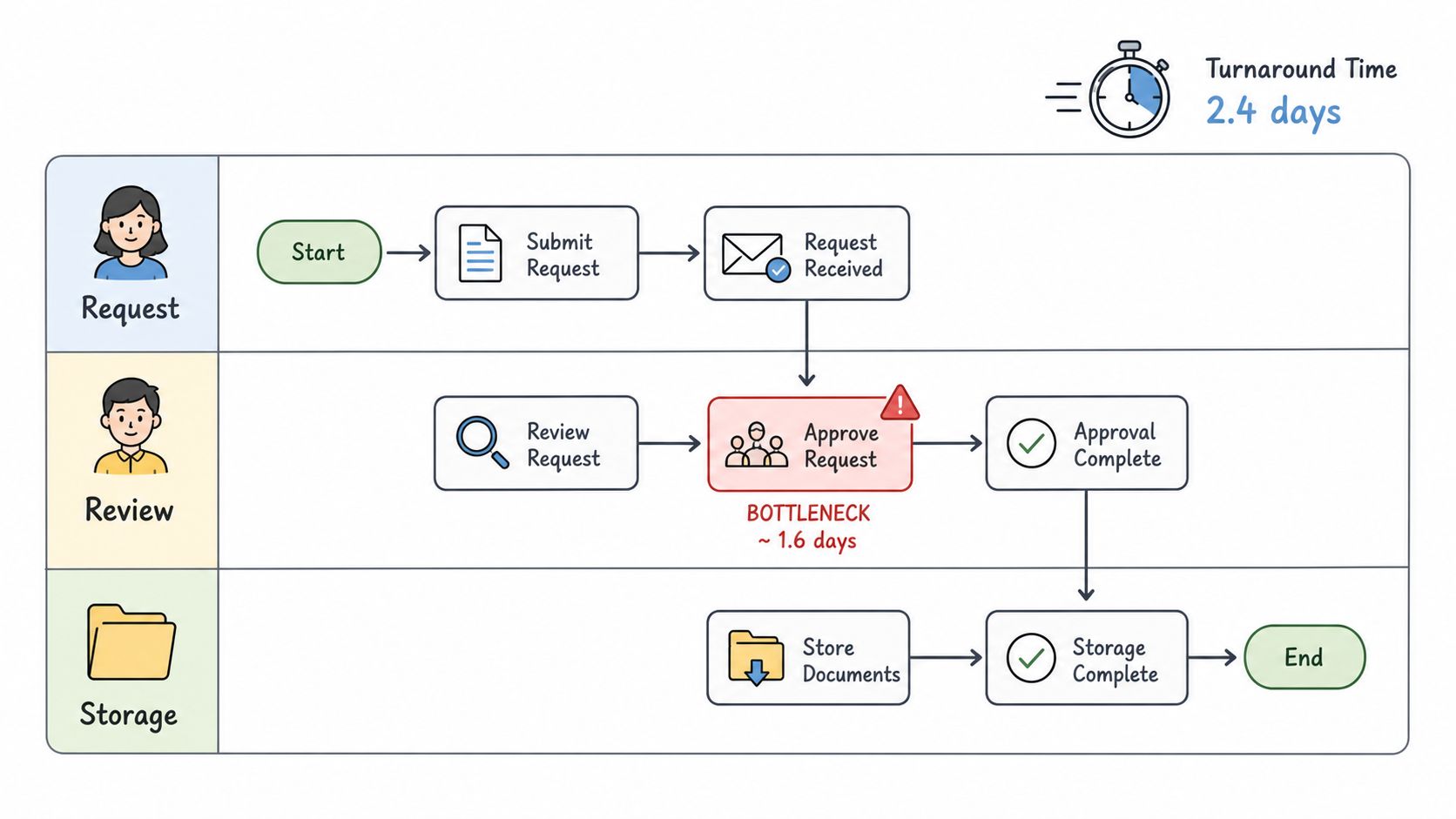
A real estate agency might map property document collection from accepted offer through closing. An HR team might chart onboarding from signed offer to right-to-work verification. A mortgage broker might trace every document from borrower submission through underwriting review. The point isn't paperwork for its own sake. The point is exposing where work stalls.
What to capture on the map
Use a swimlane view if multiple teams touch the process. That makes ownership visible fast.
- Document types: List exactly what's collected, including format requirements, signatures, supporting pages, and expiry dates.
- Manual handoffs: Note where someone downloads a file, emails it, renames it, or re-enters data into another system.
- Exception paths: Record what happens when a passport is expired, a pay stub is unreadable, or a client submits the wrong form.
- Compliance controls: Mark where access restrictions, consent, retention, and audit requirements apply.
Practical rule: If two team members describe the same workflow differently, don't automate it yet.
If you need a useful model for documenting these steps, this article on how to streamline business processes is aligned with the way document-heavy teams usually simplify requests, approvals, and storage.
2. Implement Automated Reminders and Escalation Rules for Overdue Documents
Manual follow-up is one of the quickest ways to waste skilled staff time. Someone checks a spreadsheet, sees that three applicants still haven't uploaded ID, sends three emails, then repeats the same task tomorrow.
That work should be automatic. Set reminders the moment a request is created, then escalate based on delay, document type, and urgency. For a mortgage file, a missing income document might trigger a stronger follow-up than a secondary supporting attachment. For HR onboarding, an overdue right-to-work file may need manager visibility much sooner than a benefits form.
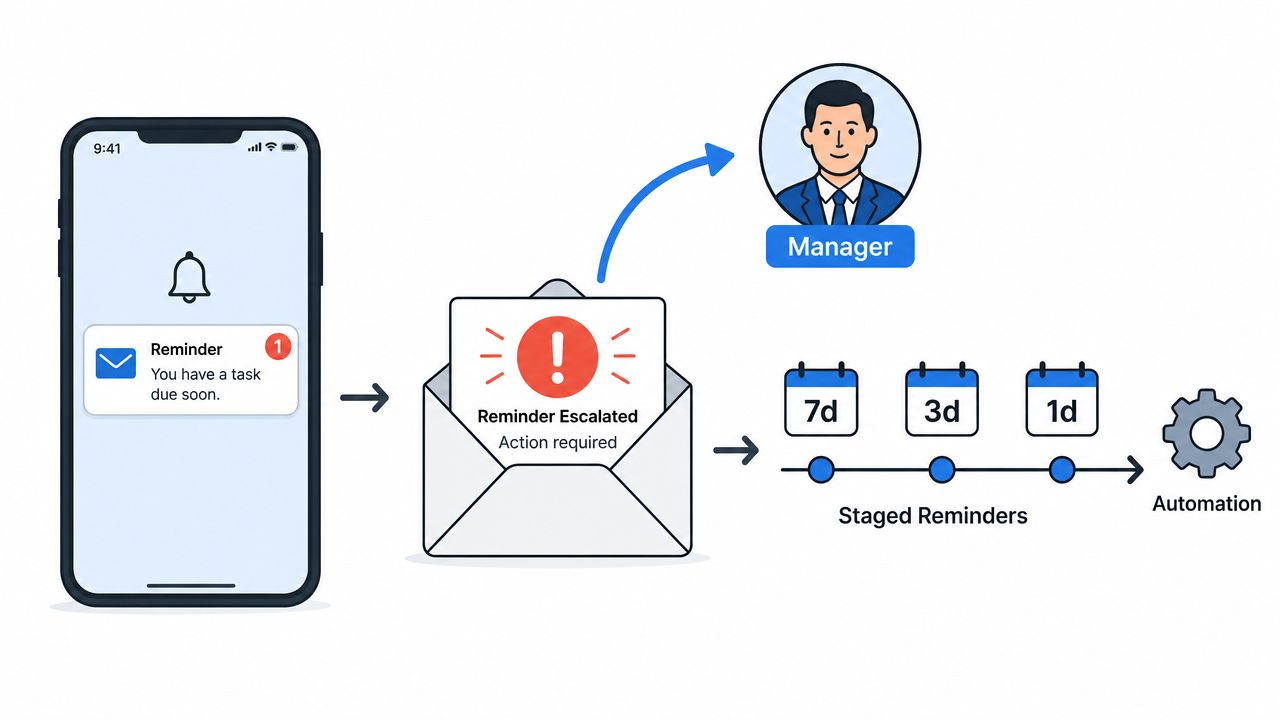
The best reminder systems don't just nag. They reduce friction. Every message should include the direct upload link, a short explanation of what's missing, and what happens next if the deadline slips. That keeps people moving without forcing them to search old emails.
Reminder rules that work in practice
A staged sequence is usually enough for most document workflows.
- Early reminder: Send a friendly prompt several days before the deadline so the requester has time to act.
- Near-deadline reminder: Make the next message more specific. Name the missing document and link directly to the upload page.
- Escalation step: Route overdue requests to the account owner, recruiter, broker, or manager when delay creates business risk.
- Snooze option: Let requesters defer non-urgent reminders briefly so they don't start ignoring all alerts.
A transportation company collecting driver onboarding documents might send a simple prompt first, then escalate to operations if licenses or vehicle records are still missing. An immigration firm can do the same with visa application files that block submission.
For teams that want a practical starting point, this guide to automated reminders for collecting documents shows how to structure reminders without making the process feel aggressive.
3. Use Template-Based Document Request Portals to Standardize Collections
A client gets your request for documents, opens it on their phone, and sees a generic list with ten items that may or may not apply. They guess, upload three files, skip two required ones, and email your team to ask what “proof of beneficial ownership” means. That is how document collection slows down before the workflow even starts.
A template-based request portal fixes the intake side of the process. Instead of sending every requester the same checklist, you give them a guided path based on the case, transaction, or onboarding type. That matters in document-heavy work. A residential purchase package needs different files than a commercial lease. Contractor onboarding requires a narrower set of records than employee onboarding. An immigration intake for a spouse visa needs different prompts, explanations, and examples than a student visa case.
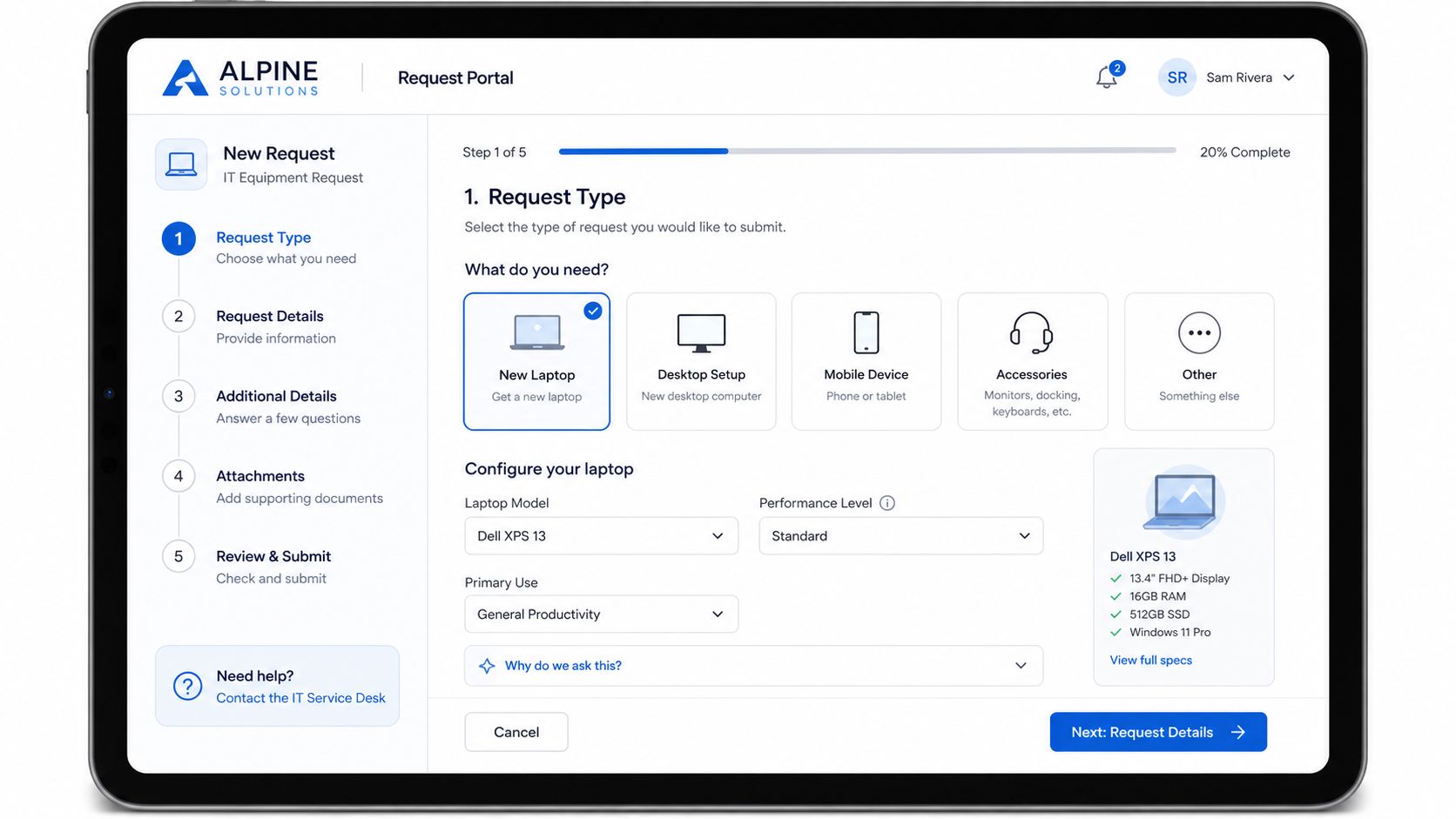
Standardization is the primary benefit here. If every requester sees the same structure for the same scenario, your team gets cleaner submissions, fewer clarification emails, and less manual sorting before review. In practice, that also makes the later automation more reliable because documents arrive in a predictable format, from the right person, at the right step.
What strong templates include
Good templates remove avoidable choices and answer the obvious questions up front.
- Clear document labels: Use terms the requester already understands, such as “driver's license” or “signed W-9,” not internal labels.
- Reason for request: Tell people why the file is needed. They are more likely to submit the right version when the purpose is clear.
- Conditional visibility: Show only the documents that apply to that person, deal type, or workflow branch.
- Mobile upload support: Many collections happen outside the office. The upload flow should work cleanly on a phone.
- Acceptable examples: Show a sample of a complete, readable submission so users know what “good” looks like.
One test I use is simple. If a requester still has to ask which version of a document to upload, the template needs more work.
For teams designing these flows, this guide to a document submission portal for structured file collection is a useful reference for legal, HR, real estate, and other document-heavy processes.
4. Establish Document Validation and Quality Review Checkpoints
Many automation projects often fail, despite their functional components. The routing works. The reminders work. The integrations work. But low-quality documents still enter the workflow and cause problems downstream.
That's the document-validation bottleneck. In cross-app workflows, missing pages, expired licenses, unreadable scans, and incomplete submissions can block everything that comes after. Background research included with this topic notes that many workflow guides miss this issue, even though validation gaps are a major source of document collection delays in SMB environments.
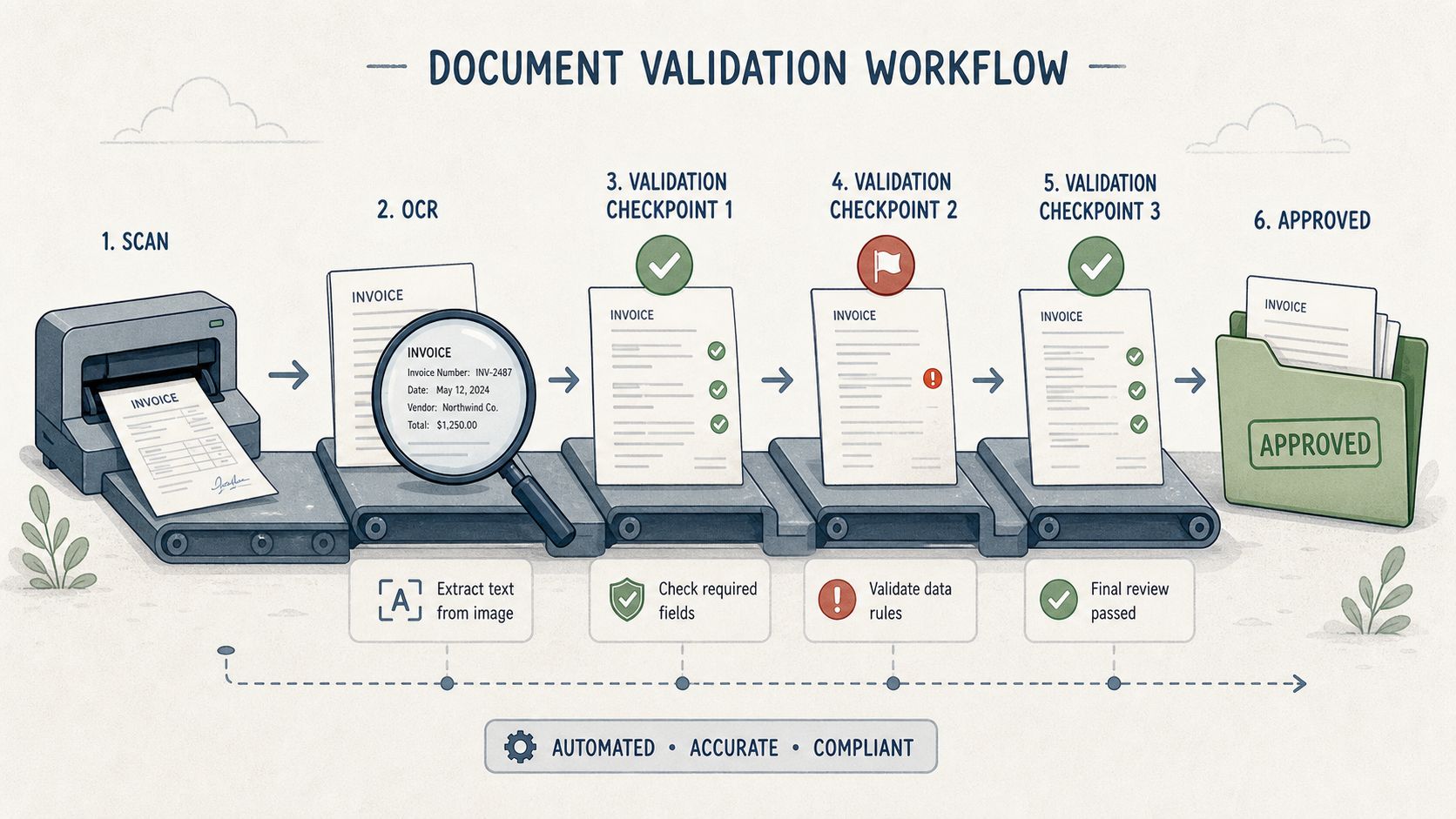
Validation checkpoints should sit close to the upload step, not later during review. If a mortgage applicant uploads a blurry bank statement, the system should catch that immediately. If a legal client submits a contract without all signature pages, flag it before the file lands in a reviewer queue. If a transportation company receives an expired driver license, stop the workflow before the record gets pushed into downstream systems.
Build validation in layers
Start simple, then add depth where it matters.
- Basic checks: Confirm file type, file size, page count, and whether the upload is corrupted.
- Document-specific rules: Require signatures, readable content, or both front and back of an ID where needed.
- Expiry and completeness logic: Flag outdated documents and incomplete submissions before routing.
- Human review lane: Send edge cases to a reviewer instead of forcing the whole workflow to fail.
This is one of the most important workflow automation best practices for document collection because it protects everything downstream. Clean input means fewer failed handoffs, fewer manual corrections, and fewer compliance risks.
5. Integrate Document Automation with Downstream Systems and Tools
Collecting a document is only half the job. If someone still has to download it, rename it, upload it into another system, notify a reviewer, and create a follow-up task, you haven't eliminated much work. You've just moved it.
Strong automation connects collection to action. When a borrower uploads a signed form, it should land in the correct loan file and trigger the next review step. When a candidate submits onboarding documents, the right records should update in the HR stack. When a legal client completes an intake package, the matter file should reflect it without a staff member stitching systems together by hand.
The trade-off is complexity. Integrations save time, but they also create new failure points. API changes, naming mismatches, duplicate records, and broken field mappings can cause quiet errors that teams only discover later.
Integration priorities that actually matter
Start with systems that receive documents every day, not every quarter.
- Primary system of record: Connect first to the place where your team already works, such as your CRM, case system, transaction system, or HR platform.
- Routing logic: Send different document types to different destinations instead of dumping everything into one folder.
- Failure monitoring: Check integration logs and queue failures, especially after updates.
- Naming standards: Keep file names, metadata fields, and document categories consistent across systems.
A portfolio manager might route client onboarding files into the core client record and trigger a review task at the same time. A real estate team might move purchase documents into the transaction workspace while notifying the coordinator that title review can start. That's where automation stops being a collection tool and becomes an operating layer.
6. Implement Role-Based Access Control and Audit Trails for Compliance
A document collection workflow breaks down fast when everyone can see everything.
The problem is rarely malicious access. It is ordinary work done with broad permissions. A coordinator downloads a file they do not need. A reviewer edits metadata outside their scope. A manager approves a document without a record of what changed first. In document-heavy processes, those gaps create compliance risk and make investigations slow.
Role-based access control keeps document collection workflows tied to actual responsibilities. The intake team may collect files, but only a reviewer should mark them accepted. A recruiter may confirm identity documents arrived, while payroll handles tax forms and banking details. In a lending workflow, processors may view uploaded statements, but only underwriters and compliance staff should approve exceptions or export sensitive files.
The best permission models follow the steps in the workflow, not the org chart alone.
- Least-privilege access: Give each role the minimum rights needed to upload, review, approve, or correct documents.
- Stage-based permissions: Limit actions by workflow step so users cannot approve, reassign, or delete files outside their part of the process.
- Audit logging: Record views, downloads, edits, approvals, rejections, and exports with timestamps and user identity.
- Sensitive-action controls: Add extra verification for downloads, bulk exports, and permanent deletion.
- Matter or account scoping: Restrict access to the specific client, case, property, employee, or location tied to the document request.
One practical rule helps here. Separate collection access from decision access. The person chasing missing documents often should not be the person clearing exceptions or changing document status after review.
Common mistake: Teams lock down the storage folder but leave workflow actions open, especially reassignment, export, and approval history edits.
Audit trails matter most when something goes wrong. If a borrower says a bank statement was submitted on time, or an employee disputes who viewed a medical form, the system should show the upload date, each reminder sent, every status change, and who touched the file. Without that history, teams end up reconstructing events from email threads and internal messages.
This also varies by industry. A veterinary group collecting treatment records, consent forms, and medication documentation may need retention and access rules that differ by location and record type. That is why veterinary record retention policies should inform workflow design early, especially if your document collection process spans clinical, administrative, and billing records.
Set access rules during workflow design, then test them with real scenarios before launch. Ask who can upload. Who can view only. Who can approve. Who can export. Who can see documents across all accounts, and who should be limited to one case or request. That exercise catches permission gaps before they become audit findings.
7. Create Automated Document Expiration and Refresh Workflows
A document collected once isn't always valid later. That's the problem with licenses, certifications, insurance records, background checks, visas, and many compliance documents. Teams often build a strong intake flow, then leave expiration tracking to a calendar reminder or someone's memory.
That approach fails under volume. A transportation company may need to track driver licenses and registration dates. HR teams need to keep certifications current. Immigration practices need to monitor travel and visa-related validity. Portfolio managers may need updated client identification on file. If expiry is manual, gaps are inevitable.
Automation should treat expiration as part of the lifecycle, not an afterthought. The document enters the system, metadata is captured, a countdown starts, and renewal workflows trigger automatically before the file goes stale.
Build refresh workflows from day one
You don't need a complicated setup to make this useful.
- Store the expiration date: Capture it during validation or review.
- Trigger pre-expiry reminders: Send renewal requests ahead of the deadline so there's time to replace the file.
- Use document-specific messaging: Tell the requester exactly what is expiring and what updated version is needed.
- Archive old versions properly: Keep prior documents available for record-keeping without confusing them with current files.
A practical example is a fleet operator requesting updated insurance and driver credentials before they lapse, rather than after a compliance issue appears. In real estate, that could mean replacing stale insurance or ownership records before a transaction gets delayed.
This is one of the most overlooked workflow automation best practices because teams focus on collection speed and forget ongoing document hygiene.
8. Optimize Mobile-First Document Submission for Remote and On-the-Go Users
If your requester is standing on a job site, sitting in a car between appointments, traveling internationally, or trying to upload a document after work from a phone, a desktop-first process will slow them down.
Mobile-first design is not just responsive layout. It changes how you structure the request. Forms need fewer fields on screen. Upload steps need camera support. Links need to open cleanly from text and email. Instructions need to be short enough to read on a phone without pinching and zooming.
High-volume document collection often happens away from a desk. Real estate agents capture signatures in the field. Drivers submit onboarding documents from mobile devices. Immigration applicants upload records across countries and time zones. Borrowers send paperwork between meetings.
Design for the real upload moment
The true test is whether someone can complete the request with one hand and limited time.
- Single-purpose screens: Ask for one action at a time instead of showing a dense portal page.
- Camera-friendly guidance: Tell users how to frame the document, avoid glare, and capture all edges.
- One-tap access: Open requests directly from a secure message link without extra navigation.
- Visible progress: Show what's done and what remains so users don't abandon halfway through.
- Resume support: Let users come back without restarting if they lose signal or switch apps.
On mobile, every extra field feels heavier than it does on desktop. Keep only what the workflow truly needs.
A construction firm collecting worker documentation on-site and a healthcare provider requesting patient records from home users face the same rule. Make submission easy where the user already is.
9. Build Conditional Workflows That Adapt Based on Document Type and Requester Profile
Not every requester should enter the same workflow. That's one of the fastest ways to create either unnecessary friction or insufficient review.
Conditional workflows let the process change based on the person, the document, and the risk involved. A first-time tenant applicant may need full identity and income verification. A repeat renter with a recent verified file may only need updated supporting documents. A high-value mortgage case might require additional sign-off. An immigration matter may branch by visa type, nationality, or document language.
The trick is not to overbuild. Teams often add so many branches that nobody can maintain the logic. Start with a few high-value conditions that clearly change requirements or review depth.
Good conditions versus bad conditions
Use conditions when they alter real work, not just because the software allows it.
- Good condition: New client versus existing client, because document requirements differ.
- Good condition: High-risk or high-value case, because the approval path changes.
- Good condition: Document category, because validation and routing differ.
- Bad condition: Tiny edge-case variations that add maintenance overhead without improving outcomes.
A practical scoring method can help you decide where to apply complexity. One useful approach is to score workflows on volume, risk, rework rate, and integration feasibility, then start with one flagship process, as described in Iriscale's workflow automation guidance.
For document-heavy businesses, conditional logic should match business policy. If the policy changes who reviews, what is required, or where the document goes next, encode it. If not, keep the workflow simple.
10. Monitor, Measure, and Continuously Optimize Workflow Performance Metrics
A document collection workflow can look healthy on paper and still fail in production. Requests go out on time, reminders fire, and dashboards stay green, yet borrowers stall at ID upload, new hires submit the wrong tax form, or vendors keep sending expired certificates. If you are not measuring those failure points, you are managing activity, not outcomes.
The teams that improve fastest track metrics at the document level, not just the workflow level. Total turnaround time matters, but it is more useful to know which specific document types create delay, which requester segments need the most follow-up, and where reviewers spend time correcting avoidable errors. That level of visibility lets you fix the intake design, not just push people harder.
What to review on a steady cadence
Keep the dashboard tied to decisions your team can make.
- Time to complete by document type: Measure how long it takes to collect proof of identity, income statements, insurance certificates, consent forms, or other required files. Broad averages hide workflow bottlenecks.
- First-pass acceptance rate: Track how often submitted documents are accepted without resubmission. A low rate usually points to unclear instructions, weak validation rules, or poor mobile capture quality.
- Reminder effectiveness: Review which reminder timing and channels lead to completion. In document collection, more reminders do not always help. Too many can train users to ignore them.
- Drop-off by step: Identify where requesters quit. Common problem points include account creation, file format errors, and confusing multi-document requests.
- Manual review load: Measure how often staff intervene, what they fix, and which queues build up. This shows whether the workflow is reducing admin work or just relocating it.
Regular reviews should happen on a set cadence, then faster when a metric moves in the wrong direction. Guidance from Gravity Flow's workflow automation recommendations supports scheduled workflow audits rather than treating optimization as a one-time project.
Use that review cycle to make small, targeted changes. If bank statements are the top source of rejection, rewrite the upload instructions and tighten file checks. If mobile users abandon the process after the second request, combine requests or reduce duplicate steps. If one reviewer handles most exceptions, document that logic and turn it into a rule.
A practical rule is to prioritize fixes in high-volume, high-friction steps first. Advice in FutureTask's workflow automation best practices points to focusing on the small share of workflow issues that drive most delay and rework. In document collection, that usually means a handful of forms, reminders, or validation errors are doing most of the damage.
Optimization works best when each metric has an owner. Operations can own cycle time, compliance can own exception rates, and client-facing teams can own completion and satisfaction signals. Without ownership, dashboards fill up and nothing changes.
10 Workflow Automation Best Practices Compared
| Item | Implementation Complexity 🔄 | Resource Requirements ⚡ | Expected Outcomes ⭐📊 | Ideal Use Cases 💡 | Key Advantages ⭐ |
|---|---|---|---|---|---|
| Map and Visualize Your Complete Document Workflow Before Automation | Moderate–High, time-intensive workshops and mapping | Low tech, high human effort (stakeholders, diagram tools) | Clear bottlenecks, baseline metrics, fewer post-deploy redesigns | Pre-automation planning, complex multi‑team processes, compliance prep | Aligns automation to reality; shared understanding across teams |
| Implement Automated Reminders and Escalation Rules for Overdue Documents | Low–Moderate, rule configuration and scheduling | Moderate, notification system, templates, routing rules | Higher submission rates, reduced manual follow‑ups, audit trail | High-volume requests with deadlines (mortgage, immigration, HR) | Maintains momentum; reduces admin time and missed deadlines |
| Use Template-Based Document Request Portals to Standardize Collections | Moderate, template creation and conditional logic | Moderate, template library, branding, localization | Faster deployment, improved first‑pass completeness | Repeatable scenarios (onboarding, loan types, case intake) | Consistency, fewer errors, better requester experience |
| Establish Document Validation and Quality Review Checkpoints | High, OCR, rules engine, validation profiles | High, OCR/validation tools, reviewer dashboard, config effort | Higher acceptance rates, less rework, faster processing | Regulated or high‑volume intake (legal, mortgage, immigration) | Automated quality control; reduces compliance risk |
| Integrate Document Automation with Downstream Systems and Tools | High, API development, data mapping, connector setup | High, integration expertise, monitoring, maintenance | End‑to‑end automation, fewer manual transfers, improved accuracy | Organizations with CRM, DMS, eSignature, accounting systems | Single source of truth; accelerates downstream processes |
| Implement Role-Based Access Control and Audit Trails for Compliance | Moderate, role design and permission policies | Moderate, IAM tools, logging infrastructure, storage | Stronger security, audit readiness, traceable access history | Regulated industries (healthcare, legal, HR, finance) | Protects sensitive data; provides accountability for access |
| Create Automated Document Expiration and Refresh Workflows | Moderate, scheduling rules and re‑request flows | Moderate, tracking system, notifications, templates | Up‑to‑date documents, fewer expired‑document incidents | Certifications, licenses, insurance, background checks | Proactive renewals; reduces compliance gaps and interruptions |
| Optimize Mobile-First Document Submission for Remote and On-the-Go Users | Moderate, mobile UI, capture and upload features | Moderate–High, mobile testing, app/web dev, device support | Increased remote submission rates, faster collection times | Field teams, remote applicants, on-site capture scenarios | Lowers friction; enables real‑time uploads from any device |
| Build Conditional Workflows That Adapt Based on Document Type and Requester Profile | High, multi‑branch logic, extensive testing | High, workflow builder, rule definitions, QA resources | Tailored processing, reduced unnecessary steps, better risk handling | Complex transactions, risk‑based processing, varied requester types | Applies appropriate scrutiny; improves efficiency and accuracy |
| Monitor, Measure, and Continuously Optimize Workflow Performance Metrics | Moderate, dashboarding, metric selection and reporting | Moderate, analytics tools, data collection, reporting cadence | Data‑driven improvements, demonstrated ROI, trend detection | Any org post‑automation seeking continuous improvement | Enables ongoing optimization and accountability for performance |
Turn Best Practices Into Your Competitive Advantage
A document collection workflow usually breaks in a very predictable way. A customer uploads the wrong insurance certificate. A candidate misses the deadline for an ID check. An operations coordinator sends three reminder emails by hand, while a reviewer keeps a separate spreadsheet to track what is still missing. Volume goes up, and the process that looked manageable at ten requests a week starts consuming real staff time.
That is why the best practices in this guide matter as a system, not as isolated fixes. In document collection, speed only helps if the right files arrive, pass review, reach the right systems, and stay current over time. If one step still depends on inbox monitoring or memory, the whole workflow slows down.
The strongest implementations usually start with one document-heavy process that already causes visible friction. Tenant onboarding is a good example. So are loan applications, employee onboarding packets, vendor compliance files, and license renewals. Pick a workflow where delays are easy to see, exceptions happen often enough to matter, and the team can define what "complete" looks like without debate.
Then roll it out in phases. Start with the parts that remove repetitive chasing first: standardized request portals, automated reminders, validation checkpoints, and clear ownership rules. After the team trusts the workflow, add conditional routing, refresh cycles for expiring documents, and integrations with the systems that use the files after collection. That sequence reduces implementation risk because it fixes the most expensive manual work before you add complexity.
I have seen teams make the opposite choice and start with advanced branching logic before they standardize the intake experience. It usually creates a cleaner diagram than a real process. If document names are inconsistent, reviewers apply different acceptance standards, or requesters do not know what to upload, more automation just moves bad inputs faster.
Superdocu is one practical option for teams focused on document collection. It supports branded request portals, automated reminders, validation review, expiration tracking, and integrations that connect collection workflows to operational systems. For legal, HR, real estate, immigration, transportation, and other document-heavy teams, that kind of purpose-built setup can shorten the path from process map to production.
The competitive advantage is straightforward. Clients and applicants get clearer requests and fewer back-and-forth emails. Internal teams spend less time chasing missing files and correcting avoidable errors. Managers can see where requests stall, which document types cause the most rework, and where policy enforcement breaks down. Over time, that consistency improves response times, reduces compliance exposure, and makes growth easier to support without adding the same amount of administrative labor.
If you're ready to reduce document chasing and build a more reliable collection process, Superdocu is worth exploring. It's built for businesses that need branded portals, automated reminders, validation workflows, expiration tracking, and secure document collection without piecing the process together manually.