
You're probably dealing with one of two situations right now.
Either supplier documents are scattered across inboxes, shared drives, and someone's desktop folder called “final final vendor docs,” or you already have a process, but it breaks the moment a supplier sends the wrong file, misses a deadline, or refuses to provide what you asked for.
That's the core problem with trying to collect documents from suppliers. It isn't the request itself. It's the chain of decisions that follows: what to ask for, who owns the review, how to follow up, how to validate what came in, how to secure it, and what to do when the supplier doesn't comply.
The teams that handle this well don't collect everything. They collect the right evidence, route it fast, and keep a clear record of why each decision was made.
Table of Contents
- Why Ad Hoc Supplier Document Collection Fails
- Defining Your Document Collection Strategy
- Building Your Document Request Workflow
- Automating Follow-Ups and Expiry Management
- Implementing Security and Validation Protocols
- Handling Exceptions and Measuring Success
Why Ad Hoc Supplier Document Collection Fails
Most broken supplier document processes look busy from the outside. People are emailing. Files are arriving. Someone is updating a spreadsheet. But the process is still weak because nobody can answer basic questions quickly.
Which suppliers are still outstanding? Which insurance certificates expire soon? Which documents were reviewed, accepted with exception, or rejected? Who approved an alternative when a supplier didn't have the requested file?
That's where ad hoc collection fails. It creates activity without control.
In the early 2020s, supplier document collection shifted from an administrative task into a formal procurement and ESG process. The GHG Protocol Supplier Engagement Guidance recommends identifying internal owners, selecting suppliers, defining information needs, and developing a data management method before outreach begins. That's a clear move away from loose email requests and toward structured, auditable programs.
The common failure pattern
A manual process usually breaks in the same places:
- Ownership is unclear. Procurement asks for the file, legal wants a different version, and compliance reviews it too late.
- Requests are inconsistent. Similar suppliers receive different checklists because each requester uses their own template.
- Storage is messy. Teams save files in email threads, local folders, SharePoint libraries, or procurement systems with no single status view.
- Audit history is weak. People remember why they accepted a document exception, but they didn't record it.
Practical rule: If you can't show the current status of every requested document without opening five systems, you don't have a process. You have a scavenger hunt.
There's also a mindset issue. Teams often treat document collection like a one-time onboarding task. In practice, it's an ongoing control. Documents expire, business scope changes, supplier contacts leave, and what looked acceptable at onboarding may become inadequate later.
What mature teams do differently
Mature teams don't start with “send me your documents.” They start with a controlled workflow and a clear data model. They know which supplier segments need which evidence, who reviews what, where records live, and how exceptions are handled.
That's why a loose process usually feels fine until the first real test. A customer asks for proof. An auditor samples a supplier file. A contract renewal exposes expired coverage. Then everyone scrambles.
If your current process still depends on inbox memory and polite chasing, it's worth studying a more structured approach to vendor document collection. The hard part isn't getting one supplier to upload one PDF. The hard part is doing it repeatedly, cleanly, and defensibly across the whole supplier base.
Defining Your Document Collection Strategy
A good strategy starts with one decision: stop asking every supplier for the same stack of documents.
That sounds obvious, but it's where many teams waste time. They use one bloated checklist for everyone, then wonder why suppliers push back, reviews drag on, and the file quality is poor. The weak point in due diligence is often quality and validation, not volume. Z2Data's analysis of supplier due diligence blind spots argues for fewer, more decision-relevant documents, combined with external validation and visibility beyond tier-one suppliers.
Start with supplier risk, not a master checklist
The fastest way to improve collection is to split suppliers into practical risk tiers. Not theoretical ones. Use the way your business works.
A simple model usually holds up:
- Low-risk suppliers support routine operations and don't handle sensitive data or critical production.
- Medium-risk suppliers affect business continuity, system access, or regulated processes.
- High-risk suppliers are operationally critical, provide sensitive services, or create serious legal, safety, data, or continuity exposure if they fail.
Risk tiering works because it forces discipline. A low-risk office supplier doesn't need the same package as a key manufacturer or software vendor with access to business systems.
Here's the rule I use: every requested document must answer a decision question. If it doesn't change approval, monitoring, or contract treatment, don't ask for it.
More files do not automatically produce better supplier oversight. Unreviewed uploads just create a larger pile of untrusted material.
A second mistake is ignoring external validation. Supplier-submitted files matter, but they shouldn't be your only view. Depending on the supplier, teams often need public registry checks, certification lookups, website verification, or internal records that confirm the submission matches reality.
Sample Supplier Document Checklist by Risk Tier
| Document Type | Low-Risk Supplier (e.g., office supplies) | Medium-Risk Supplier (e.g., software provider) | High-Risk Supplier (e.g., key manufacturer) |
|---|---|---|---|
| Legal entity details | Required | Required | Required |
| Tax form or payment setup docs | Required | Required | Required |
| Certificate of insurance | If relevant to service | Required in most cases | Required |
| Information security documentation | Usually not needed | Often needed if systems or data are involved | Needed if operational systems, IP, or sensitive data are involved |
| Licenses or professional certifications | If role-specific | If role-specific | Often required |
| Quality or process certifications | Rare | Depending on service scope | Common for regulated or production-critical work |
| ESG or supplier questionnaires | Usually light | Targeted questions | Broader evidence set |
| Subcontractor disclosures | Rare | Sometimes needed | Often needed |
| Business continuity evidence | Usually not needed | Useful for important service providers | Commonly required |
| Alternate evidence plan if documents are unavailable | Sometimes | Important | Essential |
The point of the table isn't to give you a universal checklist. It's to show how to match evidence to exposure.
If you need a starting point for insurance requests, a free COI template for contractors can help standardize what you ask suppliers to provide. That's useful when internal teams keep describing the same certificate in different ways and suppliers send back mismatched proof.
Strategy decisions that save time later
Before sending any request, settle these decisions internally:
- Define the minimum pack by tier. Keep it short and specific.
- Set acceptance rules. Decide what makes a file valid, incomplete, outdated, or exception-worthy.
- Map reviewers. Don't send requests before procurement, legal, security, or operations agree who reviews which item.
- Document fallback paths. Some suppliers won't have every requested file. That shouldn't force improvisation every time.
If you do this well, collection gets easier because the request is narrower, the supplier understands why each item matters, and reviewers aren't drowning in uploads they never needed.
Building Your Document Request Workflow
The request workflow is where strategy either becomes usable or falls apart.
A lot of teams do the strategic work, then ruin it with a vague email and a shared folder link. Suppliers respond slowly because they don't know what's required, who to contact, or what counts as acceptable. Internal reviewers wait for a “complete package,” then discover half the files are wrong and the whole cycle starts again.
A stronger workflow is simple, visible, and staged.
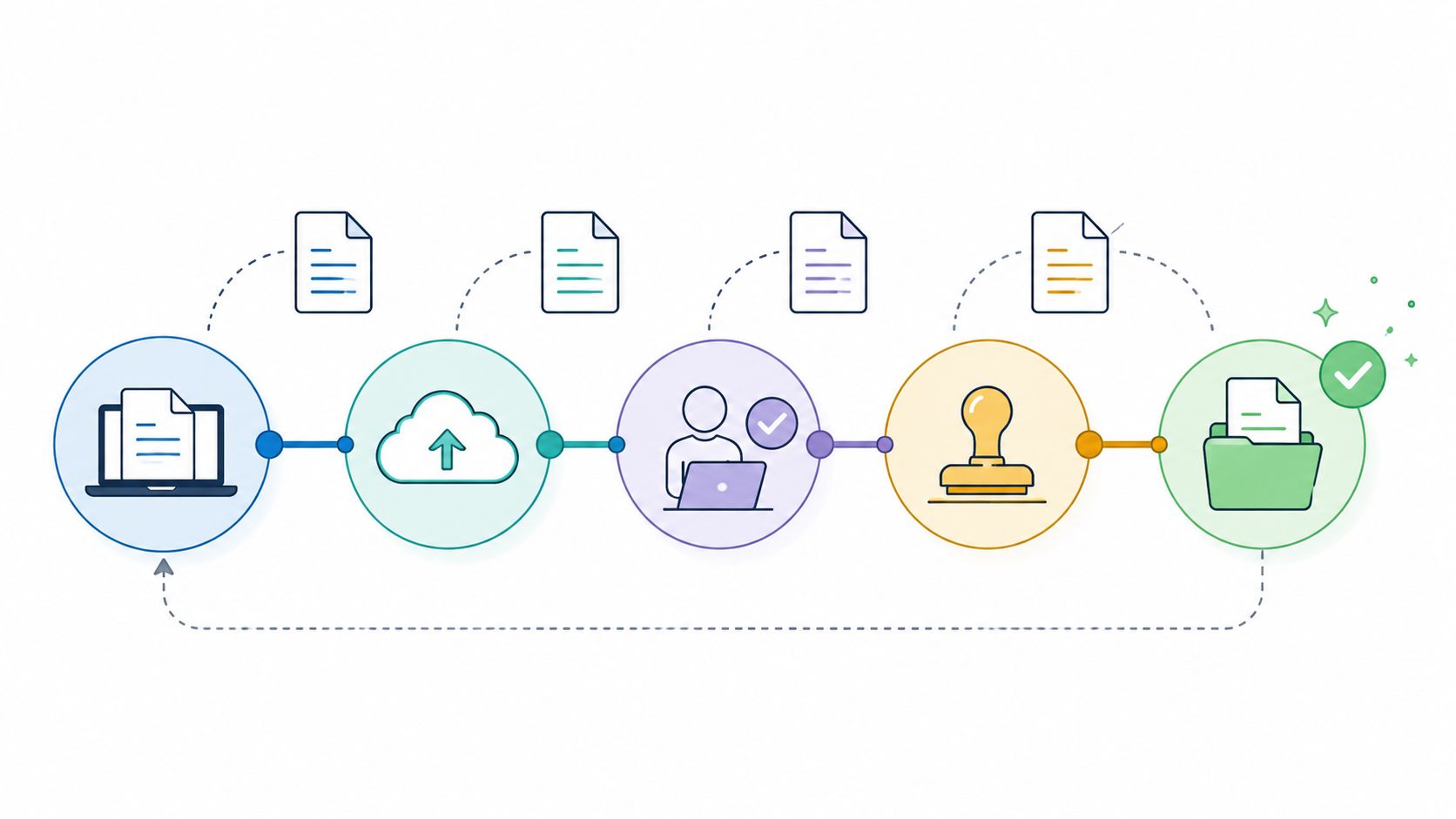
A high-performing workflow uses a standardized, risk-tiered request list and starts SME review as soon as the first files arrive rather than waiting for the full package. That sequencing reduces rework and improves the quality of follow-up, as described in this supplier document workflow discussion.
What a working request flow looks like
Here's the flow that works in practice:
Prepare the request pack
Match the supplier to a risk tier. Pull the exact document list, due dates, contact details, and review owners.Send a formal request
State the business purpose, who is requesting the documents, where to upload them, and what happens after submission.Accept files into one intake channel
Use a portal or controlled request link. Don't ask suppliers to send half the package by email and the other half through different systems.Begin review immediately
If the insurance certificate arrives first, review it first. Don't hold it in limbo while waiting for unrelated files.Close gaps with targeted follow-up
Ask for the missing page, corrected date, or clearer evidence. Don't resend the whole checklist unless the supplier needs a complete reset.
One tool category that helps here is an automated document request tool, especially when you need branded request links, status tracking, and reminders without building the process from scratch.
What suppliers need from you
Suppliers respond faster when the request is easy to understand. Most delays come from bad instructions, not bad intent.
A good request message includes:
- Why you need the documents. Tie the request to onboarding, renewal, compliance review, or contract activation.
- Exactly what to submit. Name each document and, where useful, state acceptable formats or date requirements.
- Who can answer questions. A named contact matters.
- How the files will be reviewed. This helps suppliers understand that “uploaded” doesn't always mean “accepted.”
Suppliers are more cooperative when they know the business reason, the deadline, and the acceptance standard. They resist when the request feels open-ended or arbitrary.
The workflow also needs a clean handoff between collection and review. Procurement shouldn't become a permanent translator between suppliers and subject matter experts. If the InfoSec reviewer rejects a file, the rejection reason has to be clear enough that procurement can relay it in one message without creating a second round of confusion.
A final warning. Don't design your process around the fantasy of a perfect first submission. Build it for partial delivery, clarification requests, and staged review. That's how suppliers behave, especially when several departments are asking them for evidence at once.
Automating Follow-Ups and Expiry Management
Manual follow-up feels manageable at ten suppliers. At scale, it becomes a hidden operations tax.
Someone has to remember who hasn't replied, who uploaded the wrong file, which certificates expire next month, and which reminder already went out. That work rarely looks strategic, but it eats time every week and it's one of the main reasons supplier records drift out of date.

For document-heavy workflows, automation isn't just convenient. One legal-industry source states that technology-assisted review is 20 to 40 times less expensive per gigabyte than manual review, and that manual review drives most of the cost burden in the cases studied, according to Fordham Forensics on e-discovery vendor selection. The practical lesson transfers well to supplier documents: push intake and routine validation into a structured system, and reserve human effort for exceptions and higher-risk decisions.
Where manual tracking breaks down
Spreadsheets fail in predictable ways:
- Reminder logic is inconsistent. One supplier gets chased three times. Another gets forgotten.
- Expiry dates are unreliable. Dates are entered manually, often in different formats, and nobody notices a lapse until the wrong moment.
- Review queues are opaque. Teams don't know whether a document is pending submission, pending review, rejected, or accepted.
- Renewals become reactive. Expiring files trigger emergencies instead of planned outreach.
That last point matters most. If a supplier's insurance, certification, or license expires without notice, the issue isn't only administrative. It can block work, delay approvals, or create a compliance gap you could have prevented.
What to automate first
You don't need to automate everything at once. Start with the repetitive parts that don't benefit from human judgment.
Scheduled reminders
Trigger outreach based on due date, not memory. That keeps the tone consistent and removes low-value chasing from your team's workload.Status-based nudges
Send a different reminder for “nothing submitted,” “partial submission,” and “rejected, action required.”Expiry alerts
Flag upcoming expirations early enough to collect a replacement before the existing file lapses.Basic intake checks
Catch missing files, unreadable scans, or obvious metadata problems before they reach a reviewer.
If you're evaluating platforms, Superdocu is one option for this kind of workflow. It supports request links, automated reminders, validation dashboards, and expiry tracking for document collection.
The trade-off is straightforward. Automation speeds the routine path, but it only works if your request types, acceptance rules, and ownership model are already clean. If your underlying process is confused, automation will help you repeat the confusion more efficiently.
Implementing Security and Validation Protocols
Collecting supplier files without security controls is risky. Collecting them without validation is just expensive storage.
Many procurement teams often inherit trouble from good intentions. They improve collection speed, but they don't tighten governance. Sensitive files end up in inboxes, shared drives, or portals with broad access. Documents are “received” but never properly checked. Months later, someone discovers the certificate was expired, the file was incomplete, or the provider storing the data wasn't vetted.

The FTC's business guidance emphasizes inventorying where sensitive information is stored and verifying the security practices of outside providers. Industry guidance summarized in this supplier document management overview reflects the same shift. Supplier document collection is now a controlled digital process tied to governance, audit readiness, and data protection.
Security controls that matter in practice
You don't need a theoretical security model. You need controls people follow.
Controlled intake channels
Don't let suppliers send sensitive documents through any method they choose. Standardize the intake path.Role-based access
Finance doesn't need every security file. InfoSec doesn't need every payment document. Restrict access by function.Verified third-party handling
If a platform stores supplier files, your team should verify its security practices rather than relying on sales assurances.Retention and disposal rules
Old files shouldn't live forever in duplicate folders. The FTC guidance also stresses secure disposal of paper records.
A useful companion for internal review is this information security risk assessment guide. It helps teams think through where the collection process itself creates exposure, especially when multiple outside tools and internal handoffs are involved.
A simple validation gate
Validation should happen close to intake, not months later during an audit or renewal crisis. A lightweight QA gate usually catches most issues quickly.
Use a short checklist:
- Is this the correct document type?
- Is it legible and complete?
- Is it current?
- Does it contain the required fields or evidence?
- Does it match the supplier and requested scope?
That doesn't need to be complicated. It does need to be consistent.
For teams building a governed process, this guide on how to collect and validate documents is a practical reference point. The important thing is separating submission from acceptance. A file entering the system is not the same as a file passing review.
Accepted, rejected, and accepted with exception should be distinct statuses. If your system treats every upload as complete, reviewers will miss things.
Validation also improves supplier communication. Specific rejection reasons lead to faster corrections. “Please re-upload” creates another round of vague back-and-forth.
Handling Exceptions and Measuring Success
Sooner or later, a supplier won't provide the requested document.
Sometimes the document doesn't exist in that jurisdiction. Sometimes the supplier is too small to maintain it. Sometimes they refuse on policy grounds. And sometimes your own team asked for something out of habit rather than necessity.
This is the point where weak processes go off the rails. People keep chasing, escalate emotionally, or approve the supplier informally with no record of why. A stronger process treats missing documents as a governance event, not a dead end.

Best practices for unavailable supplier documents include alternatives such as control questionnaires, public web checks for certifications or policies, and documented risk acceptance decisions, as outlined by Venminder's guidance on vendor due diligence document alternatives. That's the right mindset. The goal is defensible decision-making, not collection at all costs.
When the supplier cannot provide the document
Use a fallback ladder. Don't improvise each time.
- First, confirm whether the request is required. Some exceptions reveal that the checklist is outdated or misapplied.
- Next, seek alternate evidence. A questionnaire, public certification listing, policy statement, or contract clause may provide enough support.
- Then, assess the risk impact. Missing evidence from a low-risk supplier is different from missing evidence from a critical manufacturer.
- Finally, record the decision. Accept, reject, or approve with risk acceptance. Name the approver and the rationale.
Exceptions accumulate, and if not logged properly, the organization forgets which suppliers were approved with gaps and under what conditions.
A missing document isn't always a process failure. An undocumented exception is.
How to measure whether the process is healthy
Tracking only completion is too shallow. A healthy process needs operational and governance metrics.
Good internal measures usually include:
Average time to completion
How long it takes from request sent to accepted file package.Submission success rate
How often suppliers provide acceptable documents without multiple correction cycles.Review turnaround
How quickly internal reviewers act once files arrive.Exception rate by document type
Which requests regularly fail, and whether the request itself needs revision.Upcoming expirations in the review window
Which accepted documents are about to lapse and need renewal action.
Review those trends by supplier type, business unit, and document category. That's where the useful patterns show up. One business unit may be over-requesting. One document category may be too vaguely defined. One reviewer may be creating avoidable rework because rejection reasons are unclear.
If you want to collect documents from suppliers reliably, measure the parts that create friction, not just the number of files received.
If you want a cleaner way to run supplier document collection, Superdocu provides branded request portals, automated reminders, validation workflows, and expiry tracking in one system. It's built for teams that need a repeatable process rather than another shared folder.