
When it comes to following up with clients, two things matter above all else: speed and consistency. The business that gets back to people the fastest usually wins, plain and simple. From there, a steady, helpful rhythm of communication builds the trust you need to close the deal.
Why a Fast Follow-Up Wins More Business
In a crowded market, speed isn’t just a nice bonus—it's your biggest competitive edge. The moment a potential client fills out a form or sends an inquiry, their interest is at its absolute peak. They're actively looking for a solution, and your window to impress them is wide open.
But every minute you wait, that window starts to close. Your competitors are likely getting the same inquiries, and the first person to make a real connection often sets the bar for everyone else. Being first doesn't just show you're on the ball; it immediately positions your business as the most professional and capable option.
The High Cost of Delay
Waiting even a few hours to respond can mean the difference between landing a new client and watching them go straight to a competitor. The research is clear: the opportunity to connect with a new lead is incredibly brief.
Just look at the numbers. Somewhere between 35% and 50% of sales go to the vendor that responds first. It gets even crazier—responding to a new lead within five minutes makes you a staggering 100 times more likely to connect with and convert them. The drop-off after that is brutal.
This really gets to the heart of client behavior. When someone reaches out, they're not just sending a message into the ether. They have a problem they want solved now, and the first person to offer a clear path forward is the one who will earn their business.
Waiting to follow up is like letting a valuable opportunity walk out the door and into your competitor's office. The client's problem doesn't pause, so your response shouldn't either.
To put this in perspective, here's a quick look at how response time directly impacts your chances of success.
Impact of Follow-Up Speed on Lead Conversion
| Response Time | Impact on Connecting with Lead | Impact on Qualifying Lead |
|---|---|---|
| Within 5 minutes | Highest probability of connection | 21x more likely to qualify |
| Within 30 minutes | Sharp decline in connection rates | 6x more likely to qualify |
| Within 1 hour | Significantly lower chance of connection | Probability drops dramatically |
| 24 hours or more | Minimal chance of ever connecting | Extremely unlikely to qualify |
The data speaks for itself. A delay of just a few hours can essentially take a hot lead and turn it cold.
How Speed Shapes Client Perception
Your response time does more than just secure a conversation; it shapes the client’s entire opinion of your brand from the get-go. A quick, professional follow-up tells them a few critical things:
- You're organized. It shows you have your act together.
- You value their time. It demonstrates respect for their inquiry and urgency.
- You're reliable. It sets a positive tone for the entire working relationship.
Put yourself in their shoes. If a law firm takes two days just to acknowledge a consultation request, how will they handle a critical court deadline? If a mortgage broker is slow to reply to an initial application, what will they be like when the pressure is on during closing?
That first interaction is your first impression. These crucial speed to lead statistics really drive home how much promptness matters. By making speed a priority, you prove your competence and build instant confidence, making clients feel good about their choice before the real work even begins.
Weaving Together Your Multi-Channel Follow-Up Plan
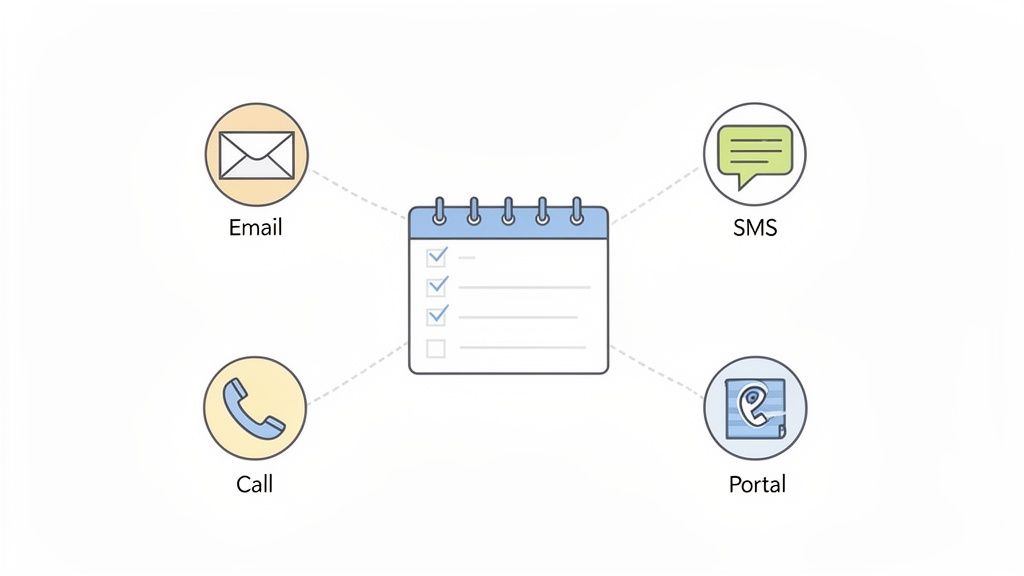
Relying on a single channel to chase down client information is like trying to build a house with only a hammer. You’ll make some progress, but you’re ignoring a whole toolbox of more effective options. A truly powerful follow-up strategy mixes different channels to create a professional and seamless experience for your clients.
The trick is to meet people where they are. While a study found that 61% of consumers prefer email for business, a younger client might see and respond to an SMS in seconds. On the other hand, a less tech-savvy client might only feel comfortable moving forward after a reassuring phone call. Knowing which tool to pull out of the box, and when, is the core of effective client follow-up.
Picking the Right Channels for the Job
Your follow-up toolkit should have a few go-to options. By layering them, you can create a communication cadence that feels helpful and attentive, not repetitive or annoying. Each one plays a unique role.
- Email: This is your workhorse. It’s perfect for sending detailed updates, non-urgent document requests, and keeping a formal paper trail. Emails give you the space to provide context and attach necessary files without feeling rushed.
- SMS/Text Messages: Think of these as quick, urgent nudges. With an incredible open rate of around 98%, texts are unbeatable for short reminders like, "Your documents are ready for review," or "Just a reminder: your appointment is tomorrow."
- Phone Calls: For building real rapport or untangling a complex issue, nothing beats a direct phone call. You can resolve a misunderstanding in a five-minute chat that might have taken a dozen back-and-forth emails. This is your high-touch tool for personal follow-ups.
- Secure Client Portals: If you work in a sensitive field like law, finance, or HR, a branded portal is a game-changer. Portal notifications offer a secure, centralized hub for alerting clients to new documents or pending tasks, which reinforces your professionalism and commitment to data security.
By blending these methods, you show clients you’re on top of things and are making the process as smooth as possible for them. A typical flow might start with a detailed email, followed by a friendly SMS reminder a few days later, and a personal call if a deadline is getting close.
Crafting the Perfect Follow-Up Cadence
Your "cadence" is just the rhythm and timing of your follow-ups. A well-designed cadence keeps you top-of-mind with gentle, persistent reminders that don't overwhelm your client. It’s all about guiding them to the next step.
Let's imagine a real estate agent waiting on signed disclosure documents. A smart cadence would look something like this:
- Day 1 (The Initial Ask): Send a detailed email with a secure portal link to the documents.
- Day 3 (The First Nudge): Pop over a short, friendly follow-up email. "Hi [Client Name], just checking in to see if you had a chance to look at the disclosure documents I sent over."
- Day 5 (The Mobile Ping): Send a quick SMS. "Quick heads-up, [Client Name]! The disclosure docs are waiting for your signature. Let us know if you have any questions."
- Day 7 (The Personal Touch): Pick up the phone. "Hi [Client Name], it's [Your Name]. I wanted to make sure you received the documents and see if I could answer any questions to help you get them signed."
This multi-pronged approach dramatically increases your chances of getting a response. If you're looking for more ideas on what to ask for and when, our guide on how to get information from clients is a great place to start.
Proven Templates You Can Adapt
Knowing what to say is just as important as knowing when to say it. Generic, robotic messages are easy to ignore. The key is to use clear, concise, and friendly language that respects your client’s time.
Here are a few templates you can tweak and make your own.
Email Template: First Friendly Reminder
Subject: Following up on [Topic/Document Name]
Hi [Client Name],
Hope you’re having a great week.
I’m just checking in on the [specific document or information] we need to move forward with [their goal, e.g., your mortgage application]. Please let me know if you have any questions!
Best,
[Your Name]
SMS Template: Urgent Nudge
Hi [Client Name], this is [Your Name] from [Company]. Quick reminder that your [Document Name] is due by [Date]. You can complete it here: [Link to Portal]. Thanks!
The best follow-up messages are short, specific, and clearly state what you need the client to do next. Eliminate any guesswork to make it as easy as possible for them to respond.
Following up with clients shouldn't be a full-time jobSuperdocu sends automatic reminders until documents arrive — so you stop chasing and start reviewing.See automated follow-ups →
Phone Call Script: Breaking the Silence
"Hi [Client Name], this is [Your Name] calling from [Company]. I'm following up on the email I sent last week regarding your [case/file/application]. I just wanted to connect personally to see if there's anything I can clarify for you. Is now a good time?"
When you thoughtfully combine these channels and messages, you build a system that works for both you and your clients. It’s how you demonstrate true professionalism and ensure nothing ever falls through the cracks.
How to Be Persistent Without Being Annoying
We've all been there. You need to follow up with a client, but you're worried about crossing that invisible line from professional persistence into pure annoyance. The fear of sounding pushy or desperate is real.
But here’s the thing: silence from a client rarely means "no." It usually just means they're swamped.
Your job isn't to chase them down; it's to stay on their radar in a helpful way. Think of each follow-up as an opportunity to provide value and remind them you're the problem-solver they need when the time is right. It's a subtle but powerful shift from chasing a transaction to guiding them toward a solution.
What the Numbers Tell Us About Persistence
Giving up too soon is probably one of the most common—and expensive—mistakes you can make. The data on this is pretty shocking. A massive 80% of deals close only after 5 to 12 contacts, yet 44% of sales professionals throw in the towel after just one try.
Even worse, 92% give up after four "no's". That massive gap is a golden opportunity for anyone willing to stick with it. It's not about being stubborn; it's about being strategic.
Of course, this doesn't mean you should send the same generic "just checking in" email a dozen times. You need a game plan. The key is to switch up your approach so every touchpoint feels fresh, relevant, and adds something new to the conversation.
Add Value, Don't Just Ask for an Update
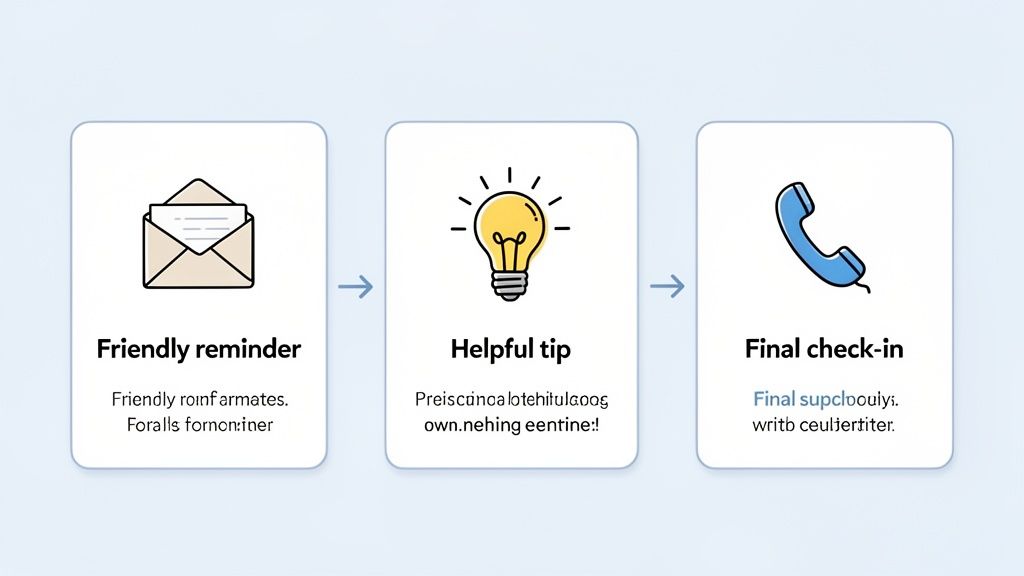
The real secret to being persistent without driving people crazy is to make every follow-up different. Each message needs a purpose beyond just reminding them you exist. When you offer something genuinely useful, you turn a potentially irritating nudge into a welcome and professional gesture.
Here are a few ways to add value with every interaction:
- Bring up a past conversation. Start by connecting back to something specific. "Hi [Client Name], last time we chatted, you mentioned you were struggling with [pain point]. I was thinking about that…" This instantly shows you were listening and are invested in their success.
- Share something useful. Found an article, a case study, or a new tool that could help them? Send it their way. A simple, "Saw this and thought of you," can be incredibly powerful.
- Offer a bite-sized piece of advice. Give them a quick, actionable tip they can use immediately. A mortgage broker might share a link to a new rate calculator; a lawyer could point out a recent regulatory change that affects their industry.
- Ask a smarter question. Instead of the predictable, "Have you made a decision yet?" try something that gets the conversation going again. "I was curious, have you had a chance to think about how [your solution] might impact your team's goals for Q3?"
Each follow-up is another chance to reinforce your expertise and show that you're there to help. When you consistently bring value to the table, you stop being a salesperson and start becoming a trusted advisor.
If you’re having trouble finding the right words, checking out a sample email requesting information can give you a great starting point for crafting your own messages.
Knowing When to Gracefully Let Go
Being a professional also means knowing when it's time to back off. If you've reached out multiple times across different channels and are met with total silence, it's time for a final, polite message to close the loop. This isn't about admitting defeat—it's about respecting their time and yours.
This "breakup" email should always be friendly and leave the door open for them to re-engage down the road.
Here’s a simple template:
Subject: Closing the loop
Hi [Client Name],
I've tried to connect a few times about [their goal] and haven't heard back, so I'll assume your priorities have changed or you've gone in a different direction.
I’m going to close your file for now, but please don't hesitate to get in touch if things change. I'd be more than happy to help.
All the best,
[Your Name]
You might be surprised by how often this kind of message gets a response. Sometimes, it's the very thing that prompts a busy client to finally reply. And if not, it allows you to professionally wrap up the conversation and focus your energy where it's wanted.
Using Automation to Streamline Your Follow-Ups
Let’s face it: managing follow-ups by hand is a losing battle. You’re juggling sticky notes, dismissing calendar alerts, and hoping that crucial client task doesn’t get buried in a busy week. Things inevitably slip through the cracks. This is where you get your time back.
Automation isn’t some complicated, enterprise-level luxury anymore. It’s a simple, powerful tool that acts like a tireless assistant, making sure every client gets the right message at the right time. Best of all, it works without you having to micromanage every single step.
From Manual Chaos to Smart Workflows
Relying on spreadsheets and your own memory to track follow-ups is broken. It’s inefficient and, frankly, a recipe for costly mistakes. An automated workflow, on the other hand, just runs quietly in the background, executing your follow-up plan with perfect consistency every single time.
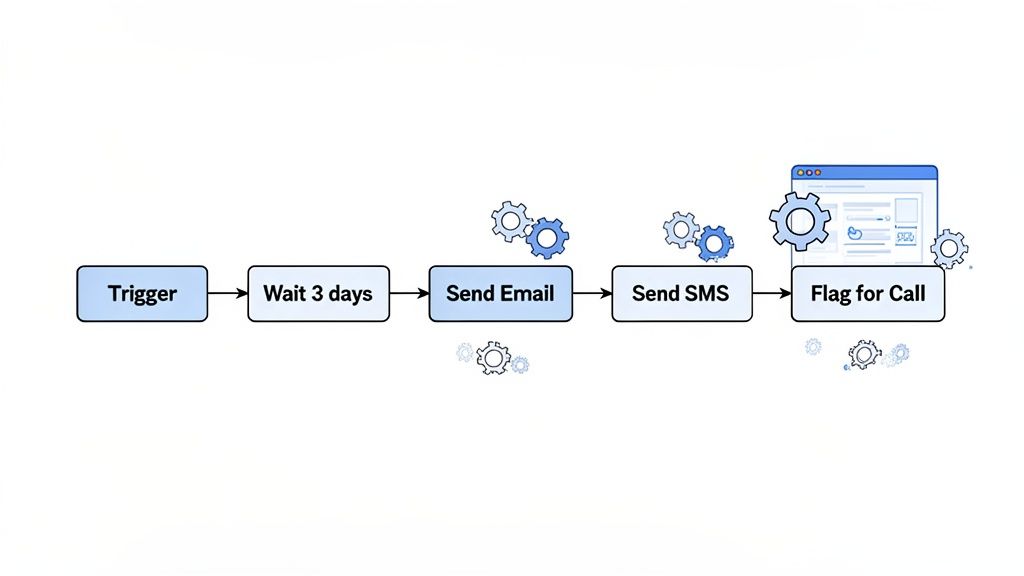
Think about it. A new client signs on, and instead of you remembering to check in, the system automatically kicks off a welcome sequence. If they forget to upload a document, a polite reminder goes out 3 days later. No response? A text message follows on day 5. Still nothing? The system can flag the client and create a task for you to make a personal call.
Automation transforms your follow-up process from a reactive chore into a proactive, reliable system. It frees up your mental energy to focus on high-value work—like actually talking to clients—instead of just chasing them.
This isn't about replacing the human touch. It's about saving it for when it truly matters. By letting technology handle the repetitive nudges, you make sure your personal interactions are strategic, timely, and impactful.
Building Your First Automated Follow-Up Sequence
Getting an automated workflow up and running is probably easier than you think. Most modern document collection platforms and CRMs use intuitive builders based on simple "if-then" logic. You just define the trigger and map out the sequence of actions that should happen next.
A classic—and incredibly effective—workflow is the "incomplete document" chase. Here’s a simple way to structure it:
- The Trigger: A client's document request has been sitting as "Incomplete" for more than 48 hours.
- Action 1 (Day 3): The system sends a friendly reminder email. You can pre-write the message and use placeholders to automatically add the client's name and the specific document that’s missing.
- Action 2 (Day 5): An SMS notification goes out. A quick, direct text can often cut through the noise of a crowded email inbox.
- Action 3 (Day 7): An internal task is created. The system flags the account and adds a task to your dashboard, telling a team member it’s time to make a personal phone call.
This multi-channel approach ensures you're persistent without having to lift a finger. For a more detailed walkthrough, our guide on automated email reminders breaks it down even further.
Manual vs. Automated Follow-Up Workflow Comparison
The difference between wrestling with follow-ups manually and letting a system handle them is truly night and day. It impacts everything from your daily schedule to your bottom line. Just look at how the daily grind changes.
| Task | Manual Approach (The Old Way) | Automated Approach (The Smart Way) |
|---|---|---|
| Tracking Status | Constantly checking and updating a spreadsheet or project board. | The system tracks document status automatically in real-time. |
| Sending Reminders | Setting calendar alerts, then finding the time to write and send each email. | Pre-written, personalized emails and SMS messages go out on schedule. |
| Team Coordination | Relying on sticky notes and verbal updates, which often leads to confusion. | A central dashboard shows every action taken and flags tasks for the right person. |
| Client Experience | Communication can be inconsistent, and delays are common. | Clients receive professional, timely, and consistent communication, which builds trust. |
As you can see, the automated approach isn't just a small improvement; it's a fundamental shift in how you operate.
Moving to an automated system is a direct investment in your own efficiency and your clients' happiness. To get the most out of it, mastering strategies for your email follow up automation can seriously boost your results.
By removing the burden of manual chasing, you create a scalable process that grows with your business. You’ll spend less time on paperwork and more time building relationships and delivering great service—which is how you win and keep clients for the long haul.
Measuring and Improving Your Follow-Up Success
Your follow-up strategy shouldn't be a "set it and forget it" kind of thing. It’s more like a living, breathing part of your business that needs regular check-ups to stay healthy. Sending out messages is easy, but knowing what’s actually landing—and what’s getting ignored—is where the real work begins. By tracking just a few key data points, you can stop guessing and start building a follow-up process that predictably drives your business forward.
This is how you stop wasting time on tactics that fall flat. It’s the difference between blindly sending yet another email and confidently tweaking your approach because you know it will get you better results.
Identifying the Metrics That Matter
So, how do you know if you're succeeding? You have to define what "success" actually means for you. This isn't about getting bogged down in a complicated analytics dashboard. It's about answering a few simple, powerful questions about your process.
Start by keeping an eye on these essentials:
- Email Open Rates: This is your first gate. If clients aren't even opening your emails, the brilliant message inside doesn't matter one bit. A low open rate almost always points to a weak or generic subject line.
- Response Time (Yours and Theirs): How fast are you getting back to people? And, just as importantly, how long is it taking them to reply to you? A long delay on the client’s end might mean your request is confusing or your timing is off.
- Document Submission Rate: Look at the percentage of clients who send their documents after the first request versus those who need a reminder. This number tells you exactly how effective your follow-up messages are.
- Average File Completion Time: From the moment you first ask for something to the moment the file is complete, how much time has passed? This is a fantastic high-level indicator of your overall efficiency.
Turning Data into Actionable Improvements
Once you start collecting this information, patterns will start to pop out. These patterns are your roadmap for making things better. The whole point is to find the bottlenecks in your system and make smart, targeted changes.
Let's say you notice your email open rates are stuck below 20%. That’s your cue to start experimenting. Try A/B testing different subject lines. Instead of the generic "Following up on your application," test something more direct like, "Quick question about your mortgage documents." Sometimes the smallest changes make the biggest difference.
Or what if you see that clients are taking an average of six days to respond to a specific request? That's a clear signal to rethink your timing. Maybe you shorten the gap between your first and second reminders from three days down to two.
Don’t just stare at the data—use it to ask smarter questions about your process. Think of every metric as a clue that can lead you to a smoother workflow and a happier client.
Today's clients expect things to move quickly. Research shows that 61% of consumers prefer digital channels for communication, and a massive 90% want immediate replies to their questions. Tracking your own response times helps you live up to those expectations, which is key for building loyalty—especially when you consider that repeat buyers often spend 67% more. If you're curious, you can dig into more data-driven insights about customer service expectations from Zendesk.com.
Ultimately, measuring your follow-up efforts ties your communication directly to your bottom line. It reveals the true return on your investment, not just in time saved, but in happier clients and faster business cycles.
Your Top Follow-Up Questions, Answered
Even with a solid game plan, you're bound to run into tricky situations that make you second-guess your next move. Handling these common challenges with confidence is what separates the pros from the rest. Here are the questions we get asked all the time, along with some straight-up answers from our experience.
What if My Client Goes Completely Silent?
Ah, the ghosting client. It's one of the most common frustrations in any industry. You've sent a few polite reminders, and now… nothing but digital tumbleweeds. The key is to stop thinking of it as chasing and start thinking of it as closing the loop.
After a few unanswered pings, it’s time for the polite "breakup" email. This isn't about being aggressive; it's about being professional. You respectfully acknowledge their silence, assume their priorities have shifted, and give yourself a clean break to move on.
"Hi [Client Name], I've tried to connect a few times about [their goal] but haven't heard back. I'll assume your priorities have changed for now. I’m closing your file, but please don't hesitate to reach out if things change down the road. All the best."
It's amazing how often this simple message gets a response. If it doesn’t, you can archive their file with a clear conscience and pour your energy into clients who are ready to engage.
How Many Follow-Ups Are Too Many?
This is the million-dollar question, isn't it? While there’s no single magic number, the data tells a clear story: most people give up way too early. A staggering 80% of deals only close after five to twelve contacts.
So, the real question isn't about the number of messages but the value within them. If every follow-up adds something new to the conversation—a helpful resource, a reference to a previous chat, or a fresh insight—you earn the right to be persistent. The minute your outreach becomes a series of repetitive "just checking in" emails, you've gone too far.
As a general rule, a sequence of five to seven touchpoints spread across different channels (email, phone, SMS) over a few weeks is a professional and effective baseline.
Should I Call or Just Stick to Email?
Email is fantastic for creating a paper trail, but let's be honest, it’s also incredibly easy to ignore. A phone call can cut right through that digital clutter. It adds a human touch that's often missing, which is especially powerful when you're dealing with a complex issue or a client who's gone quiet.
Here’s a good rule of thumb: use email for the initial request and your first couple of reminders. If you still haven’t gotten a reply, or if a critical deadline is looming, it's time to pick up the phone. A quick, friendly call can often solve in five minutes what might take days of email tag.
What Is the Best Time of Day to Send Follow-Up Emails?
While this definitely varies by industry and client type, some general patterns hold true. Studies often show that sending emails in the late morning (around 10 AM) or early afternoon (around 2 PM) gets the best open and response rates.
Why? You avoid the early morning inbox avalanche when everyone is deleting messages, and you miss the late-afternoon rush when people are trying to wrap up and head home.
But the absolute best answer lies in your own data. Start paying attention to when your clients tend to respond. Over time, you'll spot the patterns. Better yet, automation tools can schedule your messages to land in their inbox at these peak times, so you don't even have to think about it.
Ready to stop chasing clients and start automating your follow-up process? Superdocu makes it easy to build smart workflows that send reminders, track documents, and keep your business moving forward. Start your free trial today and get your time back.