
Let's be honest, for many HR teams, "document management" means overflowing file cabinets, a confusing maze of shared folders, and the constant stress of chasing down paperwork. But what if you could have a single, intelligent hub for every employee document, from the first resume to the final exit interview?
That's exactly what a human resources document management system is. It's not just another digital storage folder; it's a specialized platform designed to bring order, security, and automation to the entire lifecycle of your employee files.
What Is a Human Resources Document Management System?
Think of it as the digital backbone for your entire HR operation. Instead of documents being scattered across desktops, lost in email threads, or locked away in a physical office, everything is centralized in one secure, searchable place.
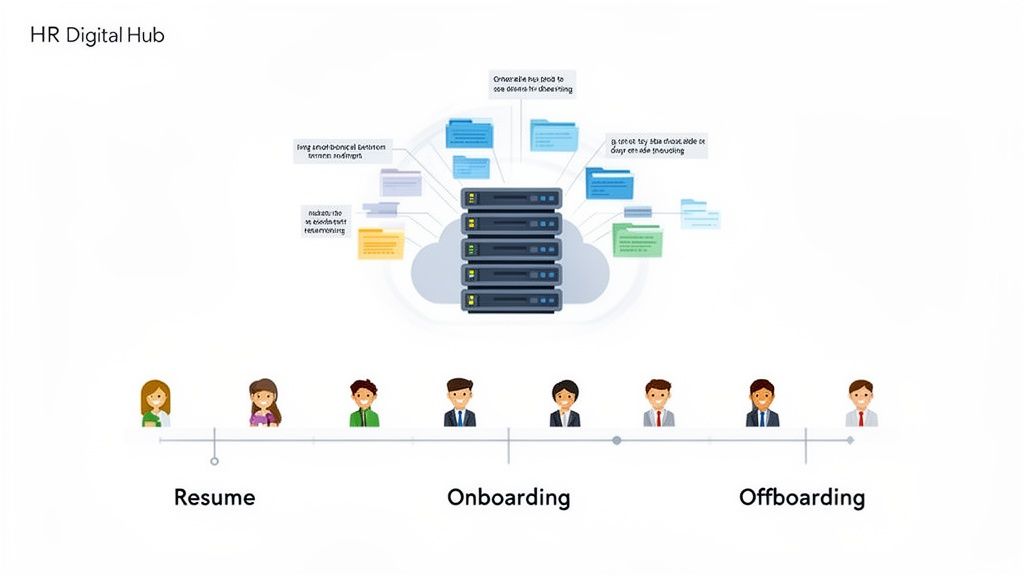
This simple shift from scattered to centralized solves so many chronic headaches. No more frantic searches for a signed offer letter or a crucial compliance form. You get a single source of truth for every piece of paper that matters.
Moving Beyond Simple Storage
Here’s the key difference: a simple cloud drive (like Google Drive or Dropbox) just stores files. A true HR document management system manages them. It's built from the ground up with the specific, high-stakes needs of human resources in mind.
It actively handles HR processes, tracks compliance, and controls the flow of information in a way a generic storage solution never could.
A dedicated system doesn’t just hold documents; it manages their journey. It ensures the right person has the right file at the right time, all while maintaining a detailed audit trail for compliance.
This is a system designed to navigate the complexities of HR, where things like document security, strict retention policies, and controlled access are non-negotiable.
From Manual Chaos to Automated Order
The difference between a manual approach and a dedicated system is stark. Just look at the time wasted. Studies show that the average employee can spend over nine hours per week just hunting for information. For an HR pro, that's time stolen from strategic work like building company culture or developing talent.
Let’s quickly compare the old way with the new way.
Manual HR Files vs HR Document Management System
This table breaks down the practical differences you'll feel every single day.
| Aspect | Manual Process (Spreadsheets & Physical Folders) | HR Document Management System |
|---|---|---|
| Accessibility | Limited to office hours; difficult to find specific files quickly. | 24/7 secure access from anywhere; powerful search finds files instantly. |
| Security | Prone to loss, misfiling, and unauthorized access. | Role-based permissions, encryption, and full audit trails. |
| Onboarding | A slow, manual paper chase for new hires and HR staff. | Automated workflows send, track, and file all new hire paperwork. |
| Compliance | Relies on manual tracking; easy to miss expirations or deadlines. | Automatic alerts for expiring certifications, visas, and I-9s. |
| Efficiency | Extremely time-consuming; high potential for human error. | Automates repetitive tasks, freeing up HR for strategic work. |
As you can see, the move to a dedicated system isn't just a minor upgrade—it's a fundamental change in how the HR department operates.
An HR document management system transforms this chaos into an orderly, automated process. It helps ensure that:
- Onboarding is seamless: New hires get a smooth, guided digital experience for submitting all their paperwork.
- Compliance is maintained: The system watches over expiration dates for you, sending alerts before it's too late.
- Audits are simplified: Every document is indexed, organized, and easily searchable, with a complete log of who accessed what and when.
Ultimately, a modern HR document management system is a strategic tool. It helps you move from a reactive, paper-drowning model to a proactive, efficient, and compliant digital framework that can scale with your business and create a better experience for everyone.
What to Look for: 7 Key Features Every HR Department Needs
A true HR document management system is so much more than a digital filing cabinet. Think of it less as a storage unit and more as an intelligent assistant, built to handle the most repetitive, time-consuming parts of HR. The right features don't just hold onto files; they actively manage the entire lifecycle of your people's paperwork, from the first offer letter to secure archival.
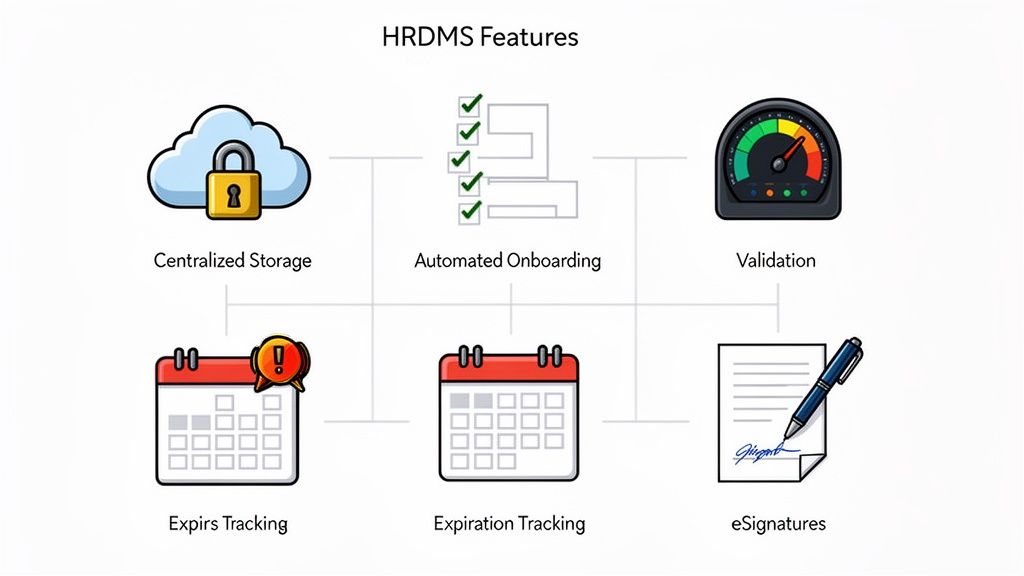
These are the core functions that separate a simple shared folder from a game-changing strategic tool. They solve the daily headaches for HR pros, giving them back precious time to focus on what actually matters—your people.
1. Secure, Centralized Cloud Storage
The bedrock of any good system is having one single, secure home for every single employee document. No more hunting through scattered local drives, messy shared folders, or dusty filing cabinets. Everything lives in one organized, cloud-based hub.
This gives your authorized HR staff secure access from anywhere, whether they’re in the office or working from home. With role-based permissions, you can lock down sensitive information like I-9 forms or medical records so only the people who absolutely need to see them can. Better yet, a full audit trail logs every single view and action.
2. Automated Onboarding Workflows
Let's be honest: onboarding is a document nightmare. A top-notch system turns that manual paper chase into a smooth, automated experience for everyone. You can build out custom workflows that walk new hires through every single step.
The system automatically pings new hires for what it needs—signed offer letters, tax forms, policy acknowledgments—and shows you their progress in real-time. This completely kills the need for endless follow-up emails and guarantees you have a complete, compliant file for every new employee from day one. To see how this looks in practice, you can learn more about crafting a better new hire journey with an effective onboarding portal.
A great onboarding workflow doesn't just collect documents; it creates a positive first impression. It shows new hires that your organization is efficient, organized, and values their time.
Getting this right is huge. Good automation can slash the time spent on administrative onboarding tasks by over 50%, freeing up your team to focus on actually welcoming and engaging your new talent.
3. A Smart Document Validation Dashboard
Once a new hire hits "submit," the work is far from over. Someone in HR still has to check every single file for accuracy and completeness. A validation dashboard makes this critical step ridiculously simple.
Instead of digging through a mountain of email attachments, HR gets a clean, centralized queue of every document waiting for review. From one screen, they can:
- Quickly review files: See everything at a glance without having to download a dozen different attachments.
- Approve correct documents: One click is all it takes to move a good document into the employee's permanent file.
- Reject incorrect files: Is a driver's license blurry? Is the form incomplete? Just reject it with a quick note explaining what's wrong. The system automatically notifies the employee to fix it and resubmit.
This one feature can turn what used to be a multi-hour chore into a task that takes just a few minutes, all while cutting down on human error.
4. Expiration Tracking and Automated Notifications
So many crucial HR documents have an expiration date—think professional licenses, work visas, or safety certifications. Trying to track all of those in a spreadsheet is just asking for a compliance disaster.
A powerful HRDMS puts this entire process on autopilot. When a document is uploaded, you just set the expiration date. From then on, the system acts as your watchdog, automatically sending reminders to both the employee and HR long before the deadline hits. It's a proactive approach that stops compliance gaps before they ever happen.
5. Customizable Templates and Built-In eSignatures
Consistency is your best friend in HR. The ability to create and use pre-approved templates for things like offer letters, contracts, and policy updates ensures every document is on-brand and legally sound. It saves a ton of time and stops people from accidentally using old versions.
Even better, a system with integrated eSignature is a must-have. It lets you send legally binding documents for a signature right from the platform. No more printing, signing, scanning, and re-uploading. The entire process is digital, fast, and fully trackable, which makes for a much better experience for candidates and employees alike.
The Real Value of Upgrading Your HR Document Management
Bringing in new software can sometimes feel like just another task on an endless to-do list. But a human resources document management system is different. It’s not just a minor tech upgrade; it’s a strategic move that delivers a serious return on your investment by completely changing how your HR team works.

The goal is to shift your team’s focus from chasing paperwork to driving high-impact projects. This happens by improving three key areas: how efficiently you operate, how you manage risk, and the experience you create for your people. When you get a handle on your documents, you’re not just tidying up files—you’re building a stronger, more productive, and people-first company.
Boost Day-to-Day Efficiency and Reclaim Strategic Time
The most immediate win you'll see is a massive boost in efficiency. Think about all the time your HR team spends on repetitive, manual work: hunting down new hire forms, sending reminders about expiring certifications, or physically filing stacks of paper. It’s a huge drain on their time and energy.
Automation completely changes the game by handling all of that for you. Instead of spending hours on follow-ups, your HR pros can focus on what they do best:
- Talent Development: Designing career paths and meaningful training programs.
- Company Culture: Leading projects that improve morale and keep people engaged.
- Strategic Planning: Working with leadership to plan for the future of the workforce.
This isn’t about saving a few minutes here and there. It's about giving your team back their most valuable resource—time—so they can stop doing low-value tasks and start driving real business growth.
Create Bulletproof Compliance and Reduce Risk
When it comes to compliance, there's no room for error. The legal and financial penalties for sloppy record-keeping are steep. Manual tracking systems are notoriously fragile and full of human error, which leaves your business wide open to violations.
An automated system is your compliance safety net. You can set up retention policies that automatically keep documents for the required time and then securely destroy them when they're no longer needed. Plus, with detailed audit trails, you always have a complete record of who touched a document and when, making it easy to prove you're compliant.
The consequences of getting it wrong are very real. In 2023, the Employee Benefits Security Administration recovered nearly $1.5 billion in owed benefits from employers who failed to meet their obligations. This just goes to show how massive the financial penalties can be for poor document management.
A dedicated human resources document management system makes sure you’re always prepared. It turns a huge business risk into a process that's well-managed and easy to defend. A big part of this is managing document lifecycles correctly, and our guide on creating a document retention policy can give you some great best practices.
Improve the Employee and Candidate Experience
First impressions really do matter. For a new hire, the onboarding process is their first real taste of your company culture. A clunky, paper-based process sends a clear message: "we're disorganized and outdated."
A modern, digital-first approach creates a smooth and professional experience right from the start. Candidates can fill out and sign everything they need on any device, anytime, without ever touching a printer or scanner. This doesn't just speed things up; it makes your company look good and helps you attract and keep the best people.
By getting rid of manual errors and creating one single source of truth for all employee files, a dedicated system builds a secure and scalable foundation for growth. It helps HR evolve from a reactive, administrative role into a proactive, strategic partner in the business.
How to Choose the Right System for Your Business
Picking the right human resources document management system is a big deal. With so many platforms out there, all claiming they'll solve your admin nightmares, how do you find the one that actually fits your company? The secret is to look past the flashy bells and whistles and zero in on what will genuinely support your team for the long haul.
Making the right call starts with asking the right questions. You’re not just looking for a tool to fix today's paperwork pile-up; you need a system that can grow with you and handle whatever challenges come next. Think of it as hiring a partner in efficiency, not just buying another piece of software.
Start with Scalability and Ease of Use
Your company is going to grow, so your software needs to be able to keep up. The first thing you absolutely have to consider is scalability. Will the system you choose today still work when your team doubles in size? A great platform should handle growth effortlessly, whether you have 10 employees or 500, without forcing you into a costly and painful migration later on.
Just as crucial is how easy the system is to use. A super-powerful tool is completely useless if your team is too intimidated to use it every day. Look for a clean, intuitive interface and a learning curve that isn’t a vertical cliff. You want your team to adopt it quickly, not let it collect digital dust.
Your HR team's time is one of your most valuable resources. The right system should feel like a helpful assistant that simplifies their workload, not a complex puzzle they have to solve each morning.
A system that’s simple to navigate means tasks like checking a document or starting a new onboarding process get done in minutes, not hours.
Evaluate Integration Capabilities
Your HR tools don't exist on an island. A top-notch human resources document management system has to play nice with the other software you already use, like your HRIS or payroll platform. When your systems are disconnected, you get data silos and force your team into mind-numbing, error-prone manual entry.
There’s a massive push for a single source of truth for a reason. Over 91% of HR pros are making single-database software a priority because juggling fragmented systems is an efficiency killer. In fact, a Forrester study found that HR departments are trying to manage an average of 6.17 different providers, leaving 80% of them struggling to pull accurate reports from scattered data.
Smooth integrations create a unified tech stack where information flows automatically between systems. This not only saves a ton of time but also keeps your data consistent and reliable across the board.
Prioritize Security and Compliance Features
When you're dealing with sensitive employee data, security isn't just a feature—it's everything. Any system you consider must have rock-solid, enterprise-grade security to protect your data and keep your business out of trouble.
Here are the non-negotiables to look for:
- SOC 2 Compliance: This is proof that the vendor has audited, established controls to safeguard client data.
- GDPR Compliance: A must-have if you handle data for any EU citizens, ensuring you meet strict global privacy laws.
- Data Encryption: All documents must be encrypted while being uploaded and while stored. This makes them completely unreadable to anyone without authorization.
- Role-Based Access Controls: This gives you granular control over who can see, edit, or approve certain documents, keeping sensitive files on a need-to-know basis.
A strong security posture isn't just a nice-to-have; it's the foundation of trust for any platform handling your team's personal information. For a deeper dive, check out our guide on what to expect from a secure cloud-based document management system.
Understand the Pricing Model
Finally, make sure the pricing is transparent and makes sense for your budget and growth trajectory. Some vendors charge per user, which can get pricey as you expand. Others might offer tiered plans based on features or storage limits. Always ask for a complete breakdown of all costs—including any hidden fees for implementation, training, or support—so you don't get hit with a surprise bill later.
A Simple Roadmap for System Implementation
Switching to a new human resources document management system should feel like a major upgrade, not a major headache. The secret to a smooth rollout isn't just flipping a switch overnight. It’s about following a thoughtful, step-by-step plan that brings your team along for the ride and sets you up for success from day one.
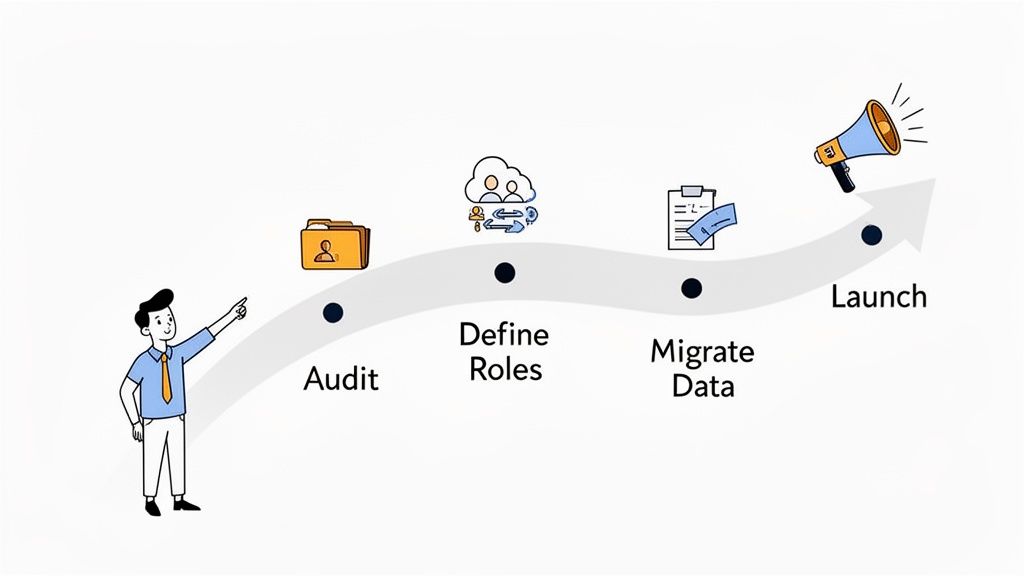
Think of it like building a house. You need a solid foundation and a clear blueprint before you even think about putting up the walls. The same goes for your new system—a little planning now saves you from a world of hurt later.
Phase 1: Audit and Plan
Before you can design a better process, you have to get honest about your current one. That means it’s time for a full audit of all your existing HR documents. Take inventory of everything you handle, from I-9s and offer letters to performance reviews and offboarding forms.
This is where you'll find the bottlenecks. Where do documents get stuck? Which manual tasks are sucking up all your team's time? The answers to these questions will show you exactly what problems your new system needs to solve.
Once you have that clarity, you can start mapping out your new, automated workflows. Decide who needs to see what, and set up clear user roles and permissions. This is crucial for keeping sensitive employee information secure and locked down.
Phase 2: Migrate and Configure
With a plan in hand, it’s time to move your files into their new digital home. How you handle this data migration can make or break the entire project. Whether you're coming from old-school filing cabinets or a messy shared drive, you need a structured approach.
Your migration plan should cover a few key things:
- Digitization: If you have paper files, you’ll need a plan for scanning them. Make sure to include quality checks so every digital copy is clear and complete.
- Organization: This is your chance for a fresh start. Use standardized naming conventions and folder structures so finding a document is always quick and intuitive.
- Verification: Before you call it done, double-check that every single record made it over and is categorized correctly in the new system.
After your data is moved in, you can start customizing the platform to fit your company. This is the fun part—uploading your branded document templates, setting up automated expiration reminders, and tweaking the system to match your unique HR workflows.
A well-planned migration is the bridge between your old, clunky process and your new, efficient one. Don't rush this step. Taking the time to get it right prevents lost data and frustrated users down the line.
Phase 3: Train and Launch
A powerful tool is useless if no one knows how to use it. Good training is absolutely non-negotiable for a smooth transition. Don’t just show people where to click; explain why this new system will make their jobs easier and help the company stay compliant.
When you’re ready to go live, communicate the change to everyone. Announce the launch date, highlight the benefits for all employees (like easy access to their own files), and provide simple instructions for any new procedures. A great launch builds momentum and gets people excited, ensuring your new human resources document management system starts delivering value immediately.
Frequently Asked Questions
When you're looking into HR tech, it's easy to get lost in the jargon. Let's clear up some of the most common questions about human resources document management systems so you can feel confident you're making the right choice.
What Is the Difference Between an HRIS and a Dedicated HRDMS?
Think of it like this: an HRIS (Human Resource Information System) is your all-purpose family doctor. It handles a bit of everything—payroll, benefits, time off—and usually offers a basic folder for storing documents. It gets the job done, but it’s not a specialist.
A dedicated HRDMS, however, is the specialist you see for a specific, critical need. Its entire focus is on the complete lifecycle of your documents. It provides sophisticated tools an HRIS just doesn't have, like automated workflows to chase down missing paperwork, dashboards to approve documents in a flash, and smart tracking for expirations that a general system can't handle.
How Secure Is a Cloud-Based HR Document System?
It’s a common concern, but top-tier cloud systems are often far more secure than anything a company could build and maintain on its own servers. Your sensitive employee files are wrapped in multiple layers of protection.
Reputable platforms offer enterprise-grade security, including end-to-end data encryption, detailed audit trails of every action, and hosting in data centers that meet strict standards like SOC 2 and GDPR. This is how you ensure your team's most critical information stays locked down.
On top of that, role-based access controls let you decide precisely who sees what. You can grant access to view, edit, or approve certain documents on a strict need-to-know basis. That kind of granular control is crucial for protecting privacy and staying compliant.
How Long Should We Keep Employee Documents?
There's no single answer here, as retention periods can vary wildly depending on the type of document and federal or local laws. For instance:
- Payroll Records: You'll generally need to keep these for three to four years.
- I-9 Forms: These must be kept for three years after the date of hire or one year after termination, whichever is later.
- OSHA Records: Certain safety and exposure records need to be stored for up to 30 years.
This is where a good human resources document management system really shines. It can automate these complex retention schedules, taking the guesswork and manual tracking off your plate and helping you stay compliant without the headache.
Can This System Help with Employee Offboarding?
Absolutely. A clean, structured offboarding process is just as important as onboarding when it comes to managing risk and staying compliant. An HRDMS is a huge help in making sure the exit process is smooth and buttoned-up.
It helps manage the entire checklist, from collecting signed exit paperwork to tracking the return of company laptops and keys. Once everything is collected, the system automatically archives the former employee's file according to your set retention policies, leaving you with a complete, auditable record of their time with the company.
Ready to stop chasing paperwork and start building a more efficient, compliant HR department? Superdocu provides the tools you need to automate document collection, validation, and management.
Discover how Superdocu can transform your HR workflows today.