
At its core, workflow automation is all about using technology to run a series of business tasks on autopilot. You set the rules upfront, and the system takes it from there. Think of it as creating a smart, digital assembly line that moves work from one step to the next automatically, without anyone needing to manually pass the baton.
What Is Workflow Automation in Simple Terms?
Let's use an analogy. Imagine your team is a bucket brigade, painstakingly passing information and documents from one person to the next. Every handoff is a potential bottleneck, a chance for something to get dropped or delayed, and it requires constant manual coordination just to keep things moving.
Now, imagine swapping that bucket brigade for a high-speed, intelligent pipeline. It connects everyone instantly, delivering exactly what's needed, right when it's needed, with zero manual effort. That's the essence of workflow automation.

It’s simply a system that takes those routine, multi-step processes and lets software handle them. You don't need a degree in computer science to get it, either. The concept really just boils down to two key parts.
The "Workflow" and The "Automation"
First, you have the workflow. This is the specific, repeatable path a task follows from start to finish. Think about the exact steps you take to onboard a new client or approve an expense report—that’s your workflow. It's a predictable sequence.
Second, you have the automation. This is the technology that actually does the work for you. Software can send follow-up emails, alert the right team members when their input is needed, or automatically file signed documents based on the rules you've already defined.
The goal of workflow automation isn't about replacing people. It's about freeing them from the tedious, repetitive work that eats up their day. When you automate the administrative grind, your team can finally focus on the bigger-picture tasks that actually require their expertise and creativity.
Let's look at a concrete example to see the difference in action.
Manual vs. Automated Workflow at a Glance
To make this crystal clear, here’s a quick comparison of how a common task—onboarding a new client—looks with and without automation.
| Task | Manual Approach | Automated Approach |
|---|---|---|
| Sending Welcome Packet | A team member manually drafts and sends a welcome email with multiple attachments. | A welcome email with a link to a secure client portal is sent automatically when the client is marked as "new." |
| Collecting Documents | A series of back-and-forth emails to request necessary documents like IDs and forms. | The client receives an automated request to upload all required documents directly to their portal. |
| Internal Notifications | Someone has to manually email or message the accounting and project teams to let them know a new client is on board. | The system automatically notifies all relevant departments as soon as the client's file is complete. |
| Tracking Progress | Progress is tracked in a spreadsheet or through email chains, making it easy to lose track of what's been done. | A centralized dashboard shows the real-time status of every new client, highlighting any pending items. |
As you can see, the automated approach doesn't just save time—it creates a more reliable and professional experience from the get-go.
This powerful combination of process and technology is no longer just for big corporations. It’s now incredibly accessible, especially for businesses that deal with a high volume of documents, like law firms, accounting agencies, and HR departments. By mapping out a clear process and letting technology handle the legwork, you build a more efficient, consistent, and error-proof operation. That means fewer headaches for your team and a much smoother experience for your clients.
The Real-World Benefits of Automating Your Workflows
So, what does workflow automation actually look like when you put it to work? The theory is nice, but the real-world results are what matter. The first thing you'll notice is how much time you get back. Think about all those hours spent on manual data entry, chasing down signatures, or sending the same follow-up email for the tenth time. Automation hands that time back to your team so they can focus on work that moves the needle.

This isn’t just about working faster; it’s about working smarter and with fewer mistakes. Human error is a natural part of any manual process, but it can be a huge liability when you're dealing with sensitive information. A solid automated workflow makes sure every document is collected and every step is completed the same way, every single time. From a complicated mortgage application to a detailed employee onboarding packet, the process just works. It's reliable and predictable.
Better Experiences for Clients and Employees
Here’s the thing: a smooth internal process always creates a better external experience. When your workflows are automated, you can give clients faster answers and keep them in the loop at every stage—without lifting a finger. That kind of consistency builds trust and makes your business look incredibly professional.
Let's look at who benefits:
- For New Clients: They don't get a confusing chain of emails asking for documents. Instead, they get one branded link to a portal where they can upload everything. If they forget something, an automated reminder gives them a gentle nudge. It’s a smooth, professional first impression.
- For New Hires: Their journey from signing the offer letter to their first day becomes simple. An automated workflow can send out the welcome email, deliver benefits forms, and collect ID documents without HR having to manually track everything. New hires feel organized and supported from day one.
When you take the tedious administrative work off your team’s plate, their morale gets a serious boost. They get to spend their time on more interesting, strategic projects that they actually enjoy.
Tighter Security and Compliance
If you're in a field like law, finance, or HR, security isn't just a nice-to-have; it's a must. Workflow automation gives you a powerful way to lock down your security and nail your compliance. You can build your company's rules right into the system, and it will enforce them automatically.
Workflow automation creates a perfect, unchangeable digital audit trail. Every action, from a document request to its final approval, is time-stamped and logged, providing clear evidence of compliance for any future review.
This means you can control exactly who sees sensitive files and ensure your processes meet regulations like RGPD. For instance, you could create a workflow that automatically archives a client's files in a secure, encrypted folder once their case is closed. This handles data retention policies without anyone having to think about it, giving you peace of mind and dramatically cutting down on compliance risk.
How Does Workflow Automation Actually Work?
Think of workflow automation like a perfectly set-up line of dominoes. You push the first one, and the rest fall in a precise, predictable sequence. It’s not magic—it's just a simple set of logical rules working together to handle tasks for you.
Once you get a handle on the basic building blocks, you'll start seeing opportunities to apply this everywhere in your business. Let's break down how a few simple instructions can create a powerful system that runs itself.
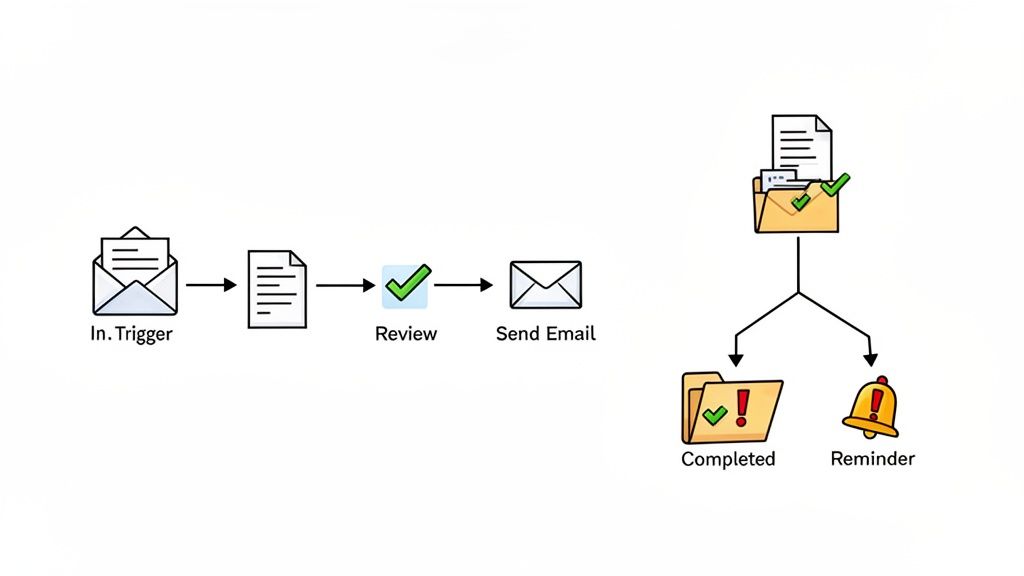
Triggers: The Starting Gun
Every single automated workflow needs a starting signal. We call this the trigger. It's the specific event that tells the system, "Okay, it's time to go."
A trigger can be almost anything, really. Common examples include:
- A new lead fills out a form on your website.
- An email with "Invoice Attached" lands in your inbox.
- You move a sales deal into the "Closed-Won" stage in your CRM.
The trigger is that first domino. Without it, the whole process just sits there, waiting for instructions.
Actions: The Work That Gets Done
As soon as a trigger fires, a series of actions kicks in. These are the actual jobs your system carries out, one after another, like dominoes toppling in a chain.
Let's say the trigger was that new lead filling out a form. The actions that follow might look like this:
- Action 1: Instantly send a personalized welcome email to the new contact.
- Action 2: Add the contact’s details to your marketing list.
- Action 3: Ping the sales team on Slack with the new lead's information.
These steps happen immediately and in the right order, every single time. Nothing falls through the cracks. If you're curious about the specifics, you can learn more about how to automate document workflow in our detailed guide.
Conditional Logic: Making Smart Decisions
This is where things get really interesting. Conditional logic—basically "if/then" rules—gives your workflow a brain. It allows the system to make decisions on its own based on the information it has, so it can handle different scenarios without you stepping in.
Think of conditional logic as a fork in the road. The system checks for a certain condition and chooses the right path based on what it finds.
For example, imagine a workflow for collecting client documents. You could set it up like this: If a submitted file is missing a signature, then automatically send a reminder. But if the document is signed and complete, then move it to the "Finalized" folder and alert the finance team.
This decision-making turns a simple to-do list into a smart, adaptable process that manages exceptions for you. It's no surprise this technology is catching on globally. While North America is the biggest market right now, the Asia-Pacific region is expected to grow at a rate of 10.03% a year through 2030, which shows just how essential this is becoming for businesses everywhere.
Seeing Workflow Automation in Action
Okay, the theory is one thing, but seeing how workflow automation solves real-world headaches is where it all clicks. The basic idea of triggers, actions, and rules can be applied just about anywhere you find repetitive, manual tasks.
Let's look at a few examples from different industries. For each one, we'll break down the common problem, see how automation fixes it, and check out the final result. It’s a simple before-and-after that makes it easy to see how you could do the same in your own work.
Human Resources: Onboarding New Hires
The Problem: An HR team is swamped every time someone new joins. They spend the first week chasing signatures on tax forms, sending out policy documents one by one, and manually kicking off the IT setup. It's slow, things get missed, and the new hire feels like they're in bureaucratic limbo instead of being welcomed to the team.
The Automation Solution: The moment a candidate is marked as "Hired" in the company's HR software, a workflow kicks off.
- A personalized welcome email instantly goes out with a link to a secure onboarding portal.
- Inside the portal, the new employee finds everything they need—their contract, tax forms, and the company handbook—all ready to be signed electronically.
- As soon as the last document is signed, the system automatically sends a ticket to the IT department to get their laptop and accounts ready.
The Outcome: The new team member has all their paperwork done before they even walk in the door, feeling organized and ready to go. HR gets back 5-10 hours per new hire, avoids the risk of missing a critical signature, and can focus on a great orientation instead of chasing paperwork.
Law Firms: Client Intake
The Problem: A law firm's paralegals are drowning in the initial client intake process. They’re stuck manually emailing forms, following up by phone to get missing details, and then typing everything from paper into the case management system. This administrative jam slows down the start of actual legal work and can leave a poor first impression on a new client.
The Automation Solution: As soon as a new client books a consultation, an automated workflow takes over.
- Step 1: The system sends the client a secure, branded form to fill out online.
- Step 2: The information they enter is automatically pushed directly into the firm’s case management software, creating a new client file without any manual data entry.
- Step 3: The workflow then prompts them to upload initial documents (like an ID or a signed retainer agreement) and sends friendly, automated reminders until it's done.
By automating how initial client information is gathered and filed, a law firm can slash non-billable administrative time by up to 80%. This frees up paralegals and attorneys to start focusing on case strategy right away.
The Outcome: What used to take days now takes a few hours. All the client's information is accurate, secure, and organized from the get-go. The firm looks sharp and professional, and they can start billing for valuable legal work much sooner.
Real Estate: Tenant Applications
The Problem: A property management company is juggling hundreds of rental applications. Each one needs background checks, income verification, and references. The old way of doing things—endless emails, messy spreadsheets, and manually notifying everyone—is pure chaos. Good applicants get frustrated by the delays and often take another offer before they even hear back.
The Automation Solution: A prospective tenant clicks "Apply Now" on a listing, which triggers the entire workflow. It sends them straight to an application portal where they can pay the fee, upload their pay stubs, and enter reference information all in one go. Once they hit submit, the system can even be set up to automatically request a background check from an integrated service.
The Outcome: The agency can now process applications 50% faster, which means shorter vacancy periods and less lost rent. Applicants love the clear, simple process. Best of all, property managers get a single dashboard showing the status of every application in real-time. No more guesswork, just a smooth process that helps them lock in the best tenants.
A Smarter Way to Handle Document Collection
It's one thing to understand the theory behind workflow automation, but seeing it solve a real, nagging business problem is where the magic really happens. And let's be honest, few problems are as universal as collecting documents. It's a task that’s almost always a mess of manual follow-ups, messy email chains, and constant "just checking in" messages.
This is exactly where a specialized tool like Superdocu steps in, turning that chaos into a smooth, automated process. Instead of asking you to build a complex system from the ground up, Superdocu zeros in on the document collection headache, making powerful automation simple and accessible for anyone—no coding required.
Turning a Pain Point into a Seamless Experience
Imagine this: instead of sending a new client a long email with a bulleted list of attachments you need, you send them a single, professional link. That’s the core of how Superdocu works. You can create a branded, secure portal where clients can instantly see what’s required and upload everything in one go.
This simple but effective process is powered by a few key features:
- Customizable Request Links: You can create a unique, polished experience for every single client or new hire.
- Automated Reminders: Stop chasing people for missing files. The system handles the follow-ups for you, sending polite nudges until every document is submitted.
- A Central Dashboard: Get a real-time view of every document request, so you can ditch the tracking spreadsheets and stop wondering who has sent what.
This targeted automation directly delivers on the promises of saving time, cutting down on errors, and giving clients a much better experience. When you automate this crucial first step, you set the right tone for the entire relationship.
Here's a look at just how straightforward it is to build a document request in Superdocu.
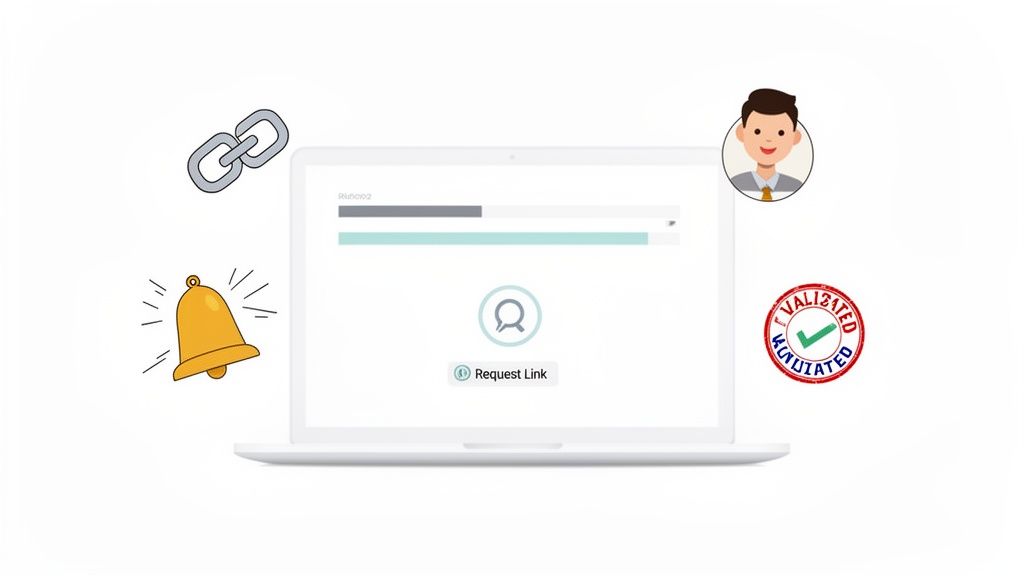
The whole interface is designed to be intuitive, letting you put together and send a complete request in just a few minutes.
The Growing Need for Smart Automation
Putting your money into this kind of specialized automation isn't just a "nice-to-have" anymore—it's quickly becoming essential to stay competitive. The global workflow automation market was valued at USD 19.76 billion in 2023 and is expected to hit USD 37.45 billion by 2030. That kind of growth sends a clear signal: businesses everywhere are looking for smarter ways to manage routine tasks so their teams can focus on work that actually matters.
By focusing on one high-impact area like document collection, you can see immediate returns. You’re not just saving administrative hours; you’re accelerating onboarding, closing deals faster, and freeing up your team for high-value work.
For any business that depends on getting accurate information on time—from law firms onboarding clients to HR departments hiring new employees—a tool that nails document workflows is a total game-changer. It’s a practical first step into the world of automation that delivers real, measurable results right away. To learn more, take a look at our guide on how to collect documents from clients easily.
Your First Steps into Workflow Automation
Jumping into workflow automation can feel like a massive undertaking, but you don't have to boil the ocean. The secret is to start small. Think of it as finding the one loose thread that, when pulled, starts to unravel a much bigger knot.
Your first move? A quick "automation audit." Just look at your team's daily grind. What are the mind-numbing, repetitive tasks that everyone hates? Pinpoint those bottlenecks and manual chores that suck up time and energy—those are your golden tickets for automation.
Start Small and Build Momentum
Forget trying to automate your entire company overnight. That's a recipe for disaster. Instead, pick one specific, high-impact workflow to focus on first. This lets you learn the ropes, see real results fast, and build a rock-solid case for doing more later.
Good places to start often involve simple, recurring tasks, such as:
- Automatically sending welcome emails to new customers.
- Requesting necessary documents and confirming when you've received them.
- Notifying a colleague the moment a new task lands on their plate.
By tackling just one of these, you can easily claw back several hours a week and wipe out a common source of human error. This first win makes the whole concept of automation click for everyone involved.
Choose the Right Tools for the Job
Once you've picked your starting project, it's time to find the right software. Look for tools that are easy to use, secure, and can scale with you as you grow. You don't need a clunky, complicated system that requires a PhD to operate; you need something that lets your team build and manage workflows without constantly calling the IT department.
For a deeper dive into this, check out our guide on how to streamline business processes.
Finally, don't forget to measure your success. Track how much time you're saving or how many mistakes you've eliminated. This data gives you hard proof of your return on investment (ROI) and shows you exactly where to point your efforts next. This simple approach makes your first foray into automation not just manageable, but genuinely exciting.
Got Questions About Workflow Automation? We’ve Got Answers.
When people first start exploring workflow automation, a few questions always seem to pop up. Let's dig into some of the most common ones to clear things up.
Is Workflow Automation Just for the Big Guys?
Not anymore. It's a common myth that only huge corporations can afford or benefit from automation. The reality is, modern cloud-based tools have made it incredibly affordable and easy for small and medium-sized businesses to get in on the action.
These tools are built for everyone, often with flexible pricing and no need for a dedicated IT department. Powerful automation is no longer out of reach.
How Hard Is It to Actually Set Up an Automated Workflow?
It's probably much simpler than you imagine. Most modern automation platforms are designed with regular business users in mind, featuring intuitive, no-code interfaces. Think drag-and-drop builders and pre-made templates for common tasks.
You could honestly build your first simple workflow—like automatically sending a welcome email to a new client—in less than an hour. No coding required.
Automation isn't about replacing people; it's about elevating them. By taking over the repetitive, low-value tasks, it frees your team to focus on critical thinking, client relationships, and strategic work that truly drives growth.
Is Automation Going to Replace People on My Team?
This is a big one, but the fear is usually misplaced. The real goal of automation isn't to replace your team's expertise; it's to get rid of the mind-numbing administrative work that bogs them down.
By handing off the grunt work to a system, you give your team the freedom to focus on what humans do best: solving complex problems, building meaningful client relationships, and thinking strategically. It's about empowering them to do more valuable work, not replacing them.
Ready to stop chasing documents and start automating your workflows? Superdocu makes it easy to build a seamless, professional document collection process in minutes. Start your free trial and see the difference today!