
Hitting "send" on an email with a sensitive file attached feels like a simple, everyday task. But in reality, it's one of the biggest gambles a business can take today. The only truly safe way to send documents securely is by using a specialized platform built for the job—one that offers end-to-end encryption, strict access controls, and a clear audit trail. This is a world away from the old "attach and pray" method of email, actively shielding your data from prying eyes and keeping you on the right side of the law.
Why You Can't Afford to Ignore Secure Document Sending
Let's be honest, we've all done it. Attaching a contract or a financial report to a quick email seems so convenient. But that convenience is a trap, exposing your company, your clients, and your reputation to huge risks. With so many of us working from home or in hybrid setups, every inbox has become a potential backdoor for cybercriminals.
This isn't just about hypotheticals. The consequences are real and they are expensive.
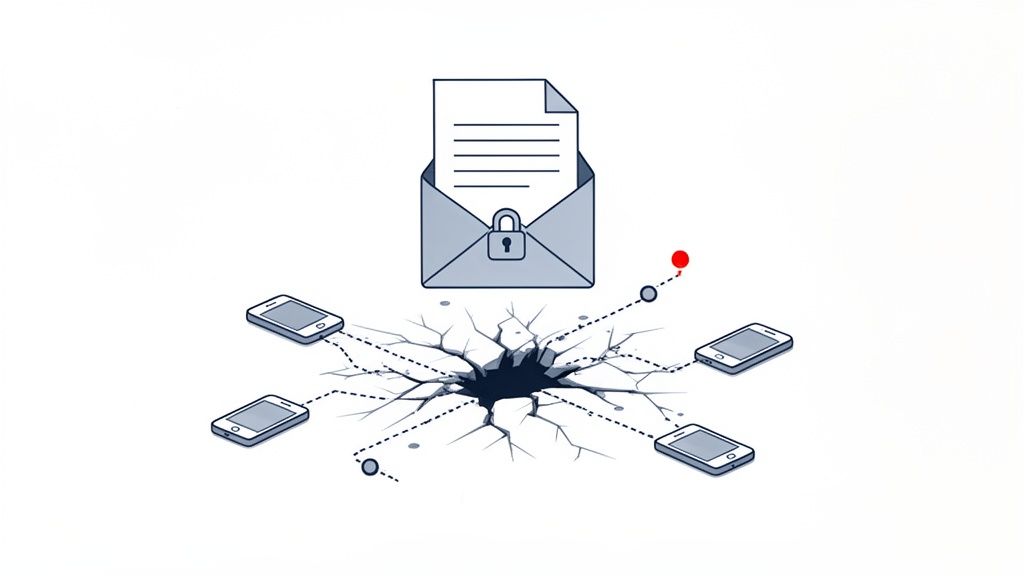
The market for secure file transfer solutions ballooned to $2.08 billion in 2023 for a reason. Businesses are scrambling to protect themselves because the average cost of a single data breach has hit a staggering $4.45 million. When you look at numbers like that, investing in the right tools starts to look less like an expense and more like an essential insurance policy.
What This Looks Like in the Real World
The risks aren't the same for everyone. Depending on your industry, a simple mistake can have wildly different—but equally catastrophic—outcomes.
- For Legal Firms: Think about a paralegal working late to meet a deadline. Rushing, they type a single wrong letter in an email address and send sensitive case files straight to the opposing counsel. That one slip-up could breach attorney-client privilege and jeopardize the entire case.
- For Human Resources: An HR manager emails a new hire their onboarding paperwork. That email contains their social security number, bank account details, and passport photo. If intercepted, it’s a complete identity theft kit handed to a criminal on a silver platter.
- For Finance and Accounting: A mortgage broker emails loan applications, bank statements, and tax returns to an underwriter. If that unencrypted email gets picked up, a fraudster has everything they need to drain the client's accounts.
See the pattern? It’s almost always a combination of human error and outdated technology that creates the perfect storm for a data disaster.
The fundamental problem with email is that you completely lose control the second you click 'send.' You have no idea if it was forwarded, who downloaded the attachment, or if it's just sitting exposed on some unsecured server for anyone to find.
To truly grasp the difference, let's compare the old way of doing things with modern, secure platforms.
Comparing Old vs. Modern Document Sending Methods
| Fonctionnalité | Traditional Methods (Email, Consumer File Share) | Modern Secure Platforms (like Superdocu) |
|---|---|---|
| Encryption | Optional, often just in transit (not at rest) | End-to-end encryption (both in transit and at rest) |
| Access Control | None. Anyone with the email can open the file. | Granular permissions, password protection, and access expiry. |
| Audit Trail | Minimal to none. "Read receipts" are unreliable. | Detailed tracking of who viewed, downloaded, and when. |
| Revoke Access | Impossible. Once sent, it's gone forever. | Ability to revoke access to a document instantly, even after sending. |
| Compliance | Fails to meet GDPR, HIPAA, and CCPA standards. | Designed to meet and exceed strict regulatory requirements. |
| Human Error | High risk (e.g., wrong recipient, "reply all" mistakes). | Features like link-based sharing reduce recipient errors. |
The table makes it pretty clear. Relying on email for sensitive files is like mailing cash in a see-through envelope—you’re just hoping for the best. Modern platforms give you the control and security you actually need.
The Tangled Web of Compliance
On top of the immediate danger of a data breach, you also have to worry about a growing list of data protection laws. And make no mistake, regulators aren't messing around. The fines for non-compliance can be devastating, especially for small and medium-sized businesses.
A few of the big ones to watch out for:
- GDPR (General Data Protection Regulation): This EU law is the gold standard for data privacy. Sending personal data of EU citizens without proper security is a major violation, and fines can go as high as 4% of your company's global annual revenue. If you need to get up to speed, our GDPR compliance checklist is a great place to start.
- HIPAA (Health Insurance Portability and Accountability Act): For anyone in healthcare, HIPAA is non-negotiable. Patient health information requires ironclad protection, and sending medical records over standard email is a fast track to severe penalties.
- CCPA (California Consumer Privacy Act): This law gives Californians more power over their personal data and legally requires businesses to have "reasonable" security measures in place.
Falling short of these standards doesn't just hurt your bank account; it shatters the trust you've built with your clients. People are giving you their most confidential information. Proving you can protect it is no longer a nice-to-have—it's the cost of doing business.
The Pillars of Secure Document Transfer
When you're trying to send documents securely, it’s never about just one feature. It's really about a combination of safeguards all working together. Think of it like a bank vault. A vault doesn't just have a strong door; it’s got reinforced walls, time locks, and surveillance cameras. Secure document transfer works the same way, relying on a multi-layered approach to keep your sensitive information locked down.
Getting a handle on these core components helps you move past basic password protection and pick a solution that offers real, robust security. Let's break down the three essential pillars that form the foundation of any platform you can actually trust.
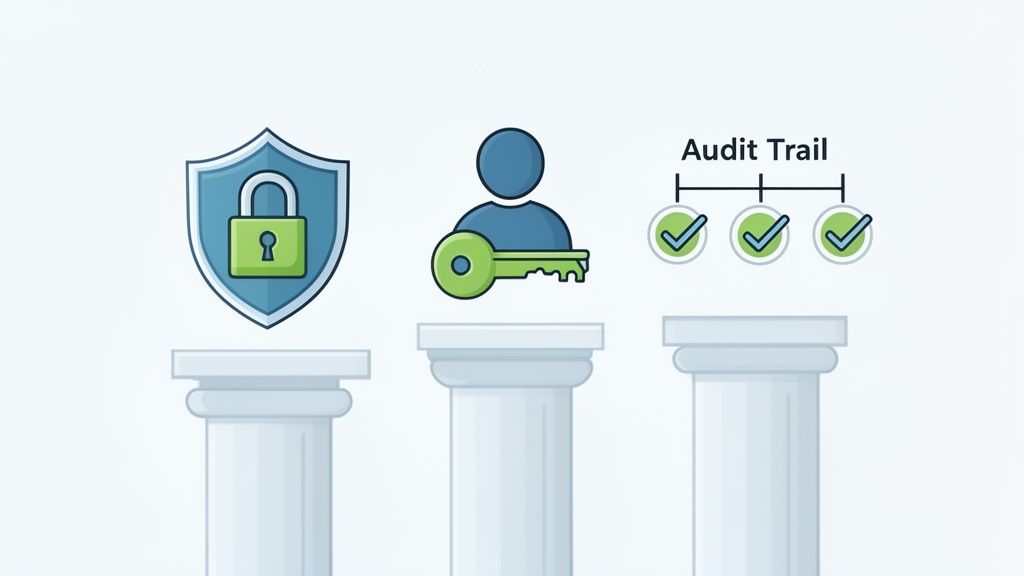
End-to-End Encryption: The Digital Armored Truck
End-to-end encryption is the absolute gold standard for protecting your data, whether it's sitting on a server or flying across the internet. Picture this: you're sending a valuable package. Encryption is like locking that package in an unbreakable box before it even leaves your hands. Only the person on the other end has the unique key to open it. No one else—not even the platform you're using—can peek inside while it's in transit.
This is a world away from the security on a standard email, which is more like sending a postcard. Anyone who gets their hands on it along the way can read the message. With proper encryption, your document is scrambled into unreadable code from the moment you hit "send" until the exact moment your recipient opens it. This means that even if a hacker manages to intercept the data, all they get is a useless jumble of characters.
Any platform that doesn't offer end-to-end encryption as its default setting is not a truly secure option for sensitive business documents. It’s the non-negotiable first line of defense against data breaches.
Granular Access Controls: You're the Bouncer
Encryption protects the document on its journey, but what happens once it arrives? This is where access controls come into play. A good system lets you act like a bouncer for your own information, deciding precisely who gets in and what they're allowed to do once they're inside.
This goes way beyond a simple password. Real access control means you can set specific permissions for every single recipient. For instance, you could:
- Set View-Only Access: Let a client see a contract but prevent them from downloading or printing it.
- Use Time-Limited Access: Grant an auditor access to financial records for a 48-hour window, after which the link automatically dies.
- Revoke Access Immediately: Instantly cut off access to a document if you realize you sent it to the wrong person or a project has wrapped up.
These controls put you firmly back in the driver's seat. They make sure your documents are only ever seen by the right people, under the exact conditions you've decided on.
Comprehensive Audit Trails: Your Digital Paper Trail
The final pillar is the audit trail. This provides a detailed, unchangeable record of every single action taken with your document. It's like having a digital detective on the case, logging who opened the file, when they opened it, what device they used, and if they downloaded it.
This level of detailed tracking is critical for a couple of big reasons. First, it gives you complete visibility and, frankly, peace of mind. You’ll never have to wonder if a client got that critical proposal; you can see the exact moment they viewed it.
Second, it's absolutely essential for compliance. Regulations like RGPD in Europe, HIPAA in healthcare, and PCI‑DSS in payments demand more than just secure storage. They require proof of secure transmission and strict control over who can see or share documents. For law firms, HR teams, or mortgage brokers, sending files by email just isn't worth the risk anymore.
An audit trail gives you the concrete proof you need to show you’ve handled sensitive data responsibly. It turns security from a guessing game into a documented certainty. This is also where these systems link up with other critical functions, like identity checks, which you can learn more about in our guide to document verification software.
Choosing the Right Tools to Send Documents Securely
Picking the right platform to send documents securely isn't a one-size-fits-all deal. A solo financial advisor has completely different needs than a multinational law firm, and making the wrong choice can lead to clumsy workarounds, clients who won't use the system, or worse—a security hole you never saw coming.
The goal here is to find a solution that not only locks down your data but also fits neatly into how you already do business. It should make life easier for everyone involved, not add another frustrating step to the process.
Comparing Your Options: Secure Portals vs. Email Add-ons
When you start looking, you'll find that most tools fall into two main buckets. Knowing the difference is the first step to making a smart decision.
-
Secure Email Add-Ons and Services: Think of tools like ProtonMail or StartMail. Their main job is to encrypt the email message itself. They're a massive improvement over standard email, making the content of your message unreadable to anyone who might intercept it. The downside? They often require your recipient to jump through a few extra hoops and don't always give you great tracking or control over the attachments themselves.
-
Dedicated Client Portals and Platforms: These are the all-in-one solutions that create a secure, branded space for all your document sharing. Instead of just attaching a file to an email, you send a secure link to a portal where your client can upload or download whatever they need. This approach puts you firmly in control of the entire exchange.
For any business that regularly handles sensitive information—we're talking contracts, financial statements, or personal IDs—a dedicated platform is almost always the better choice. It moves the entire conversation into a controlled environment where you can manage who sees what, track every action, and even automate reminders.
Your Must-Have Feature Checklist
It’s easy to get lost in a sea of features when you're comparing tools. To cut through the noise, just focus on the things that will actually make a difference to your security and your daily workflow.
Security and Compliance Essentials
- End-to-End Encryption: This is completely non-negotiable. It means your files are scrambled and protected from the moment they leave your computer until the second your client opens them.
- Granular Access Controls: Can you set a unique password for a file? Can you make a link expire after 24 hours? Can you prevent someone from downloading a document and only allow them to view it? You absolutely need this level of control.
- Detailed Audit Trails: You have to be able to see exactly who accessed a file and when. This is non-negotiable for accountability and for proving you're compliant with regulations like GDPR or HIPAA.
Client Experience and Usability
- Branded, User-Friendly Interface: Your clients need to feel confident using the platform. A clean, professional portal with your company's logo on it builds instant trust.
- No Client Account Needed: This one is huge. The best systems let clients access files with a secure link, without forcing them to create and remember another username and password. This single feature gets rid of so much friction.
- Mobile-Friendly Access: Let's face it, many of your clients will be opening these documents on their phones. The experience has to be seamless on any device.
A secure platform is only effective if your clients actually use it. If the process is confusing or requires them to jump through too many hoops, they will inevitably default back to insecure email attachments, defeating the entire purpose.
Matching the Tool to Your Industry
The right tool also depends heavily on what you do. A marketing agency sending creative briefs has very different security needs than a healthcare provider handling patient records.
Think about these real-world scenarios:
-
A Financial Advisor needs a platform that not only secures tax returns and investment statements but also talks to their CRM. This lets them track every document exchange as part of the bigger client relationship, creating a smooth workflow from day one.
-
An HR Department onboarding a new hire needs to collect a driver's license, bank details, and signed contracts. The perfect tool for them would be a secure document intake platform that lets them create a checklist, send one simple link, and get all the files back in an organized, secure folder.
-
A Law Firm lives and breathes compliance. For them, maintaining attorney-client privilege is everything. They need a system with bulletproof audit trails to prove chain of custody for evidence and sensitive case files.
Ultimately, choosing the right platform is an investment in both your security and your business's efficiency. By focusing on features that build client trust, keep you compliant, and simplify your team's day-to-day work, you can turn a potential vulnerability into a real professional strength.
Building a Secure Document Collection Workflow
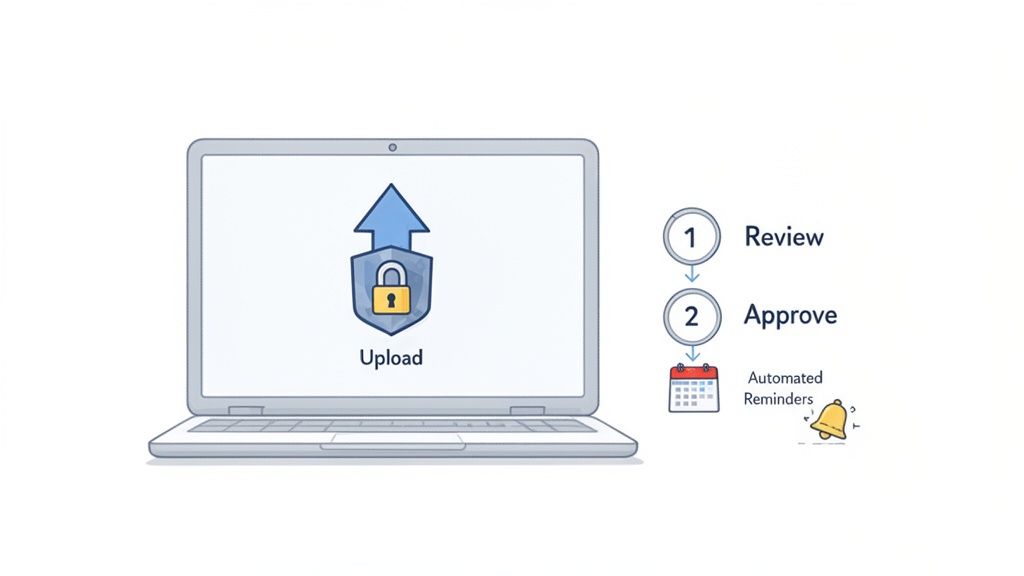
Having the right tools is a great start, but it's only half the battle. The other, and arguably more important, half is the actual process you build around those tools. A clunky, confusing workflow will just lead to frustration, human error, and clients falling back on risky habits like email attachments—completely defeating the purpose of your investment.
The real goal here is to design a system that’s both ironclad and effortless. It should give your clients confidence from the get-go and save your team from the administrative nightmare of chasing down paperwork. This isn't just about security; it's about creating a professional, smooth experience that makes you stand out.
Create a Professional and Branded Portal
First impressions matter, especially when you're asking for someone's sensitive information. Sending a client a generic, third-party link can feel impersonal and, frankly, a little sketchy. A much better approach is to use a secure, branded portal that feels like a seamless part of your business.
When you add your company logo, colors, and a personalized welcome message, you instantly build trust. Your client knows they’re in the right place and can see you take their data protection seriously. This one simple step transforms the document request from a chore into a reassuring part of your professional service.
Think about it from their perspective. When a client uploads their tax returns or a copy of their passport, they need to feel confident. A polished, branded portal communicates professionalism and reassures them that their sensitive information is being handled with the care it deserves.
This front-end experience is critical. It sets a positive tone for the entire relationship and encourages clients to send what you need promptly, making the whole process smoother for everyone involved.
Automate Reminders and Eliminate Manual Follow-Ups
Let’s be honest, one of the biggest time-wasters in collecting documents is the endless cycle of follow-up emails. Manually tracking who has sent what and sending constant reminders is tedious, inefficient, and easy to mess up. This is where automation becomes your best friend.
A solid workflow platform lets you set up automated reminders that gently nudge clients who haven’t finished their document requests. You can customize the timing and frequency, ensuring you have persistent but professional follow-up without lifting a finger.
For instance, you could easily configure a system to:
- Send a friendly reminder 48 hours after the initial request goes out.
- Follow up again three days before the deadline.
- Send a final, more urgent notification right on the due date.
This kind of systematic approach ensures nothing falls through the cracks. It frees up your team to focus on high-value work instead of playing email tag. For the client, it's just a series of clear, helpful prompts that guide them along without being annoying.
Establish a Clear Review and Approval Process
Once documents start arriving, the next challenge is managing them without creating a digital mess. A folder full of randomly named files like "Scan_1.pdf" or "IMG_5022.jpg" is a recipe for chaos. A proper workflow brings order to this process by giving you a central hub to review, approve, or reject submissions.
Think of it as mission control for your documents. A good system will display all submitted files in an organized dashboard, tied directly to the client and the specific request. This lets you quickly check if you have what you need.
If a client uploads a blurry photo of their ID or an outdated bank statement, you can reject that one document with a clear note explaining the problem. This targeted feedback is so much more efficient than a long email chain. The client gets a notification, uploads the correct file, and the process moves forward without missing a beat. This structured review loop cuts down on the back-and-forth and drastically speeds up your turnaround times.
When looking for a platform, focusing on a few key features will give you the most bang for your buck. These are the elements that truly create a secure and efficient workflow for both you and your clients.
Key Features of a Secure Document Workflow Platform
| Fonctionnalité | Benefit for Your Business | Client Experience Impact |
|---|---|---|
| Branded Client Portal | Reinforces your brand identity and builds immediate trust. | Provides a professional, secure, and reassuring environment for uploads. |
| Automated Reminders | Saves hours of manual follow-up work and reduces delays. | Offers helpful, non-intrusive nudges to keep the process on track. |
| Centralized Dashboard | Organizes all submissions for easy review, tracking, and management. | Ensures faster processing times and fewer mistakes or requests for resubmission. |
| Status Tracking | Gives you at-a-glance visibility into all pending and completed requests. | Gives clients clarity on what they have submitted and what is still needed. |
By thoughtfully combining these elements, you can stop just sending documents and start building a workflow that’s efficient, professional, and fundamentally better for everyone.
The Future of Integrated Document Security
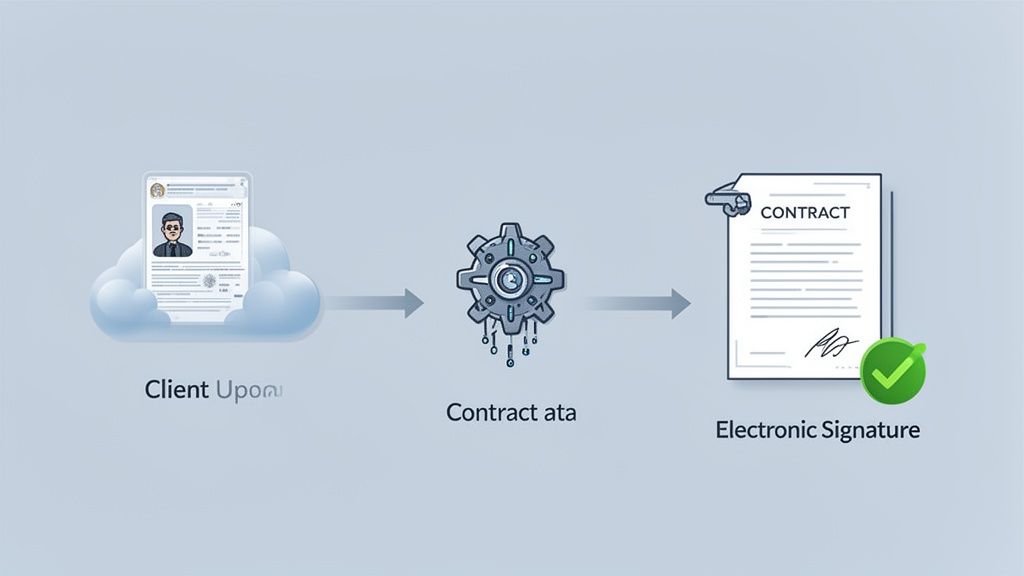
Sending documents securely has moved way beyond just protecting a file in transit. We’re now seeing the rise of fully integrated workflows where security isn’t an add-on, but the very foundation of a smarter, more connected process. The conversation is shifting from how to protect a file on its journey to what happens before, during, and after it arrives.
This all comes down to a need for more efficiency and less friction in how we do business. Think about it: a client securely uploads their passport, a system automatically verifies it and pulls the necessary info, and then a pre-filled contract is instantly sent for an electronic signature. That’s where the industry is going—a unified environment that tightens security, eliminates manual errors, and saves a ton of time.
The Rise of Embedded Workflows
The real breakthrough here is that secure document transfer is becoming just one step in a much larger workflow. Instead of juggling separate tools for collecting files, verifying data, and getting signatures, businesses now want platforms that can handle it all in one place.
Why is this so important? Every time data has to jump between disconnected apps, you’re creating a potential security gap. A unified workflow closes those vulnerabilities.
When a document lives within one secure ecosystem from start to finish, you get a much stronger audit trail and a lower risk of data exposure. It’s also just flat-out more efficient, especially in complex fields like finance or legal, where a single transaction can involve a dozen documents and multiple approvals.
Take a mortgage application, for example. In an integrated system, it looks something like this:
- Secure Request: The broker sends one link where the applicant can upload everything—bank statements, tax returns, proof of income.
- Automated Data Extraction: The platform uses Intelligent Document Processing (IDP) to read the documents, pull out key figures, and populate the loan application automatically.
- Instant E-Signature: Once the data checks out, the completed application is sent for a legally binding e-signature, all without ever leaving the secure portal.
This isn't some far-off concept; it’s already happening. The best security strategies today aren’t about building taller walls around your data. They're about creating smarter, connected pathways that make the secure option the easiest and most logical choice for everyone.
Why E-Signatures and IDP Are Game-Changers
The combination of e-signatures and intelligent document processing is what really makes these advanced workflows tick. It's no surprise that both technologies are seeing explosive growth, which signals a massive shift in how businesses handle sensitive information.
The global e-signature market is on track to hit $13.4 billion by 2030, while the intelligent document processing (IDP) market is expected to surge to over $66 billion by 2032. You can find more details on these growing markets at ExplodingTopics.com.
But it's not just about convenience. E-signatures provide an ironclad audit trail, proving who signed what and when. IDP, on the other hand, nearly eliminates the risk of human error from manual data entry, freeing up your team from mind-numbing administrative work.
When you bring these technologies together with a secure document collection system, you get a powerful, end-to-end solution. It handles the entire lifecycle of a client interaction, keeping everything locked down and moving smoothly. The future of sending documents securely is less about the "sending" and more about the entire, integrated experience.
Common Questions About Secure Document Transfer
Even with the best tools in place, some practical questions always come up when you’re handling sensitive information day-to-day. Let's tackle some of the most common ones we hear from businesses that are tightening up their security.
Getting these details right gives you the confidence that your data—and more importantly, your clients' data—is truly protected.
Is a Password-Protected PDF Sent Via Email Secure Enough?
This is a classic workaround, but honestly, it’s not a secure method. The problem isn't the password on the PDF itself; it's how you get that password to the recipient.
Most people send the password in a separate email. If a cybercriminal has breached that email account, they now have both the locked file and the key to open it. It's like leaving your house key under the doormat next to your locked front door.
Plus, you get no audit trail. You have no way of knowing who actually opened the file or when. A truly secure system encrypts the entire transfer from end to end, so the document is protected every step of the way, not just locked with a password that can be easily intercepted.
How Can I Get My Clients to Use a New Secure Portal?
This is a huge one. The last thing anyone wants is another username and password to remember. The trick is to make the new process easier and feel more professional than the old way.
Success really boils down to three things:
- Make it frictionless. The best client portals let people upload documents through a secure link without creating an account. One-click access is a game-changer.
- Communicate the "why." Frame the change as a direct benefit to them. A simple message like, "We're upgrading our system to better protect your confidential information," goes a long way.
- Look professional. A clean, branded portal builds trust instantly. It feels like an integrated part of your business, not some random third-party tool.
When the new way is more convenient and inspires more confidence than digging through email attachments, your clients will be happy to use it.
What Documents Should Always Be Sent Through a Secure Platform?
Here’s a good rule of thumb: if leaking the document would cause financial loss, reputational damage, or legal trouble, it needs to be sent securely. This is non-negotiable for anything containing personally identifiable information (PII).
Think about files like these:
- Legal contracts and sensitive case files
- Financial statements, tax returns, and banking information
- Medical records and personal health data
- Copies of government IDs like passports or driver's licenses
- Employee onboarding documents (I-9s, direct deposit forms)
- Trade secrets or proprietary business plans
Basically, if you wouldn't be comfortable leaving a printed copy on a table in a coffee shop, you shouldn't be sending it over standard email.
It's a huge mistake to assume only certain industries need this. Cybercriminals love targeting small businesses precisely because they think their defenses are weaker. A single data breach can lead to massive fines and a complete loss of client trust that you may never recover from.
Do Small Businesses Really Need This Level of Security?
Yes, without a doubt. In fact, small businesses are often at greater risk. A 2023 report revealed that a staggering 55% of small and medium-sized businesses had suffered a cyberattack in the past year.
Unlike a massive corporation with a dedicated IT security army, a single breach can be a knockout blow for a smaller company.
The good news is that modern secure platforms have made top-tier security affordable and easy for businesses of any size. This isn't just an extra business expense; it's a fundamental investment in protecting your livelihood and the trust you’ve worked so hard to build.
Ready to stop worrying about email attachments and create a professional, secure workflow? Superdocu makes it simple to request, collect, and manage client documents in one secure, branded portal. Start your free trial today and see how easy it is to protect your business and impress your clients. Learn more at Superdocu.