
A deal is ready to move. The buyer has answered every question. The seller thinks they're done. Then someone notices the disclosure packet is the wrong version, one signature is missing, and two supporting documents are sitting in three different email threads. The closing doesn't fail because the market changed. It stalls because the paperwork process was loose.
That's the key reason brokers, lenders, and property teams keep searching for real estate forms online. They don't just want PDFs on a website. They want a system that helps people use the right forms, collect the right files, chase fewer missing items, and keep a clean record when compliance questions show up later.
Paper processes break in predictable ways. Files get renamed badly. Agents save forms to desktops. Clients print, scan, and upload sideways photos. Staff members send manual reminders, then resend them because nobody knows which version is current. If that sounds familiar, a good place to reset your operational thinking is this real estate transaction checklist, because form chaos usually starts with a workflow problem, not a form problem.
Table of Contents
- The Paper Chase That Costs You Deals
- Beyond PDFs The New World of Digital Real Estate Forms
- Navigating the Legal Landscape of Digital Forms
- A Blueprint for Secure and Efficient Document Collection
- How to Digitize Your Real Estate Workflow Step by Step
- Supercharge Your Process with Automation and Integrations
- Avoiding Common Pitfalls to Build a Future-Proof System
The Paper Chase That Costs You Deals
Most brokerages don't lose time on one big paperwork mistake. They lose it in small, repeatable failures.
A listing coordinator downloads a form, but it isn't the latest approved version. An agent sends a contract for signature, then realizes a required addendum was left out. A lender asks for updated income documents, but the borrower replies to an old email thread with attachments named “scan001” and “final final.pdf.” Everyone is working hard, yet the file still feels unstable.
That instability creates three kinds of friction.
- Client friction: Buyers and sellers don't know what's still missing.
- Team friction: Agents, admins, and transaction coordinators duplicate effort.
- Compliance friction: Nobody wants to explain during an audit why a stale document version made it into the file.
Practical rule: If your team relies on inboxes to tell the story of a transaction, your process is already too fragile.
Paper makes the problem obvious, but messy digital habits create the same result. A scanned PDF sent by email is still a manual workflow. So is a shared drive with no intake rules. So is an e-signature tool with no document collection plan behind it.
Real estate forms online solve the first layer of the issue by making forms accessible from anywhere. The operational win comes later, when the form is connected to collection, review, reminders, and storage. That's when the team stops reacting and starts controlling the process.
Beyond PDFs The New World of Digital Real Estate Forms
The phrase real estate forms online used to mean one thing. Download a document, fill it in, and send it back.
That's still part of the job, but it's no longer the whole job. In practice, digital form handling has moved through several stages, and many offices are stuck somewhere in the middle.
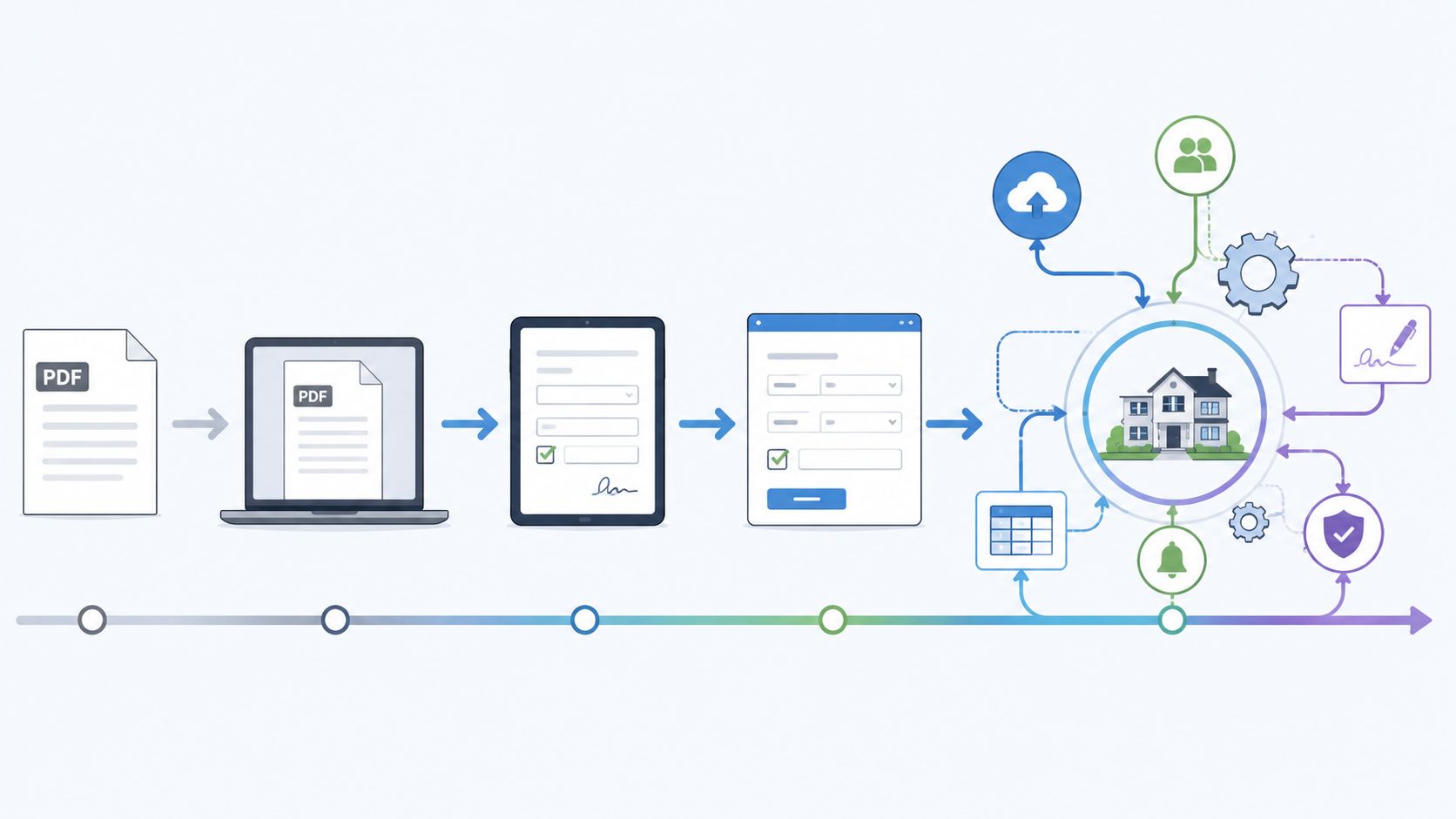
How online forms evolved
The first stage was simple distribution. Associations put form libraries online so members could retrieve current documents without visiting an office or waiting for printed packets. Florida Realtors describes Form Simplicity as the “complete and updated online source” for its forms and contracts, which captures the core shift from paper shelves to digital access.
The second stage added fillable documents. Instead of printing and handwriting details, users could type into fields. That removed some friction, but it didn't solve routing, version control, or missing attachments.
The third stage brought in e-signature tools. That was a major improvement. Teams could send documents faster, track execution, and keep a basic audit trail. But many firms learned the hard way that signed documents alone don't equal a complete transaction file.
Why a PDF library isn't enough
The modern stage is workflow-based document management. The form is only one object inside a larger process.
A complete workflow usually includes:
- Structured intake: The client sees exactly what to submit.
- Required items: Teams can flag what's mandatory before a file advances.
- Reminders: The system follows up without someone writing the same email again.
- Review logic: Staff can check submissions before they hit the transaction file.
- Storage discipline: Documents stay attached to the right deal, party, and stage.
Here's the trade-off teams frequently confront:
| Approach | What works | What breaks |
|---|---|---|
| Static PDF library | Fast access to standard documents | No collection, follow-up, or review control |
| Fillable PDF tools | Better than handwriting and scanning | Easy to create file sprawl |
| Standalone e-signature | Faster execution and cleaner approvals | Supporting documents still drift into email |
| Workflow platform | Centralized requests, review, reminders, and storage | Requires setup and team adoption |
A digital form isn't the same as a digital process.
That distinction matters. An office can own good forms software and still run a bad paperwork operation. The strongest setups treat forms as part of a controlled sequence, not as isolated downloads.
Navigating the Legal Landscape of Digital Forms
Legal confidence matters because speed is useless if the file won't hold up. In real estate, the practical compliance questions usually land in three buckets. Are you using the right forms, are signatures being handled properly, and are sensitive documents being protected well enough?
State rules decide the form set
A national mindset doesn't work well here. The National Association of REALTORS® says forms are “state specific because real estate laws vary significantly from state to state”. That single point explains why so many associations and local organizations maintain their own libraries, and why online form systems often revolve around state-approved access rather than one universal set.
The scale of that complexity is real. NC REALTORS® lists 159 contract forms and 96 commercial contract forms in its library through the same NAR reference above. For operations teams, that means “just upload all our forms” is not a serious plan. You need ownership, update discipline, and a clear rule for which forms are valid in which transaction type.
If your business touches cross-border transactions or clients who compare U.S. deals with other property markets, it also helps to understand adjacent legal processes. This plain-language EHF Mortgages conveyancing explanation is useful because it shows how document handling, legal review, and transfer steps connect in a property transaction, even though the governing framework differs by market.
E-signature validity and process discipline
Many real estate professionals no longer ask whether electronic signatures are usable. The better question is whether their process supports enforceability and clean records.
An e-signature workflow needs a few basics:
- Identity clarity: You should know who is being asked to sign.
- Document integrity: The final executed file must be preserved as signed.
- Consent handling: Parties should understand they are signing electronically.
- Auditability: Staff should be able to reconstruct what was sent, signed, and stored.
For teams revisiting this area, this overview of electronic signature technology is a practical reference because the legal layer and the workflow layer need to line up. Sending a document for signature is easy. Proving that the right version went to the right person, with the right supporting record, is the discipline that protects the brokerage.
Legal risk usually enters the file long before anyone calls a lawyer.
Privacy is part of compliance
Real estate files often include more than contracts. They can contain bank statements, IDs, income records, corporate documents, tenancy materials, and financial disclosures. A process that uses unsecured attachments, scattered downloads, or informal forwarding exposes more people to more data than necessary.
That's why privacy should be treated as a workflow design issue, not just an IT issue. Limit who can request, receive, review, and export documents. Keep a clear submission path. Avoid collecting sensitive files in personal inboxes. Build retention and retrieval rules before you need them.
The firms that handle this well don't just digitize forms. They reduce how often staff has to touch sensitive information in the first place.
A Blueprint for Secure and Efficient Document Collection
Good document collection feels boring in the best way. Clients know where to go. Staff know what's missing. Managers can see status without chasing updates. Nothing depends on memory.
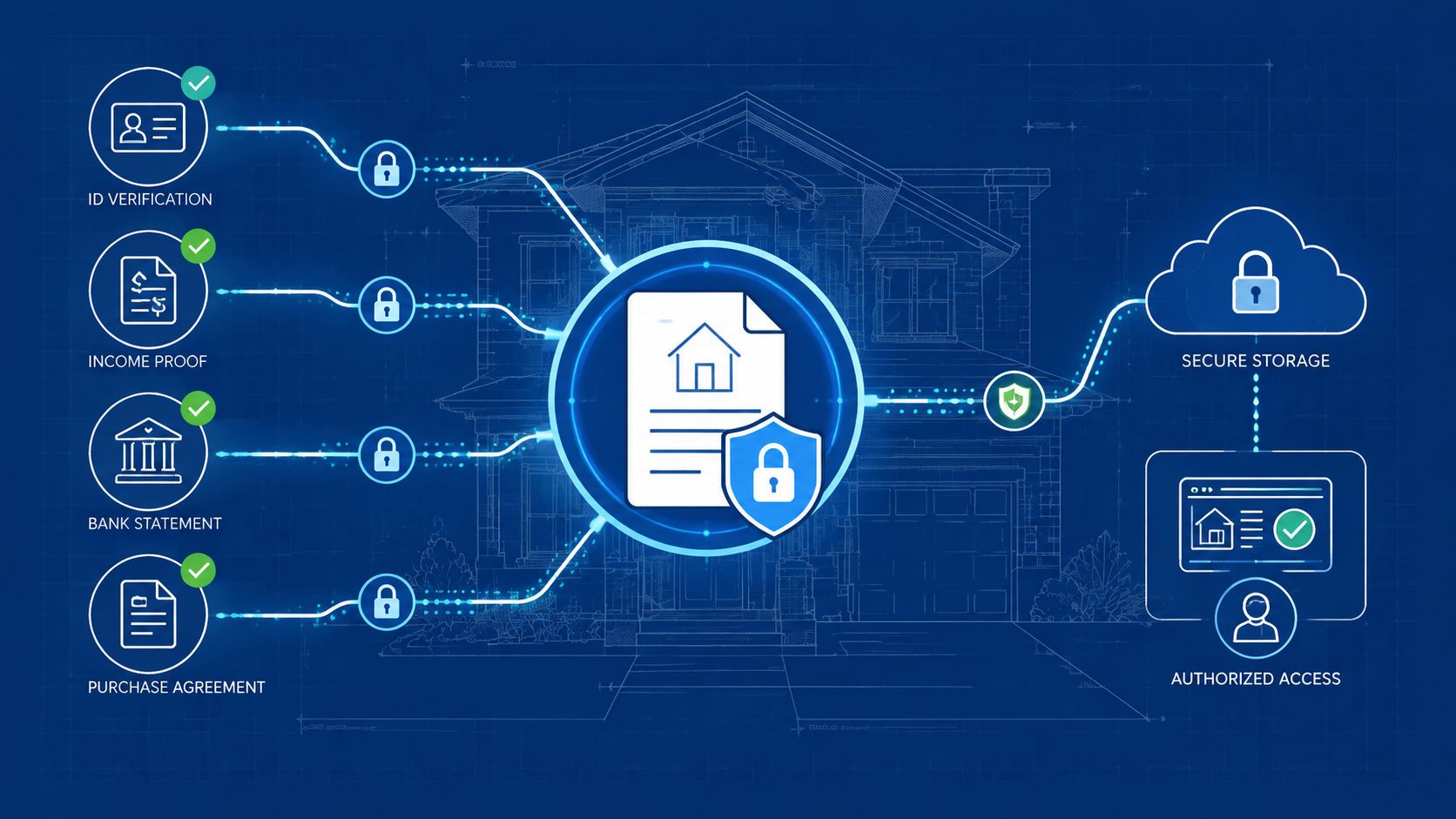
One front door for every submission
Start with a single intake point for each transaction or client matter. That can be a branded portal, a secure request page, or a structured workspace tied to the transaction. The point isn't the label. The point is that everyone submits through the same front door.
When firms skip this step, they create parallel channels. Some documents arrive by email, some by text, some through e-signature envelopes, and some through cloud links. Staff then waste time reconciling where the “real” file lives.
A stronger intake setup should do four things well:
- Show the request clearly: Clients should see exactly which forms and supporting files are needed.
- Separate categories: Contract documents, IDs, disclosures, and financial records shouldn't all land in one bucket.
- Support any device: Many clients will upload from phones.
- Match your brand: A clean interface builds trust faster than a patched-together chain of links.
Validation reminders and audit trails
Collection is where most real estate workflows break down, not access. Oregon REALTORS® highlights that the operational challenge is moving from form access into collection, validation, and follow-up across the transaction ecosystem in its overview of member forms and related transaction tools.
That's why the second half of the blueprint matters more than the first.
- Validation at intake: Don't wait until review to discover that a required field is blank or the wrong file was uploaded.
- Automated reminders: Clients often intend to finish later. The system should follow up without staff manually checking every file.
- Expiration awareness: Some documents age out. Your workflow should flag that before a stale file gets reused.
- Central archive: Keep final submissions and related history in one auditable place.
Treat your transaction file like a controlled cabinet, not a pile of attachments.
A clean archive also changes internal behavior. Agents stop keeping private backup copies. Coordinators stop sending “just checking” emails. Brokers gain a clearer compliance trail. The result isn't just faster paperwork. It's less uncertainty.
How to Digitize Your Real Estate Workflow Step by Step
Digitization projects fail when teams try to replace everything at once. The cleaner approach is to standardize one transaction path, prove it works, then expand.
Start with the forms you already use
Begin with an audit. Not a software demo. Not a wishlist. A real inventory.
List every document used in a normal buyer file, seller file, lease file, or lending package. Include official forms, brokerage addenda, internal checklists, supporting records, and anything staff routinely requests after the first packet goes out. You'll usually find that the visible contract is only a small slice of the document load.
Then sort what you find into groups:
- Core forms that must be current and approved.
- Supporting documents that clients or counterparties need to provide.
- Internal review items that staff use to move the file forward.
- Completion records that belong in storage after execution.
This exercise exposes friction quickly. Maybe the same tax record is requested by three people. Maybe agents use different file names for the same disclosure. Maybe your lease team has better habits than your resale team. Those patterns matter because your future workflow should remove them, not digitize them.
Build and launch in a controlled way
After the audit, choose a platform based on workflow fit, not feature volume. A good scorecard usually includes ease of use for clients, staff review controls, reminder automation, branded intake, storage discipline, and compatibility with your existing tools. Some brokerages will prefer transaction-centric products such as Dotloop or SkySlope. Others may add a document collection layer where intake and validation are the bigger problem. Superdocu is one example of that category, with branded portals, automated reminders, validation dashboards, and reusable collection workflows for document-heavy processes.
Use templates early. Create repeatable packages such as:
- New buyer onboarding
- Listing agreement intake
- Tenant application collection
- Loan document refresh
- Compliance follow-up for missing items
Don't make every template identical. A buyer intake may need staged requests. A listing packet may need immediate signature routing. A tenant application may need more supporting documents than forms.
Training matters just as much as setup. Agents won't adopt a system because leadership says it's important. They'll adopt it when they see fewer follow-up emails, fewer file corrections, and less rekeying. Show them the actual change in their day. “Send one request link instead of six separate emails” is persuasive. “We're transforming operations” is not.
Use a limited launch. Pick one office, one team, or one transaction type. Watch where clients hesitate. Track where staff bypass the process. Fix that first. Then expand with a version that has already survived real use.
Supercharge Your Process with Automation and Integrations
Once the intake flow is stable, the next gains come from connection. A forms process that sits alone still creates manual work around it. A connected process removes duplicate entry and keeps systems aligned.
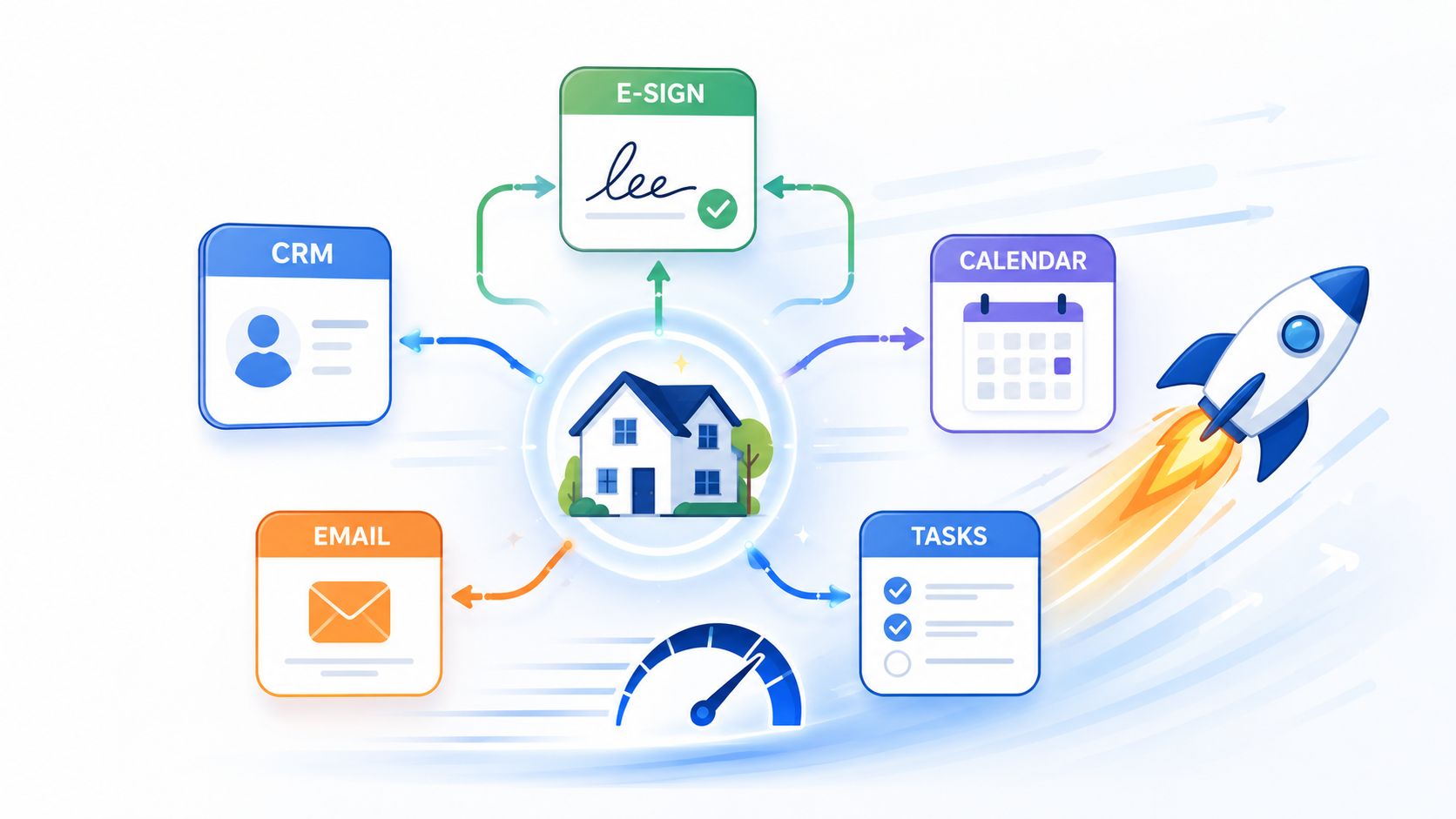
Where integrations save time
The most useful integrations usually sit in three places.
First, CRM integration. If your contact data already lives in a CRM, client names, email addresses, and deal context shouldn't be retyped into every form request. That reduces avoidable errors and gives staff one cleaner source of truth.
Second, MLS-connected form creation. SkySlope says its forms platform uses live MLS synchronization so agents can start contracts in seconds with pre-filled data, which is the practical value of integrating forms with listing information rather than rebuilding documents manually on each deal through its forms product overview.
Third, workflow automation tools. When a client submits a packet, that event can trigger follow-up actions elsewhere. If you're exploring this layer, this guide to document automation is a useful way to think about where manual handoffs can disappear.
What a connected workflow looks like
A connected real estate workflow might work like this:
- Deal created in CRM: Contact and property context are already stored.
- Request launched automatically: The client receives the right intake package.
- Forms prefilled where possible: Staff avoids duplicate typing.
- E-sign step triggered: Signature routing starts only after prerequisite documents are in.
- Task and calendar updates follow: Internal users see what changed without separate messages.
- Archive rules apply at completion: Final files land in the right storage location.
The strongest automations don't feel flashy. They just remove routine decisions your team shouldn't be making by hand.
That's the operational difference between a digital tool and a digital system. The first one helps a person do work. The second one automatically prevents unnecessary work from appearing in the first place.
Avoiding Common Pitfalls to Build a Future-Proof System
Most online forms projects fail for ordinary reasons.
Some firms buy an e-signature tool and assume the workflow problem is solved. It isn't. Others upload a form library and leave clients to figure out what belongs where. That also fails. The most common mistake is solving one visible step while ignoring the chain around it.
A few pitfalls show up again and again:
- Buying for signatures only: Signed forms still need intake, review, reminders, and storage.
- Ignoring state-specific governance: The wrong form version can create problems long after execution.
- Skipping agent adoption work: If the process feels slower to agents, they'll route around it.
- Letting email remain the backup system: Once that happens, version control disappears.
- Treating security as an afterthought: Sensitive files need a controlled path from request to archive.
Oregon REALTORS® points to the bigger issue in its explanation of forms access and transaction tools. The hardest part isn't accessing the form. It's the end-to-end workflow of collection, validation, and follow-up, and the direction of travel is toward platforms that support the whole transaction flow rather than isolated steps.
That's the standard to use when you evaluate your own process. Don't ask whether your team can get forms online. Ask whether your system can move a file from request to completion without confusion, duplicate effort, or weak records.
If your team is still piecing together forms, attachments, reminders, and approvals across email and shared folders, it's worth looking at Superdocu as one option for building a more controlled document collection workflow. It gives brokerages, lenders, and property teams a way to create branded request portals, automate reminders, validate submissions, and keep documents organized in one place so the process doesn't fall apart after the form is downloaded.